February 6, 2022
Solved

Changing name of QB from Company LLC to Company Inc

  • February 6, 2022
  • 1 reply
  • 0 views

How do I change my companys name from COMPANY LLC to Company Inc. ?

Best answer by Rose-A

I'd be pleased to help you with changing your company name in QuickBooks, Bullseye37.


You can change your Company name through the My Company page in QuickBooks Desktop. Here's how:
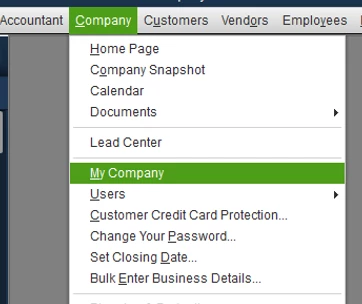
 

  1. Click Company at the top menu bar and choose My Company.
  2. Select the Pencil icon to edit.
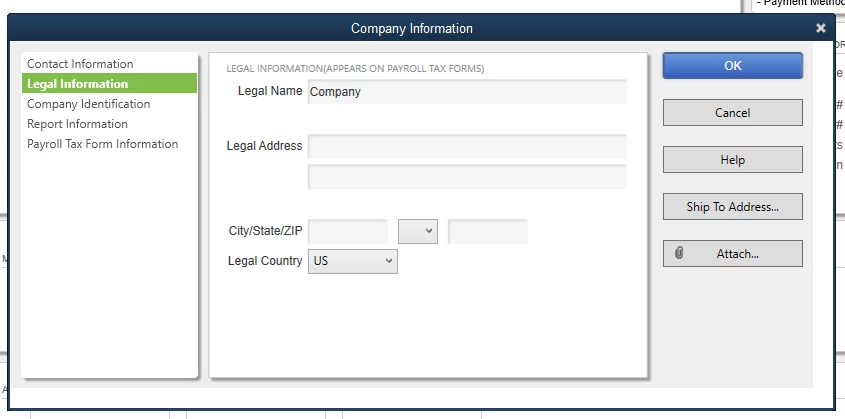
  3. Tap Legal Information and enter the new company name and hit OK.


You can get more details about this in this article: Update your business name and address for QuickBooks Desktop Payroll. On the same link, you'll find steps on how to change your company for your Intuit Account as well as for direct deposit.


Please get back to me if you need anything else. I'm more than willing to lend you a helping hand.

1 reply

Rose-A
Rose-AAnswer
February 6, 2022

I'd be pleased to help you with changing your company name in QuickBooks, Bullseye37.


You can change your Company name through the My Company page in QuickBooks Desktop. Here's how:
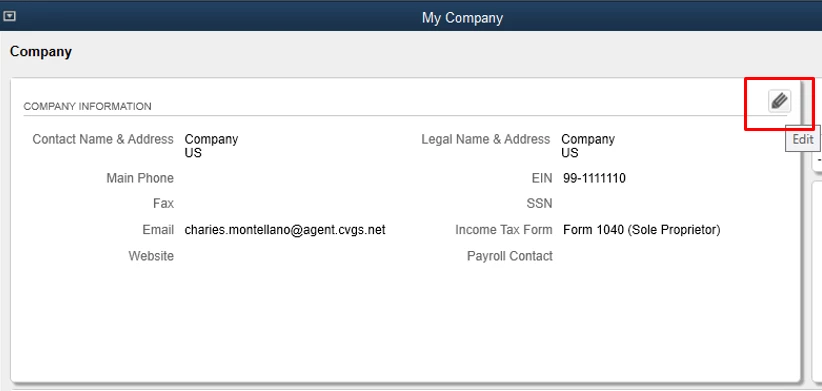
 

  1. Click Company at the top menu bar and choose My Company.
  2. Select the Pencil icon to edit.
  3. Tap Legal Information and enter the new company name and hit OK.


You can get more details about this in this article: Update your business name and address for QuickBooks Desktop Payroll. On the same link, you'll find steps on how to change your company for your Intuit Account as well as for direct deposit.


Please get back to me if you need anything else. I'm more than willing to lend you a helping hand.