Good day, @SCUTI,
Let's log in to the QuickBooks Payroll Maintenance page so you can change the email address for your payroll notification.
Here are the steps on how to accomplish this:
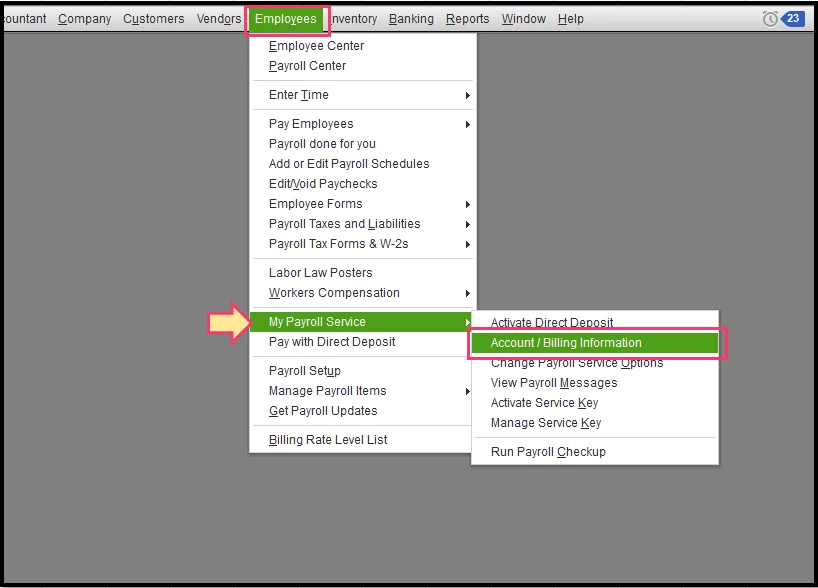
- Click the Employees menu.
- Select My Payroll Service, then Account/Billing Information.
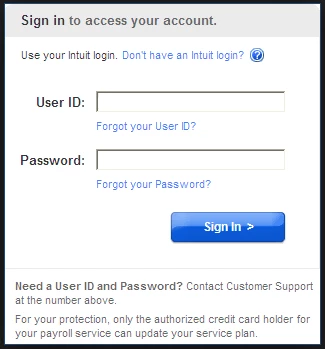
- Sign in using your Intuit Account credentials.
- Click the Edit link next to Contacts.
- Enter your direct deposit PIN, then click Continue.
- Change the contact details of the Payroll Admin:
- First name
- Last name
- Phone
- Email
- Click Update.
- Click Close after the confirmation.
- Check the updated Contacts information and close the page.
You can go through this article for additional information with payroll information: Update Payroll Admin information in QuickBooks.
Also, please update the payroll tax table every time you pay your employees, or at least every 45 days. This is to ensure your payroll has accurate information.
By following the solution above, you're now able to update the email address. Keep in touch if there's anything I can help you with concerning payroll. I'm always around whenever you need help.

