I appreciate you getting back to us and clarifying things, @KM2030.
At this time, there isn't an option to change multiple names in the Chart of Accounts. You can consider changing the account's name one at a time.
Here's how:
- In your QuickBooks Desktop, go to the Lists menu and select Chart of Accounts.
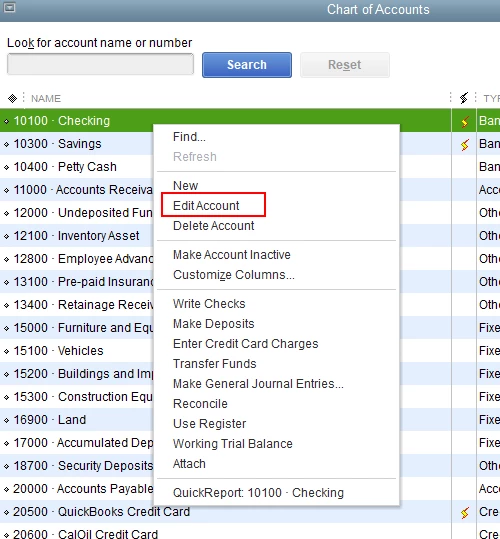
- In the Chart of Accounts window, right-click on the account you want to change the name and select Edit Account.
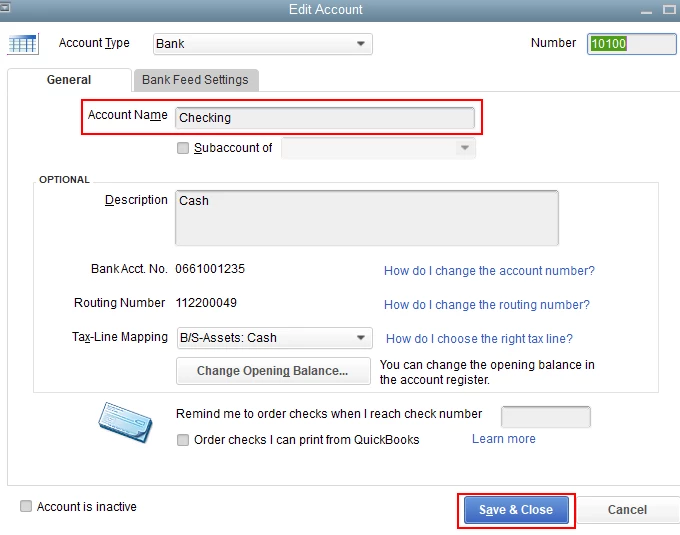
- Change the name in the Account Name field, then click Save & Close.
I'm adding this article for more details: Create, edit, or delete account in QuickBooks Desktop.
To learn more about the Chart of Accounts in QuickBooks Desktop, feel free to check out this article: Understand the chart of accounts in QuickBooks.
Please let me know if you need clarification about this, or there's anything else I can do for you. I'll be standing by for your response. Have a great day and keep safe.

