Thanks for swinging by the Community, @Irhmail451.
First, I appreciate the detailed screenshots you provided to give me a better understanding of your concern. I've got some insights about tax-line mapping in QuickBooks Online (QBO) and why some accounts keep showing in your Chart of Accounts after inactivating them.
Unfortunately, the option to set up tax lines in QBO is unavailable, as well as printing the Chart of Accounts with them. The column you highlighted in your screenshot isn't the tax line, but the account type. Selecting the appropriate account type sets you up with accurate reports so you can assess the financial health of your business. Currently, setting up tax-line mapping is only available in QuickBooks Desktop.
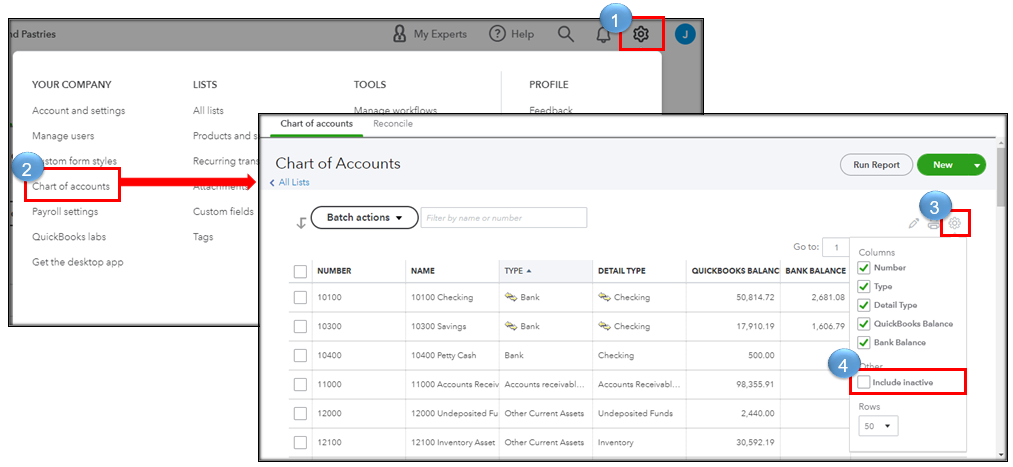
In addition, let's uncheck the Include inactive box to ensure that inactive accounts will not show in your Chart of Accounts.
I'll guide you on how:
- Go to the Gear icon and click Chart of Accounts.
- Click the Gear icon found on the leftmost part of the page.
- Uncheck the box for Include inactive.
Moreover, there are default or special accounts in QBO that can't be inactivated, edited, or merged. They include Inventory Assets and Reconciliation Discrepancies accounts, as what you refer to on your screenshots. These accounts are created by QBO automatically, and we're unable to use them for any other purpose.
When you run reports, inactive accounts and their transactions are still visible. QBO includes them to maintain accuracy. However, you may customize them to hide inactive accounts, but doing so may affect accuracy.
Please don't hesitate to ask the Community more questions about the Chart of Accounts, we'll make sure your concerns are well-taken care of. Have a good day, and stay safe!


