Hello, @CT58.
The "X" or back option to close an open window to get back to the previous screen is only available when you're creating a transaction from the +New button. I've attached a screenshot for visual reference.
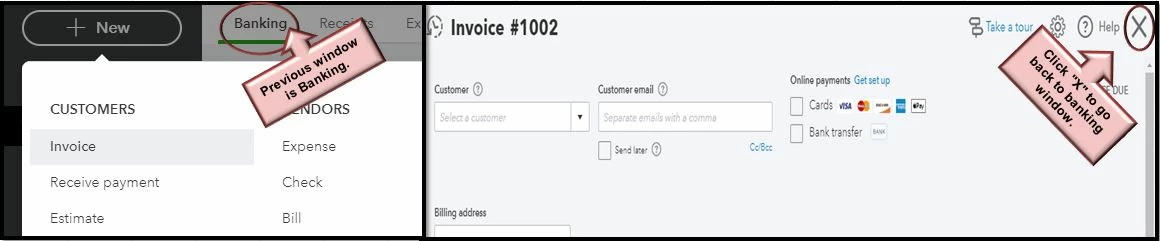
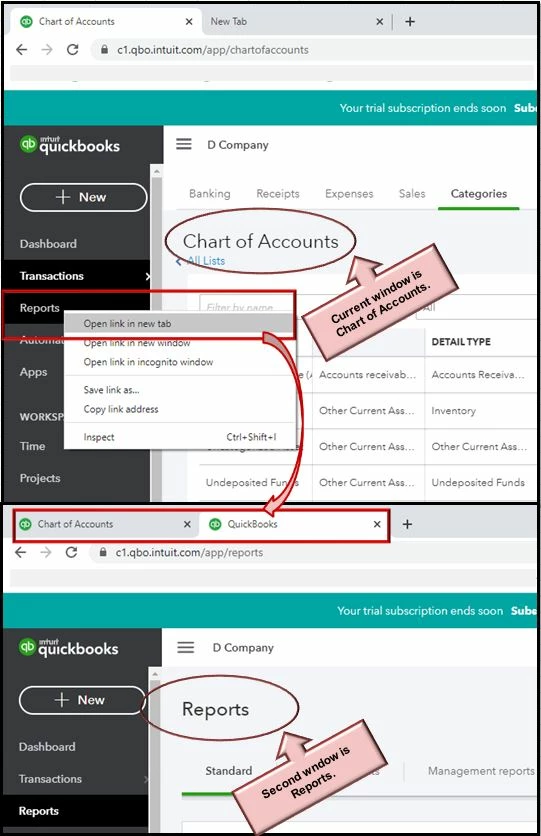
Also, here's how to open several windows when accessing the different tabs in QuickBooks Online:
- For example, if you're currently viewing Chart of Accounts and want to open a report at the same time, hover the mouse to the Reports menu.
- Right-click and choose Open link in new tab.
- You can also drag the reports window to another screen.
To learn more about the latest product updates in QuickBooks Online, please visit our QuickBooks Blog. This page provides details for product recent improvements, news, and product enhancements.
You can always get back here if you have other concerns or questions about accessing your QBO account. I'll be here to help you. Stay safe.


