Thanks for posting a question here in the Community, @judi-qb.
Allow me to share with you some insights on how you can run a report for your invoice payments transactions in QuickBooks Desktop.
First off, you'll have to make sure to record the payments when the invoices were paid and the items were taken by the customers. Check out this article to learn more on how to record invoice payments in QuickBooks Desktop: How do I enter invoice payments in QuickBooks Desktop.
Also, you'll have to ensure to use Cash as the report basis when running your Profit and Loss such as detail, standard, by class, etc. I'll guide you how:
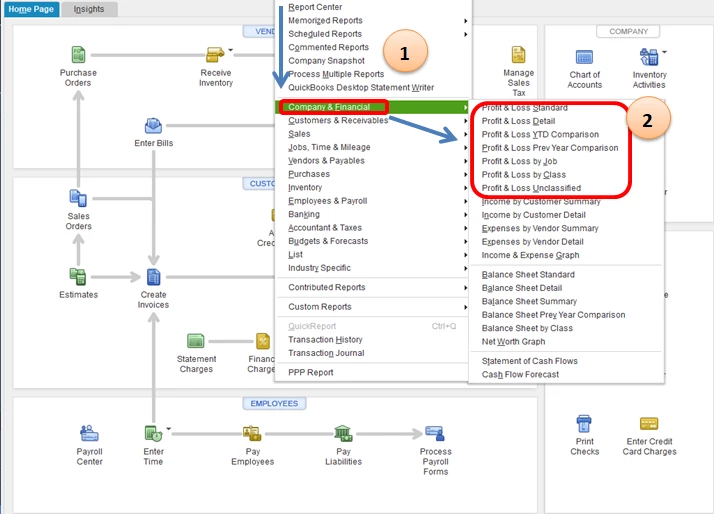
- Go to the Reports menu then choose Company and Financial option.
- Choose the desired report say Profit and Loss Standard report to view a summarized report for your income and expenses, Profit and Loss Detail to show detailed information for your income and expenses, etc.
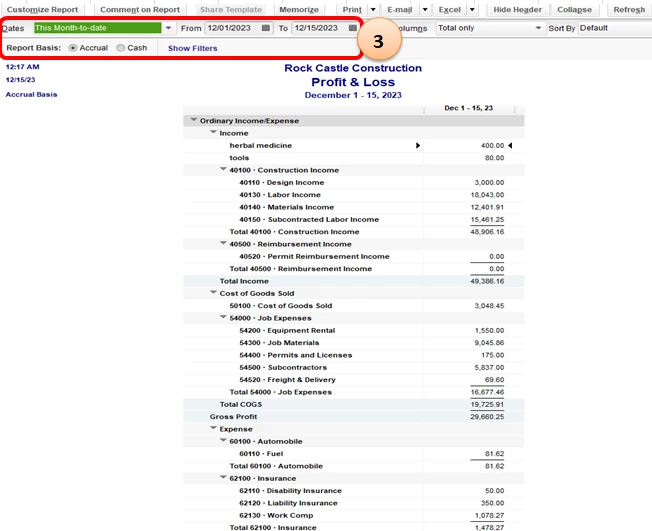
- Once you've already selected your Profit and Loss report, you'll have to make sure you choose the date and the Report Basis as Cash to show only paid invoices transactions from your customers.
Please see screenshots below for visual reference:
I'm also thinking of adding this article about customizing your reports which might come in handy to you so you can personalize your reports: How do I customize my reports in QB Desktop?
You're also able to memorize these customize reports. This way, you don't have to make another customization for the same report you wish to have: How do I memorize a report in QuickBooks Desktop.
Fill me in if you have more questions. I'll be here to help. Take care and have a great day!

