Gracias pero necesito un estado de cuenta donde me presente el customer y los proyectos asì como los invoices pendientes de pago, QBO no tiene ese formato?
Gracias por volver al hilo y aclarar los datos que necesitas, Norma. Estaré encantado de guiarle a través de los pasos para obtener un informe que proporcione la información relevante.
Sin embargo, QuickBooks Online (QBO) no proporciona un informe prediseñado que combine todos los elementos que usted describió.
Como solución alternativa, puede ejecutar el informe Detalle del saldo del cliente. A continuación, personalice los filtros para mostrar a los clientes con proyectos y sus facturas pendientes.
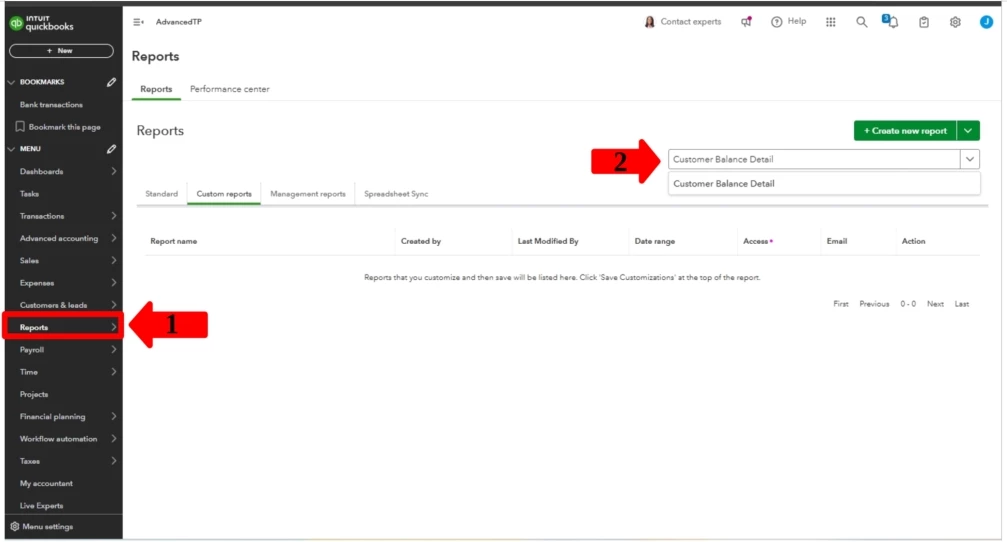
- Vaya a la pestaña Informes.
- Busque el informe Detalle del saldo del cliente.
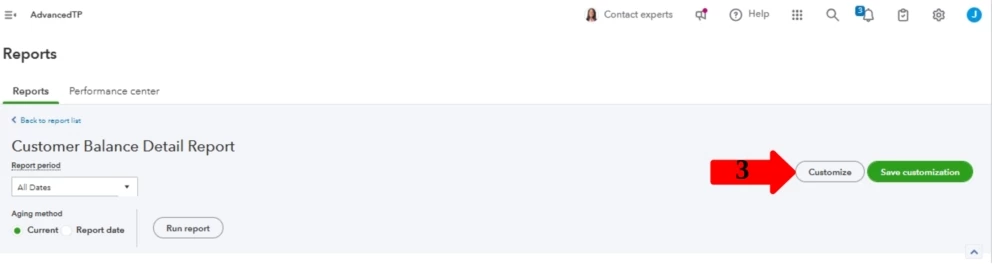
- Haga clic en Personalizar y luego vaya a la sección Filtro.
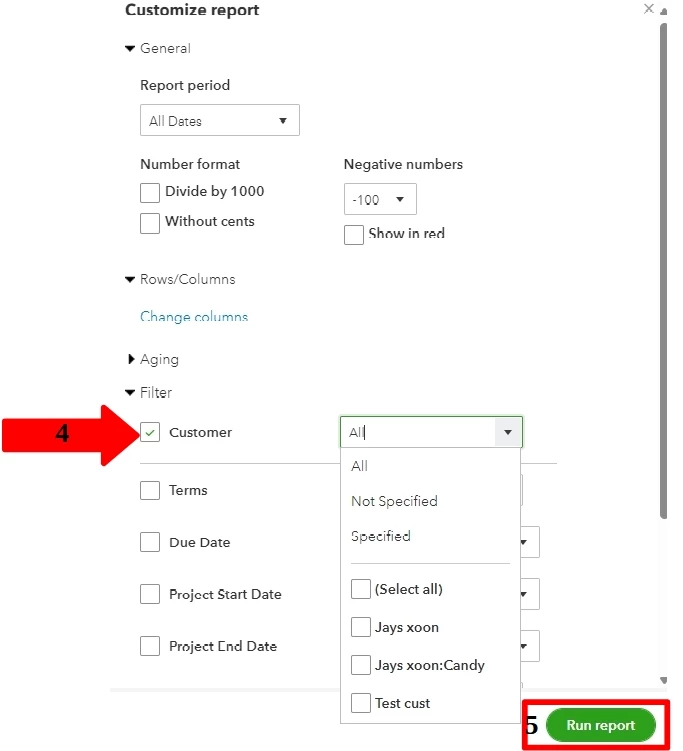
- seleccionar la casilla Cliente y elija los clientes específicos con proyectos en la lista desplegable.
- Haga clic en Ejecutar informe.
Para obtener más orientación sobre cómo filtrar informes, consulte este artículo: Personalizar informes en QuickBooks Online.
Además, puede guardar su configuración personalizada memorizando informes en QBO.
Si tiene alguna pregunta sobre la personalización de informes o necesita más ayuda, no dude en agregar una respuesta. Estamos aquí para ayudarle a aprovechar al máximo QuickBooks Online.
-----------------------------------------------------------------------------------------------------------------------------------------------------
Thank you for getting back to the thread and clarifying the data you need, Norma. I'd be glad to guide you through the steps to pull up a report that provides the relevant information.
However, QuickBooks Online (QBO) does not provide a pre-built report that combines all the elements you described.
As a workaround, you can run the Customer Balance Detail report. Next, customize the filters to display customers with projects and their outstanding invoices. Here's how:
- Go to the Reports tab.
- Search for the Customer Balance Detail report.
- Click Customize, then go to the Filter section.
- Select the 'Customer' box and choose the specific customers with projects in the drop-down list.
- Click Run report.
For further guidance on filtering reports, please refer to this article: Customize Reports in QuickBooks Online.
Additionally, you can save your customized settings by memorizing reports in QBO.
If you have any questions about customizing reports or need further assistance, please don't hesitate to add a reply. We're here to help you make the most of QuickBooks Online.
Disclaimer: I have used one of our translation tools to convert the post into English for enhanced understanding and communication.

