Te agradezco que te conectes con nosotros en la comunidad, Norma. Puedo proporcionar información sobre cómo modificar los saldos de las cuentas en el plan de cuentas de QuickBooks Online (QBO).
Para las cuentas ingresadas manualmente en el COA, puede editar el saldo inicial accediendo al registro de la cuenta y localizando la entrada del saldo inicial. Con mucho gusto describiré los pasos y brindaré una referencia visual para ayudar a lograrlo rápidamente:
- Accede a tu empresa QuickBooks Online.
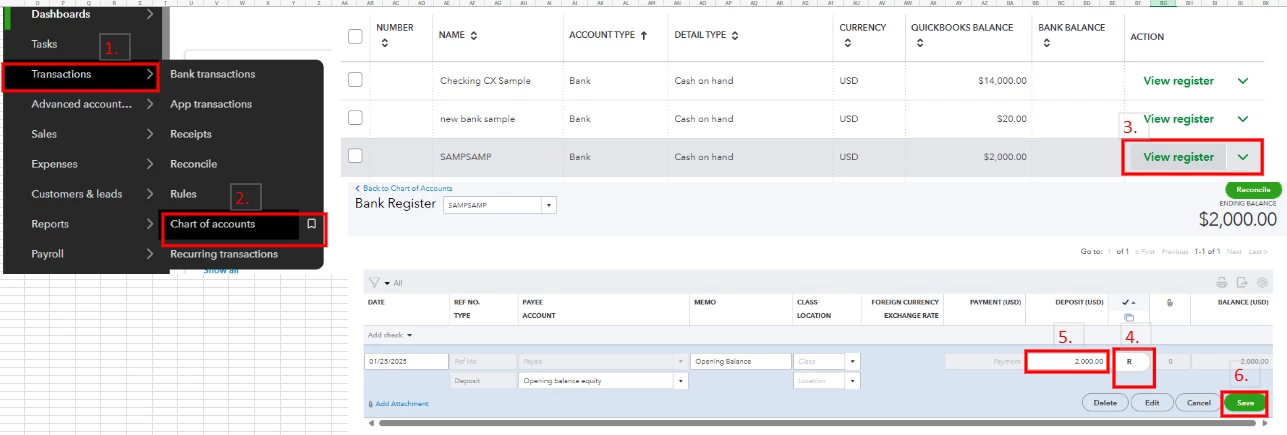
- En la barra de navegación izquierda, seleccione la pestaña Transacciones y haga clic en Plan de cuentas.
- Localice la cuenta y luego haga clic en Ver registro.
- En el registro de cuenta, busque la entrada Saldo inicial y luego haga clic en ella.
- En la columna Marca de verificación: heavy_check_mark:, seleccione la casilla con la "R" hasta que la casilla quede en blanco.
- Modifique el saldo en la columna Depósito (USD).
- Una vez hecho esto, haga clic en el botón Guardar.
Consulte la imagen a continuación para obtener orientación visual.
Además, te recomiendo visitar esta página para ayudarte a administrar las cuentas en el Plan de cuentas: Manage default and special accounts in your QuickBooks Online chart of accounts.
Si necesita ayuda para manejar cuentas bancarias o cuentas en el COA, nuestro QuickBooks Live Expert Assisted siempre está listo para extender una mano y brindar consejos sobre cómo gestionarlos de manera eficiente.
Si tiene otras preguntas relacionadas con QuickBooks o necesita ayuda para administrar cuentas en el COA, le recomiendo que utilice la sección de comentarios. De esta manera, puedo responder y ayudar con prontitud.
Descargo de responsabilidad: esta publicación se creó en inglés y se tradujo utilizando nuestra herramienta de traducción.
I appreciate you for connecting with me here in the Community, Norma. I'll provide information to help you in modifying account balances in the QuickBooks Online (QBO) chart of accounts.
For accounts manually entered in the COA, you can edit the initial balance by accessing the account register and locating the opening balance entry. I'll gladly outline the steps and provide a visual reference to help accomplish this promptly:
- Access your QuickBooks Online company.
- On the left navigational bar, select the Transactions tab and click Chart of accounts.
- Locate the account and then click View register.
- In the Account register, find the Opening balance entry and then click on it.
- In the Checkmark
 column, select the box with the “R” until the box is blank.
- Modify the balance in the Deposit (USD) column.
- Once done, click the Save button.
Please see the image below for visual guidance.
If you require assistance handling bank accounts or accounts in the COA, our QuickBooks Live Expert Assisted is always ready to extend a helping hand and provide tips on how to efficiently manage them.
In addition, I recommend visiting this page to help you manage accounts in the Chart of accounts: Manage default and special accounts in your QuickBooks Online chart of accounts.
In case you have other questions related to QuickBooks or need help managing accounts in the COA, I encourage you to use the comment section. This way, I can respond and assist promptly.

