May 26, 2020
Solved

Convert receivable to a loan

  • May 26, 2020
  • 1 reply
  • 0 views

I have an accounts receivable that has been converted to a loan. How do I handle this is Quicken since it involves invoices and there is no cash involved? I haven't been able to find a way to mark the invoices as paid without receiving cash.

Thanks

Best answer by Charies_M

Thanks for keeping us updated with the results, sandy38.


To check where credits were applied in QuickBooks Desktop, you can run the Transaction History report. This provides the details of your transactions including the credits applied to them. 


Here's how to pull it up:


  1. Go to Reports menu.
  2. Choose Transaction History.
  3. Optional: Click on the Customize Report button to filter the information you want to show in the report.

I've attached a sample screenshot below for a better view:
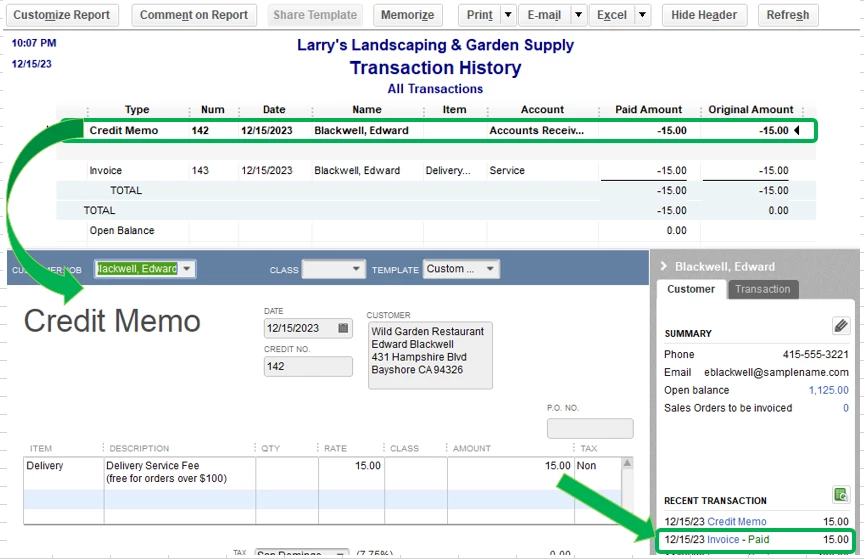
 

Feel free to check out this article for more information about customizing reports in QuickBooks Desktop.


You got me here if you have other questions. I'm always happy to assist you further. Have a great day ahead.


1 reply

May 26, 2020

Hi there, @sandy38.


To record the transactions in QuickBooks, you'll have to create a journal entry to credit Accounts Receivable. I'll guide you how:


  1. Go to the Company menu and select Make General Journal Entries.
  2. Fill out the necessary fields. Make sure your debits equal your credits when you’re done.
  3. One done, click Save & Close.


Also, I suggest consulting an accountant to know which account will be debited when creating a journal entry.


I've included an article, in case you'll want to learn how to combine multiple transactions into a single record in your QuickBooks Desktop: Record and make Bank Deposits in QuickBooks Desktop.


Don't hesitate to reach out to us if you have other concerns or queries. I'll be around to help.

sandy38Author
May 27, 2020

Charlene,

That seems to work, but I noticed that when I apply the credits coming from the general journal entry, I can't go back and see where they were applied in Create Invoices like I can with a payment. 

Thanks,

Sandy

Charies_MAnswer
May 27, 2020

Thanks for keeping us updated with the results, sandy38.


To check where credits were applied in QuickBooks Desktop, you can run the Transaction History report. This provides the details of your transactions including the credits applied to them. 


Here's how to pull it up:


  1. Go to Reports menu.
  2. Choose Transaction History.
  3. Optional: Click on the Customize Report button to filter the information you want to show in the report.

I've attached a sample screenshot below for a better view:


Feel free to check out this article for more information about customizing reports in QuickBooks Desktop.


You got me here if you have other questions. I'm always happy to assist you further. Have a great day ahead.