

Solved
copy and pasting from the chart of accounts
how do you past when you copy in QP
in the edit
it says copy acct
so i copy
now how do i past that line so i can edit it

how do you past when you copy in QP
in the edit
it says copy acct
so i copy
now how do i past that line so i can edit it
no one it getting what i want to do
makes me think it can not be done but
i even did print screens
maybe i can not or do not know how to explain myself but im not an IT person or i would have this done already
if someone truly wants to help me then call to me xxx xxx xxxx
Hello, lrhmail451.
There's no need to call and I'd like to clarify and elaborate more on the Copy Account function.
The Copy Account function only works for the account name, not the entire line. We use it to paste multiple account names on transactions such as journal entries and other forms.
Also, we're unable to use it to create a new account in the Chart of Accounts. The reason being is that it's a list menu, and not an edit window. Although, you can paste the account name in the Add new account window when making a new account.
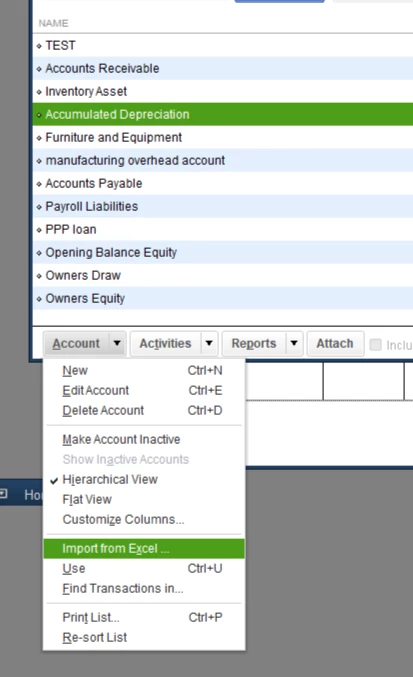
Instead, you'll want to use the import function to add new accounts in the Chart of Accounts. You can check this article for a guide in using the Standard and Advanced Import features: Import or export MS Excel files.
You can also use the Import from Excel function. Though, you might have to format and create your own Excel spreadsheet file for the new accounts:
You're welcome to visit our articles if you need help reconciling your bank accounts, managing customers, editing your lists ,etc.. Check them out here.
I'm up to answer other questions you might have for QuickBooks Desktop. Add your details in the reply section below again and I'll get back to you as soon as possible.
Enter your E-mail address. We'll send you an e-mail with instructions to reset your password.