July 7, 2022
Solved

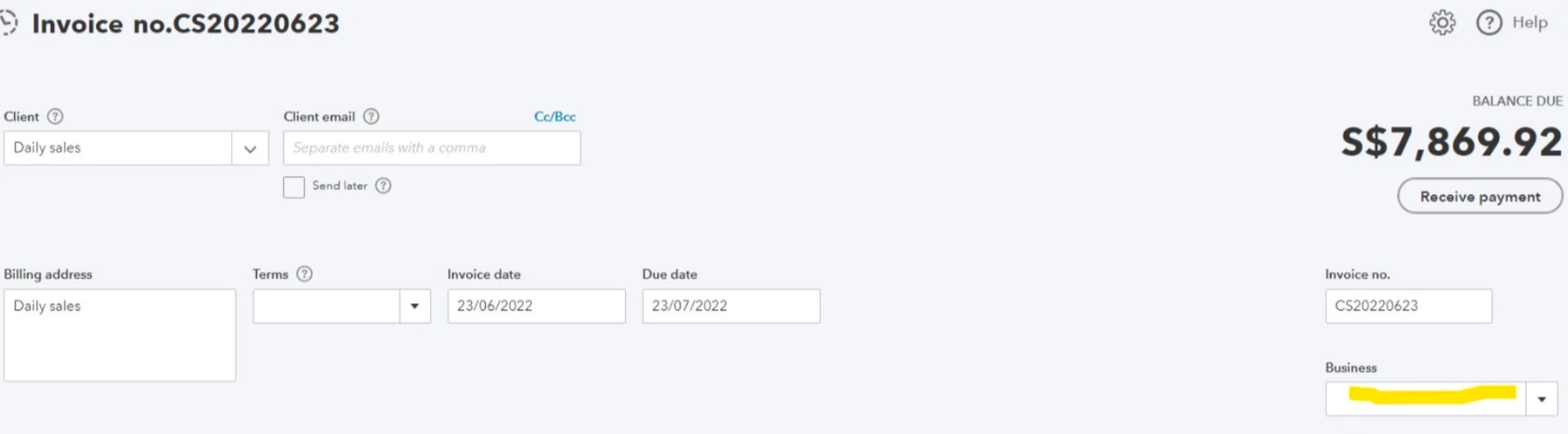
Could you help to find business field in invoice (it is not custom)
  • July 7, 2022
  • 1 reply
  • 0 views

Best answer by JessT

I appreciate the screenshot, NP11.


I can recognize that it's not a custom field because it's placed on the right. It's actually a Location tracker field labeled as Business. I'll help you navigate through its settings if that's what you mean.
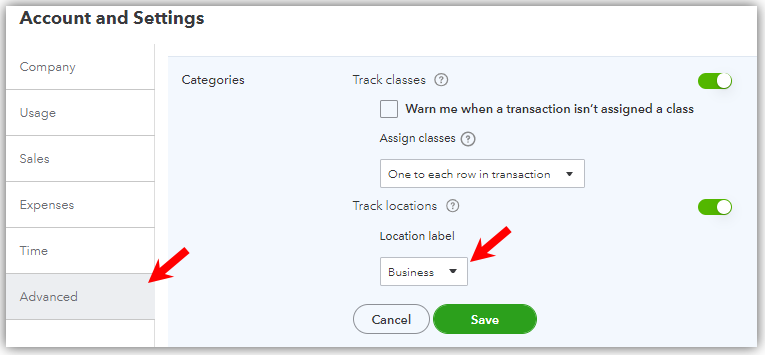
 

  1. Click on the Gear icon.
  2. Choose Accounts and settings.
  3. Select Advanced and click the Categories section.


On the other hand, you can also add more Location labels using these steps:


  1. Click on the Gear icon.
  2. Choose All lists.
  3. Select Businesses.
  4. Click New to add one.


You can also check out this article for more information about the said feature: Set up and use location tracking.


Feel free to reach back out if you have any other concerns about the features in QBO. I'm just right here to continue to help.

1 reply

JessT
JessTAnswer
July 7, 2022

I appreciate the screenshot, NP11.


I can recognize that it's not a custom field because it's placed on the right. It's actually a Location tracker field labeled as Business. I'll help you navigate through its settings if that's what you mean.


  1. Click on the Gear icon.
  2. Choose Accounts and settings.
  3. Select Advanced and click the Categories section.


On the other hand, you can also add more Location labels using these steps:


  1. Click on the Gear icon.
  2. Choose All lists.
  3. Select Businesses.
  4. Click New to add one.


You can also check out this article for more information about the said feature: Set up and use location tracking.


Feel free to reach back out if you have any other concerns about the features in QBO. I'm just right here to continue to help.

NP11Author
July 7, 2022

Thank you very much

AlcaeusF
July 7, 2022

Hi there, @NP11.


I'm glad your concern got resolved by reaching out to the Community space. Please know we're open 24/7. That said, you can post anytime regarding any QuickBooks issues. Take care always!

