February 3, 2021
Solved

Create a subvendor?

  • February 3, 2021
  • 1 reply
  • 0 views

Heres my situation: 

I buy products from Vendor B and they ship direct to us, however we do not get billed from them. Anything we buy from Vendor B is billed through Vendor A. We have alot of bills form Vendor A so when I want to find a bill from Vendor B I have to search all through the bills from Vendor A and I dont have an easy way to search or find it because Vendor B doesnt exist in quickbooks. I see there is no way to add a sub vendor so I was wondering if there is another trick or way I can add vendor B somehow when I enter bills for Vendor A so I can find them. 

Best answer by MadelynC

I’ve got information here so you can track vendor B in QuickBooks, @ruddmj190.


Thanks for sharing this concern in the Community. You may consider these instructions to easily find the event associated with that vendor.


You can create a vendor list in QuickBooks Desktop Enterprise that has multiple sub-vendors. You can use the Add/Edit Multiple List Entries feature to enter Vendor B details. Let me show you how:


  1. Click the Lists menu.
  2. Go to Add/Edit Multiple List Entries window.
  3. From the List drop-down, select Vendors.
  4. Locate the parent vendor.
  5. Click Customize button.
  6. Here's how to add entries to the list.
    1. Click in the first empty row at the end of the list and begin making your entries.
    2. You can also copy the data from Excel and paste it into the Add/Edit Multiple List Entries window.
  7. Click Save Changes.


Since this window is for your list information only, consider adding the Vendor B in the Memo when creating Bill for Vendor A. You can run a report like Custom Transaction Detail, then add Memo under the Column. This way, you quickly identify and locate the transaction associated with that vendor.
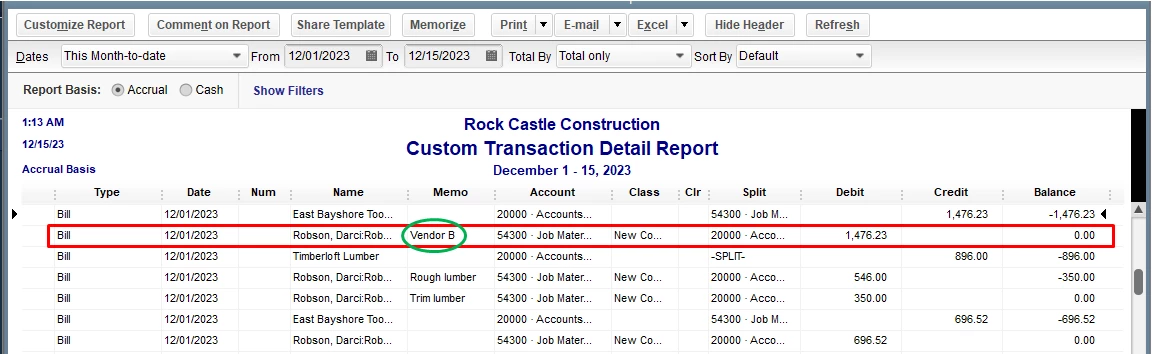
 

This reference will give you an overview of how to use the Add/Edit Multiple List Entries window to modify multiple customers, vendors, and items in QuickBooks.


In case you need more information about our report features in QuickBooks. Feel free to check this article about customizing reports. It also includes instructions on how to modify them.


Feel free to click the Reply button if you have additional vendor-related questions or something else. I'm always here to help. Have a great day ahead.


1 reply

MadelynCAnswer
February 3, 2021

I’ve got information here so you can track vendor B in QuickBooks, @ruddmj190.


Thanks for sharing this concern in the Community. You may consider these instructions to easily find the event associated with that vendor.


You can create a vendor list in QuickBooks Desktop Enterprise that has multiple sub-vendors. You can use the Add/Edit Multiple List Entries feature to enter Vendor B details. Let me show you how:


  1. Click the Lists menu.
  2. Go to Add/Edit Multiple List Entries window.
  3. From the List drop-down, select Vendors.
  4. Locate the parent vendor.
  5. Click Customize button.
  6. Here's how to add entries to the list.
    1. Click in the first empty row at the end of the list and begin making your entries.
    2. You can also copy the data from Excel and paste it into the Add/Edit Multiple List Entries window.
  7. Click Save Changes.


Since this window is for your list information only, consider adding the Vendor B in the Memo when creating Bill for Vendor A. You can run a report like Custom Transaction Detail, then add Memo under the Column. This way, you quickly identify and locate the transaction associated with that vendor.


This reference will give you an overview of how to use the Add/Edit Multiple List Entries window to modify multiple customers, vendors, and items in QuickBooks.


In case you need more information about our report features in QuickBooks. Feel free to check this article about customizing reports. It also includes instructions on how to modify them.


Feel free to click the Reply button if you have additional vendor-related questions or something else. I'm always here to help. Have a great day ahead.

November 23, 2021

Hi, thanks @ruddmj190 for bringing up something very important I was always looking for such a solution.

Dear @MadelynC, your time and effort is appreciated, still I don't see how do i do a SubVendor when using 'Add/Edit Multiple List Entries'?

Please describe!

November 23, 2021

Hello, amexpert.


I'll take it from here and lay down the details about MadelynC's answer when handling sub-vendors. 


QuickBooks Desktop doesn't support sub-vendors. 


To clarify MadelynC's answer, you can use the Add/Edit Multiple List Entries function to add Vendor B to your vendors list in QuickBooks. 


When you create a bill or any expense transactions, use the Memo field to indicate that you bought items from Vendor B but billed through Vendor A. 


If you need to take a look at your vendor transactions or any other financial data, you can check this article for a guide: Understand reports.


Do you need to enter other lists or want to record specific transactions? Or do you have any other concerns with QuickBooks Desktop? Please let me know the details below and I'll guide you through the process.