

January 25, 2019
Solved

Creating New Customers Using Inactive Customer's Name

  • January 25, 2019
  • 1 reply
  • 0 views

I run a property for lease. The customer profiles I create are not the names of the lessee but the unit or room number in which they have rented. I then put the names of the lessees on the billing address so that it will appear below the room number. This is convenient for me especially when there are a lot of people in one room and they split the entire rent; the invoice is not addressed to one person.


My question is, what happens when the current tenants move out. Of course I want the next tenant to still have the invoice addressed to their room number AND have a clean balance and transaction history (not inheriting the previous tenant's). If I mark the first tenant's customer profile as inactive and create a new one with the same name (because I'm using the room/unit number as the recipient of the invoice), will that be OK?
Best answer by Joyce_P

QuickBooks doesn't allow duplicate names regardless if they're inactive, pomyles15.


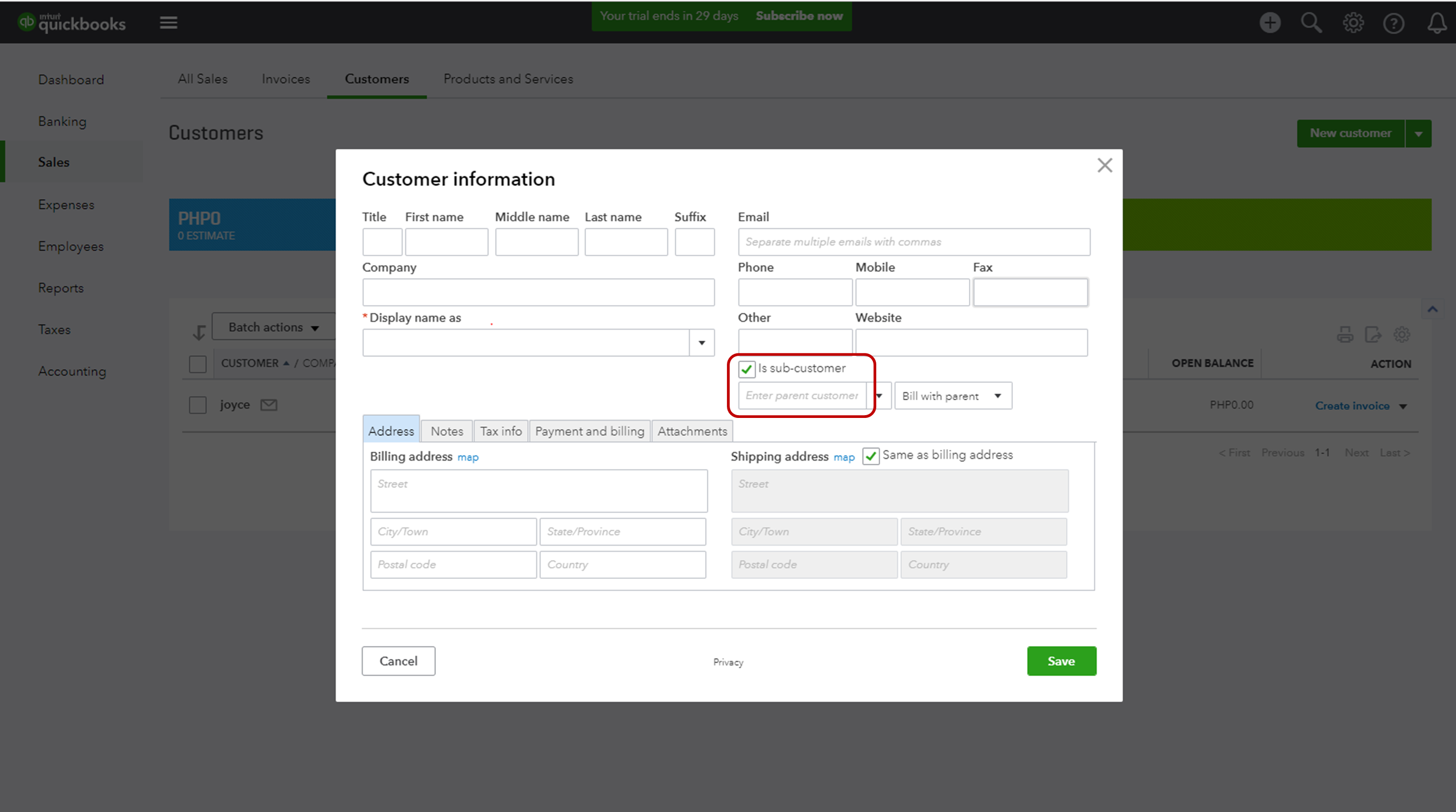
You can also add new customers as sub-customer. For example, the customer's name is Room 1, add a new tenant as sub-customer.
 

Here's how:

  1. Go to sales, and click Customer.
  2. Click on New Customer.
  3. Enter the information of the new customer.
  4. Check the sub-customer.
  5. Choose the parent customer.
     

This way, you won't always change the old tenant's name when you'll make it inactive.

Please see the screenshot below: 


You can get back if you have other questions.


1 reply

January 25, 2019


Inactivating a customer and creating a new one with the same name can cause duplication, pomyles15.


You can change the name of the old tenant to the unit or room number with the year they moved out, then make it inactive. This way, you can create a new tenant that is named under the original unit or room number, and they won't be able to inherit the previous tenant's transactions.


I'll always be here if you need further assistance.


pomyles15Author
January 25, 2019

I see. So if I change the old tenant's customer name to, say, "Room 1 Tenants - 2018" and my new tenants to just "Room 1 Tenants" that would do it, right?


Well what if I have a new customer again in the same room and I name the previous one "Room 1 Tenants - 2018" too, same with the existing inactive customer with that name, will quickbooks allow me to do that?

Joyce_PAnswer
January 25, 2019

QuickBooks doesn't allow duplicate names regardless if they're inactive, pomyles15.


You can also add new customers as sub-customer. For example, the customer's name is Room 1, add a new tenant as sub-customer.
 

Here's how:

  1. Go to sales, and click Customer.
  2. Click on New Customer.
  3. Enter the information of the new customer.
  4. Check the sub-customer.
  5. Choose the parent customer.
     

This way, you won't always change the old tenant's name when you'll make it inactive.

Please see the screenshot below: 


You can get back if you have other questions.