Glad to see you here, baconbuilt.
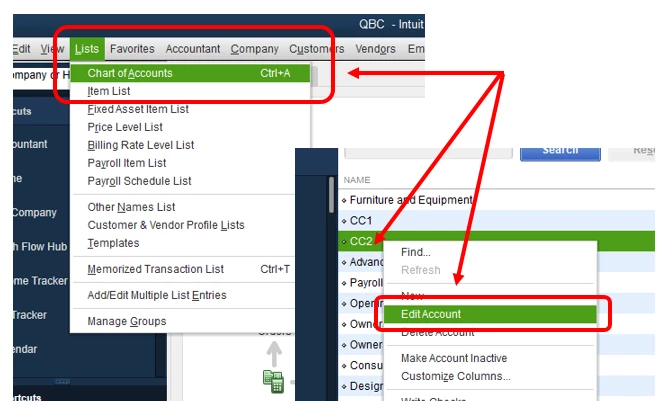
Let me share the steps with you on how to merge duplicate accounts in QuickBooks Desktop. Here's how:
- Go to the Lists menu, then select Chart of Accounts.
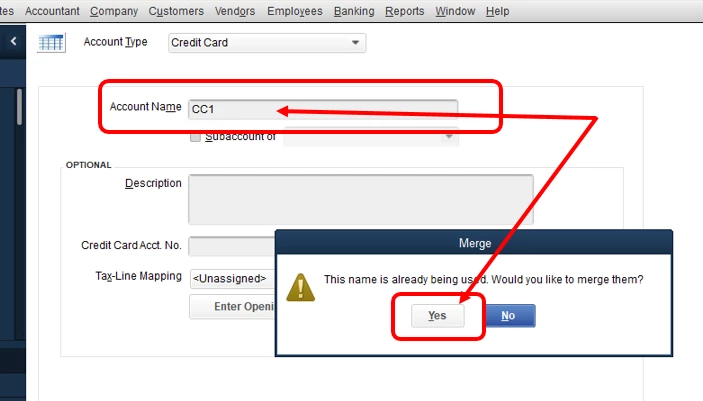
- Look for the credit card accounts that you want to merge, then copy the name of the card that you want to keep.
- Right-click the entry you don’t want to use, then select Edit.
- Paste the name you copied, then select Save & Close.
- Click Yes to merge the entries.
Please note that if you get the message, “You cannot merge an account that has online information associated with it into another account”, this means that you have an active bank feed on one of the accounts. You'll have to turn it off first before merging the account. Here’s how to turn off bank feeds.
Check out this article for additional details about this process: Merge List Entries in QuickBooks Desktop.
Don't hesitate to reply to us if you're able to me and let me know if you're able to merge the accounts. You can also ask more questions if you need anything else.

