July 31, 2021
Solved

Custom Field Text

  • July 31, 2021
  • 2 replies
  • 0 views

I want to create a custom field with a long text in the additional information on the job page.  I would like this information to transfer over to my invoice.  I am trying to create a work description field that will allow me to state the original issue and the work done to fix the issue.  When I add a custom field I don't have enough character space available.  I have QuickBooks Pro Plus 2021.  Any help would be greatly appreciated.

Best answer by LieraMarie_A

I've got another workaround for you, @BevanandTina.


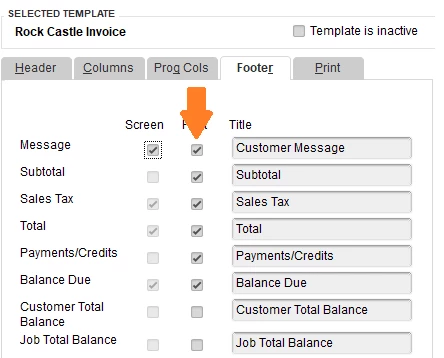
I'd suggest utilizing the "Message" field on the invoice. You have the option to add this field on screen and print.


Here's how:

  1. From the invoice page, select Customize Data Layout.
  2. Select the Footer tab.
  3. Check the Message box under the Print column.
  4. Click OK.


For more info, check out this article: Use and customize form templates.


If you stumble into an issue while you use and customize templates, don't worry. We have an awesome guide that will help you fix it:  Fix Common Template Issues.


I'm always around if you need further assistance in personalizing your templates. Have a wonderful day.

2 replies

KlentB
July 31, 2021

I can share another way to accomplish that, BevanandTina.


Each text field in QuickBooks Desktop has a maximum number of characters that can be entered. For custom fields, you can only input up to 30 characters. To more about this topic, you can read this article: Character limitations for fields.


I'll also take note of your ideas and suggestions to help improve your experience in the program. In meantime, you can directly enter the additional information of the job in the Memo field of the invoice. This field can contain up to 4095 characters. Here's how to do it:


  1. Go to the Customers menu.
  2. Choose Create Invoices.
  3. From the Customer: Job drop-down menu, select the appropriate customer name or job. 
  4. Fill in the relevant information at the top of the form like the Date Invoice #Bill to/Sold to, and Terms.
  5. In the detail area, enter the items and services.
  6. Enter the additional details of the job in the Memo field.
  7. Click Save & Close.

I also encourage reading this guide to earn about the maximum number of list entries you can make in QuickBooks Desktop: Maximum number of list and custom field entries.


Fill me in if you need further assistance in managing your sales forms. I'll be right here to continue helping.

August 1, 2021

Thank you for your response.  I can use the memo field on the invoice but I can't get the memo text to print on the invoice.  When I go into customization and the layout designer it doesn't give me an option to add the memo field.  Any suggestions on how to get the text in the memo field on the invoice?

LieraMarie_A
August 1, 2021

I've got another workaround for you, @BevanandTina.


I'd suggest utilizing the "Message" field on the invoice. You have the option to add this field on screen and print.


Here's how:

  1. From the invoice page, select Customize Data Layout.
  2. Select the Footer tab.
  3. Check the Message box under the Print column.
  4. Click OK.


For more info, check out this article: Use and customize form templates.


If you stumble into an issue while you use and customize templates, don't worry. We have an awesome guide that will help you fix it:  Fix Common Template Issues.


I'm always around if you need further assistance in personalizing your templates. Have a wonderful day.

BigRedConsulting
October 7, 2022

@BevanandTina  RE: I am trying to create a work description field that will allow me to state the original issue and the work done to fix the issue. 


Usually this is done by adding text to the Description column on the invoice table. You can add as many rows as you want that contain only descriptions, and the descriptions can be 4k characters long.  You can add the custom text to a row with an item or to a row without.


Above, the text is on its own row, but I could have also replaced the text for the 1000 item with the custom text.