

November 24, 2024
Question

Customer Invoice

  • November 24, 2024
  • 1 reply
  • 0 views

So what I'm trying to do, is save a TON of time here. When I create an invoice I go around my store with a barcode scanner and it comes up with the item in the invoice. If I click the barcode again it will enter in the quantity as 2 instead of one and so on. 

I really would like to know if there is a way to Auto-Select the Bin location of the item I'm ordering?? As you can see in the picture I have a lot of Bins and when done with the invoice I have to go back through and select every single BIN location from the drop down for each item. 

Is there a way quickbooks will just auto select the bin with the inventory in it? I know you can have it pop up if it is going to go negative and wont let you sell it, so it obviously knows there is inventory.

Just looking for some help! Thanks in advance for any info!

-Ryan
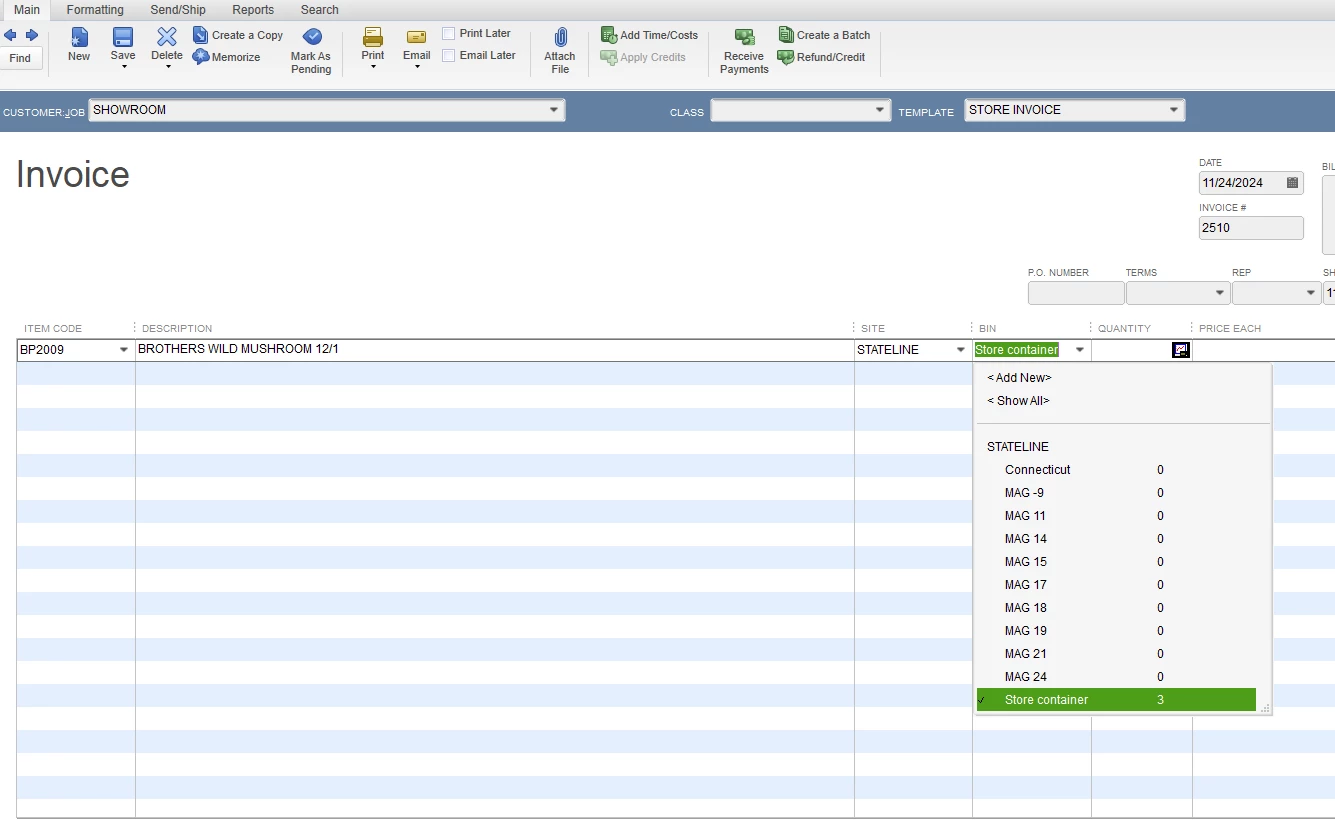
1 reply

November 24, 2024

Currently, the option to auto-select the bin with the inventory in QuickBooks is unavailable, Ryan2024. However, we value your feedback and suggestions for improving our product.


QuickBooks Desktop provides the functionality to set up multiple locations for effective inventory tracking. If you want to streamline your processes and minimize manual effort when creating invoices, consider submitting your feature suggestion to our Product Development Team. Your recommendations and suggestions are valuable to us as they help us identify areas we can improve.


I'll show you how you can send one:


  1. Locate the Help option.
  2. Choose the Send Feedback Online option.
  3. Select the Product Suggestion option. A pop-up window displays. Enter your feedback suggestion.
  4. Click the Send Feedback button.


As a workaround, you can use third-party applications to automate the process of managing your inventory in QuickBooks Desktop Financial Software. These alternatives can help you integrate and manage transactions in a way that aligns with your business needs.


You can also refer to the following articles to learn more about saving your reporting customizations and configuring your preferences for financial reporting:


Please don’t hesitate to reach out if you need additional help managing and customizing your invoices, or if there's anything else I can do to improve your experience with QuickBooks.

Ryan2024Author
November 25, 2024

Ok. I sent it in as a suggestion. What are the chances it will actually get looked at? How can I go about seeing if its something they are willing to work on for me?

November 25, 2024

@Ryan2024   No one ever gets back to anyone about the Feedback left.  In fact, I'd bet that no one even looks at any of it.  Even the feedback and suggestions that HUNDREDS of us have left for the SAME thing, never gets done.  Trust that NO ONE cares what features you would like to see, what features you NEED, and what features you want back that they took away. 


Good luck, though.