

February 2, 2024
Solved

Data Integrity Verification Failed (Error Code: -3645)

  • February 2, 2024
  • 2 replies
  • 0 views
 

I keep getting this error code every time I open quickbooks. It goes off every 30 seconds or so. I recently upgraded my laptop and added a new company and then this started. I save my backups to OneDrive and haven't ever had this problem before. I followed the instructions to fix it, but it continues to pop up....any one else? I called the number under the error as suggested but no one can remote in only my IT Team through my company. Can anyone help me please?!?! 
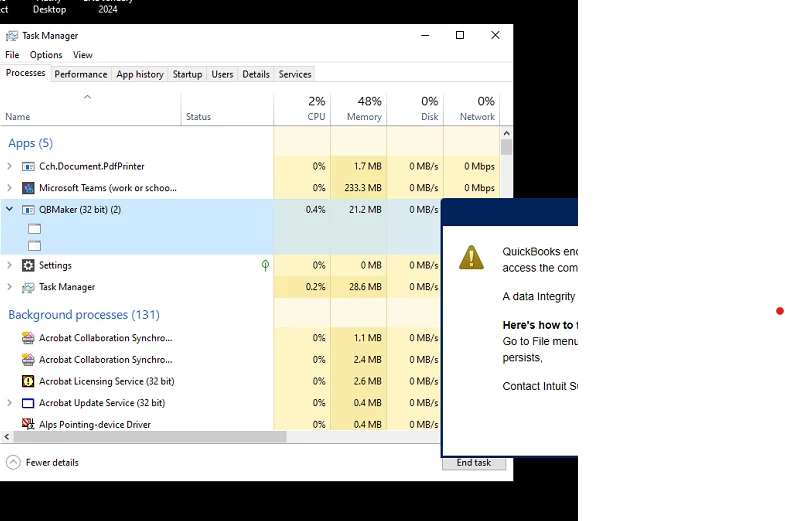
 

Best answer by ITGuru77

QBMaker was the source of the fake error message. If you click on it and open the file location you can find the files to delete. After those files are deleted the fake error goes away. Don't call that number.

C:\Users\Public\Documents\System64\SOGT

Here is the path that the files were in on this computer. 


2 replies

February 2, 2024
Don't call that number. It's a scam message. Can you find the following files in the same folder? 90s.trf QuickBooksDownloader.exe.config QuickBooksDownloader.exe.manifest
srg623Author
February 2, 2024

No, the only files there are the backups I have saved.

February 2, 2024

Find the files in your local drive, not in your cloud drive.

ITGuru77Answer
February 12, 2024

QBMaker was the source of the fake error message. If you click on it and open the file location you can find the files to delete. After those files are deleted the fake error goes away. Don't call that number.

C:\Users\Public\Documents\System64\SOGT

Here is the path that the files were in on this computer. 


srg623Author
February 13, 2024

Thank you, with these directions I was able to find and delete these files....so far so good, it seems to be working. I haven't received an error message in over 5 minutes and it was popping up every 45 seconds to a minute.