February 1, 2024
Solved

Did QuickBooks remove the Import Custom Form Style option?

  • February 1, 2024
  • 1 reply
  • 0 views

Hi! 


I've just opened a new business, but I've been using QBO for nearly a decade with another business. Since my business is design-focused, I'd like to control the look of my invoice and make it customized beyond what is offered through QB's invoice templates.


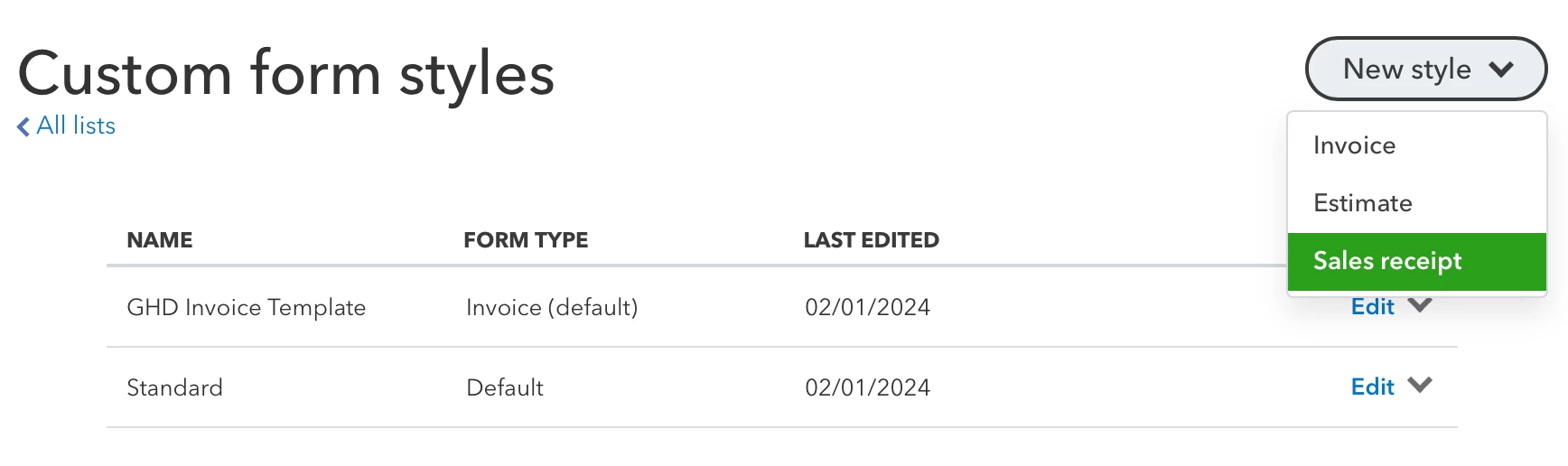
In my other business, I've always created my own template in Word and then uploaded through the Import option, but this option doesn't seem to be available in this instance of QBO for my new business (same service level):


I tried asking for Help through QB, and the person I chatted with either didn't understand or couldn't give me an answer. What happened, or is there something I'm missing?


Thanks in advance for any insight here!

Best answer by RCV

We understand if it appears difficult to you to upload custom forms, GHD-1.


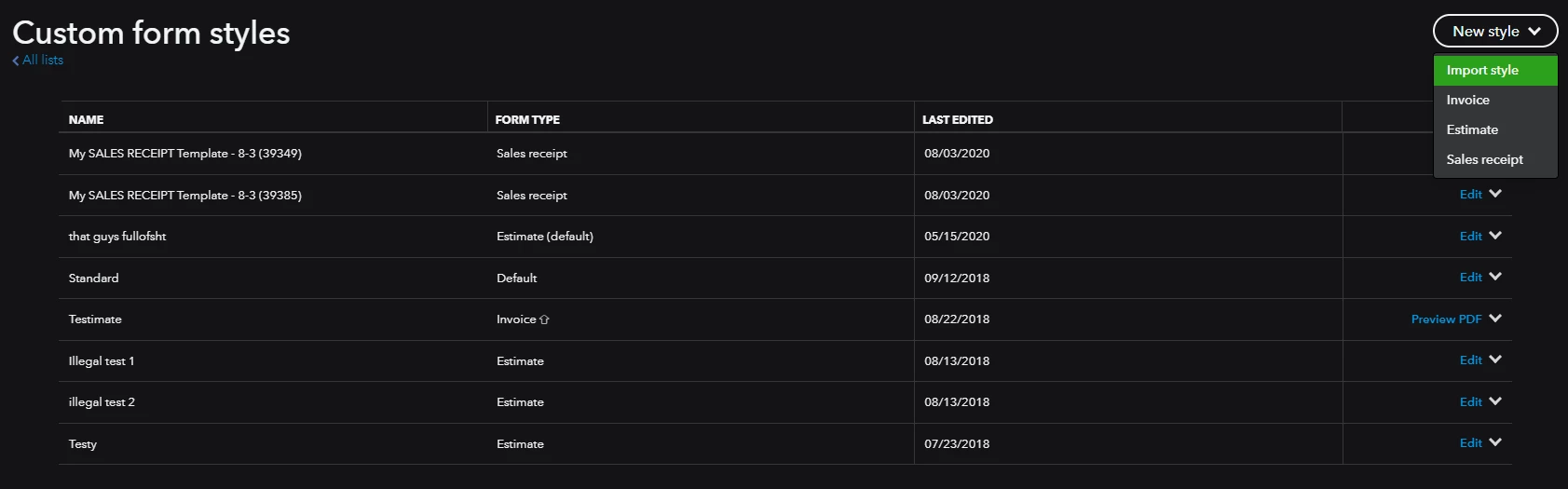
If you had your Import Styles feature enabled in QuickBooks Labs before 6/25/2021, it would still be accessible and usable in QuickBooks Online (QBO). Let me guide you on how: 


  1. Go to the Gear icon.
  2. Go to Custom form styles.
  3. Click New style.
  4. Tap Import style.
  5. Upload your DOCX file and follow the presented steps.


In the event it wasn't enabled before 6/25/2021, the option to turn it on is unavailable. We see consumer feedback as an opportunity to improve the numerous features of our products. I'd recommend giving our engineers direct feedback. They may look into this suggestion and incorporate it into future updates. Here's how:


  1. Go to the Gear icon.
  2. Hit Feedback.
  3. Type in your recommendation in the Share your feedback field.
  4. Click Next.
  5. Follow the on-screen instructions to complete the process.


Your valuable feedback goes to our Product Development team to help improve your experience in QuickBooks Online. You can track feature requests through the QuickBooks Online Feature Requests website.


Furthermore, to keep yourself informed with the latest news about our product, make sure to regularly check out the product updates webpage. Additionally, QuickBooks Online offers a variety of customizable templates that can come in handy for customizing your forms. Take advantage of these resources to enhance your experience with our product.


Keep me posted if you have any additional questions about editing your template or uploading new custom forms. I'll be right here to help. You have a good one. 

1 reply

RCVAnswer
February 1, 2024

We understand if it appears difficult to you to upload custom forms, GHD-1.


If you had your Import Styles feature enabled in QuickBooks Labs before 6/25/2021, it would still be accessible and usable in QuickBooks Online (QBO). Let me guide you on how: 


  1. Go to the Gear icon.
  2. Go to Custom form styles.
  3. Click New style.
  4. Tap Import style.
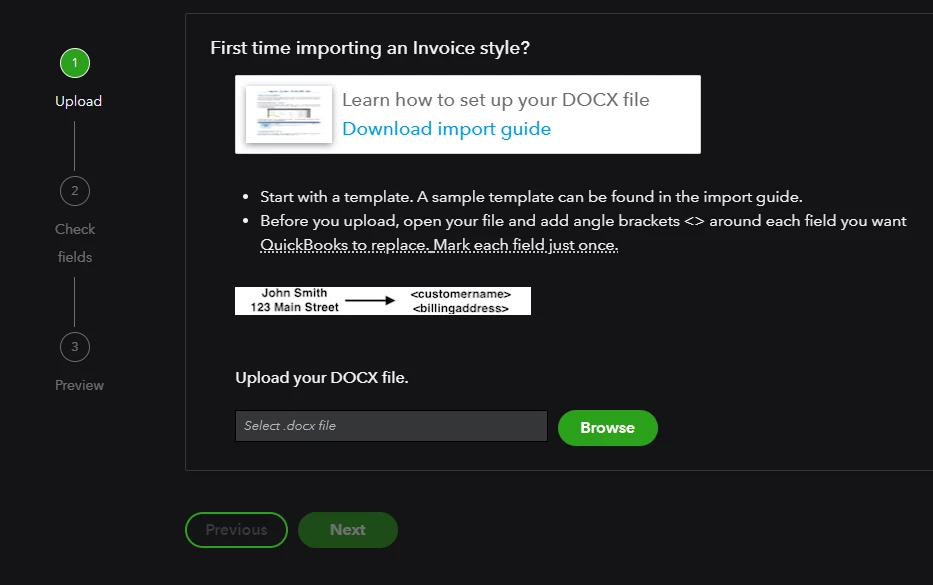
  5. Upload your DOCX file and follow the presented steps.


In the event it wasn't enabled before 6/25/2021, the option to turn it on is unavailable. We see consumer feedback as an opportunity to improve the numerous features of our products. I'd recommend giving our engineers direct feedback. They may look into this suggestion and incorporate it into future updates. Here's how:


  1. Go to the Gear icon.
  2. Hit Feedback.
  3. Type in your recommendation in the Share your feedback field.
  4. Click Next.
  5. Follow the on-screen instructions to complete the process.


Your valuable feedback goes to our Product Development team to help improve your experience in QuickBooks Online. You can track feature requests through the QuickBooks Online Feature Requests website.


Furthermore, to keep yourself informed with the latest news about our product, make sure to regularly check out the product updates webpage. Additionally, QuickBooks Online offers a variety of customizable templates that can come in handy for customizing your forms. Take advantage of these resources to enhance your experience with our product.


Keep me posted if you have any additional questions about editing your template or uploading new custom forms. I'll be right here to help. You have a good one. 

GHD-1Author
February 2, 2024

@RCV  – Thanks very much for letting me know. It's frustrating to hear that importing custom templates is no longer an option! With a design-focused business, it's really important to have a consistent look across all channels, and not being able to do this through Quickbooks will make my job more difficult. I will supply feedback on this per your instructions.


Thanks again for your help and for your prompt response!