
Solved
Editing uploaded transactions
I uploaded CSV files and now all bank transactions look like deposits- Can I change them to be withdraws without uploading them all over again?

I uploaded CSV files and now all bank transactions look like deposits- Can I change them to be withdraws without uploading them all over again?
Hello there, @StoverMcPieces. I'm here to provide details about fixing uploaded bank transactions in QuickBooks Online (QBO).
At this time, there's no direct way to edit the uploaded bank transactions that showed up as deposits instead of withdrawals. What we can do is to exclude all of the uploaded transactions in bulk, then edit the CSV file and make sure the amounts have a negative sign (-) before importing them again.
To guide you further, follow the steps below:

You can also go to the Excluded tab if you need to delete them permanently.
After that, review your csv file and edit it to ensure the withdrawal transaction amounts have a negative sign (-). Once everything's good with the CSV file, you can proceed to import them back into QBO.
See this sample screenshot for your visual reference:
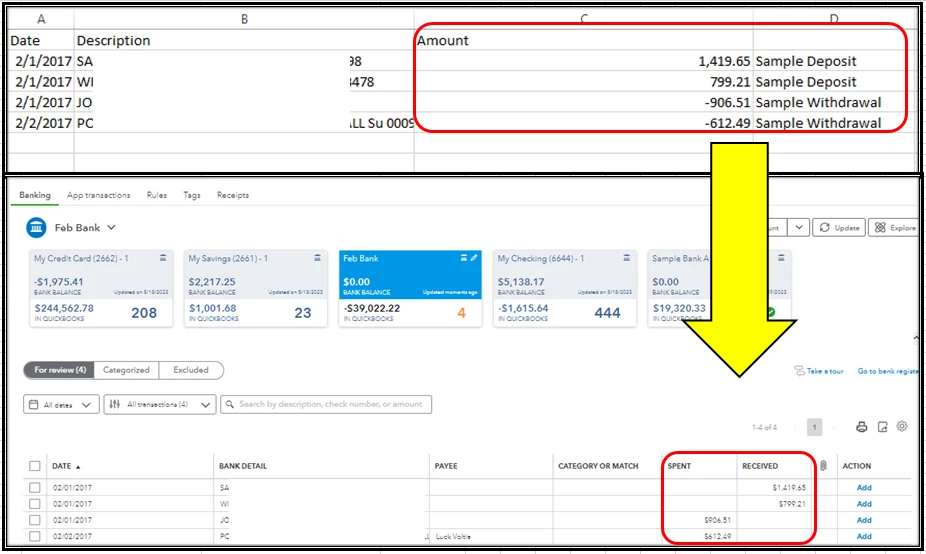
Additionally, here are some articles that you can read to help speed up the review process of your online bank transactions:
Please keep me posted if you still have questions or concerns about managing your bank transactions in QBO. I'm always ready to help. Have a great day!
Enter your E-mail address. We'll send you an e-mail with instructions to reset your password.