December 30, 2021
Solved

Email invoices in 2019 Desktop Pro stopped working

  • December 30, 2021
  • 1 reply
  • 0 views

I have 2 company files and could send invoice emails from either one via "Quickbooks E-Mail"  I didn't have to link my gmail nor company email in order for this to work.  Now, in Company A email works fine, but Company B won't send emails.  I want to know how to get the "Quickbooks E-mail" option to work on Company B again.

Best answer by AlcaeusF

Hello @rankhornjp,


I appreciate you for getting back to us and for adding some screenshots. Allow me to chime in and help you send e-mails using the QuickBooks E-mail feature in QuickBooks Desktop.


Can you share what happens when you select QuickBooks E-mail in the Preferences? Are you getting the same error from your first screenshot? Any additional information will help us provide a much more accurate resolution.


Since it's working fine with Company A, the issue may be related to the company file only. You can perform some basic troubleshooting to isolate and fix the issue.


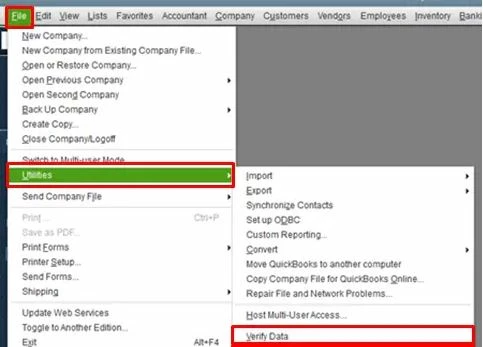
If you've already updated your QuickBooks to the latest release, please proceed with running the Verify Data and Verify Rebuild tools. These features in QuickBooks will help self-identify data issues within a company file and self-resolve them using Rebuild Data. 


To run Verify Data:


  1. Click the File tab at the top menu bar.
  2. Hover your cursor to Utilities.
  3. Select Verify Data


Next, please run the Rebuild Data option through these steps:


  1. Click the File tab at the top menu bar.
  2. Hover your cursor to Utilities.
  3. Select Verify Rebuild.


After following the solutions above, restart your QuickBooks and choose the QuickBooks E-mail option again. You should be able to use the feature without any error.


You can also check this article for more details about how to repair the program using QuickBooks Tool Hub: Fix common problems and errors with the QuickBooks Desktop Tool Hub.


Drop me a comment below if you have any questions about the program features or paying bills. I'll be happy to help you some more.


1 reply

December 30, 2021

Hi there, @rankhornjp.


Let me lend a helping hand with sending invoices via email in QuickBooks Desktop.


There are a few possible reasons why this is happening:


  • The email preference being set incorrectly.
  • A damaged QuickBooks installation.
  • Domain admin was blocked.
  • Account security settings from your email provider.


To isolate the issue,  you want to make sure your QuickBooks Desktop software is in its latest release. QuickBooks periodically provides maintenance release and product (software) updates to fix emailing concerns, add features and enhancements, and update compliance information.  Once done, you can check the web mail's settings in the preferences.


Here's how:


  1. At the top menu bar, click Edit.
  2. Choose Preferences.
  3. Click Send Forms on the left panel.
  4. Under My Preferences tab, select the email account you're using.
  5. Click Edit.
  6. Mark the SSL box, or just select Default.
  7. In the Server Name field, make sure the server name matches your email provider's settings.


You can find out more details about connecting your email address for invoicing here: Connect your email to QuickBooks Desktop


I'm sure you'll find our articles helpful in case you need help recording other transactions for your customers. You can browse for one in our Sales and customers topic. 


I'll keep this thread open in case you have other questions with the Desktop platform. I'm always here to help. 

January 12, 2022

If you look at the attached picture you can see that "Web Mail" is selected.  I DON'T want to use web mail, I want to use "Quickbooks Email" that is what Company A is using and that's what this company file was using until it stopped working.

AlcaeusF
AlcaeusFAnswer
January 12, 2022

Hello @rankhornjp,


I appreciate you for getting back to us and for adding some screenshots. Allow me to chime in and help you send e-mails using the QuickBooks E-mail feature in QuickBooks Desktop.


Can you share what happens when you select QuickBooks E-mail in the Preferences? Are you getting the same error from your first screenshot? Any additional information will help us provide a much more accurate resolution.


Since it's working fine with Company A, the issue may be related to the company file only. You can perform some basic troubleshooting to isolate and fix the issue.


If you've already updated your QuickBooks to the latest release, please proceed with running the Verify Data and Verify Rebuild tools. These features in QuickBooks will help self-identify data issues within a company file and self-resolve them using Rebuild Data. 


To run Verify Data:


  1. Click the File tab at the top menu bar.
  2. Hover your cursor to Utilities.
  3. Select Verify Data


Next, please run the Rebuild Data option through these steps:


  1. Click the File tab at the top menu bar.
  2. Hover your cursor to Utilities.
  3. Select Verify Rebuild.


After following the solutions above, restart your QuickBooks and choose the QuickBooks E-mail option again. You should be able to use the feature without any error.


You can also check this article for more details about how to repair the program using QuickBooks Tool Hub: Fix common problems and errors with the QuickBooks Desktop Tool Hub.


Drop me a comment below if you have any questions about the program features or paying bills. I'll be happy to help you some more.