

April 29, 2020
Question

Emailing Invoices Crashes the Program

  • April 29, 2020
  • 10 replies
  • 0 views

For the 2nd time in as many months the "Emailing Invoices" crashes QuickBooks Desktop. 


I uninstalled and reinstalled all possible programs then contacted Intuit.  After a couple hours on the phone they acknowledge there is a problem but in 2 days they have not come up with an answer.  THIS IS MISSION CRITICAL.  I cannot function without it, but Intuit does not seem to have the same priority levels.


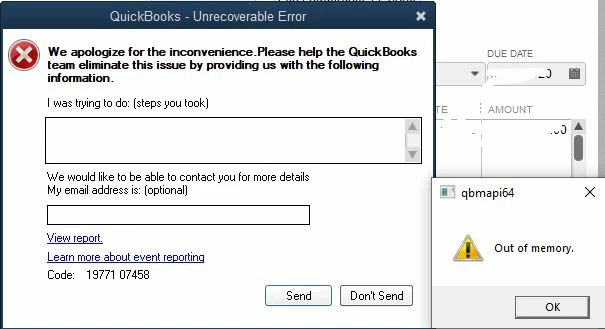
When Sending an Invoice or simply checking the "Send Forms" preference, I receive the following error:


Quickbooks- Unrecoverable Error and qbmapi64 "Out of memory"


10 replies

April 29, 2020

Hi @SoftwareTeacher,


Being able to email invoices is imperative to a business. Are you using Outlook as your email provider? If so, we have an open case about QuickBooks is unable to send emails to Outlook. As a workaround, you'll want to use Webmail.


Let me guide you how:

  1. Go to Edit, then Preferences.
  2. Choose Send Forms, then select the Web Mail radio-button.
  3. Click Add, then enter another email provider.
  4. Hit OK.

If you're not using Outlook, you can run the QuickBooks File Doctor. This tool fixes company file issues. Please see this article for the detailed steps: Fix company file and network issues with QuickBooks File Doctor.


I'm also attaching this handy article about the unrecoverable error in QuickBooks Desktop for more recommended solutions.


Please know that the Community is always here to lend a hand. Don't hesitate to reach out anytime. Thanks for posting and have a nice day.

April 29, 2020

"Being able to email invoices is imperative to a business. Are you using Outlook as your email provider? If so, we have an open case about QuickBooks is unable to send emails to Outlook. As a workaround, you'll want to use Webmail."

I am not convinced this is a resolution to the problem. The issue is an ongoing one. I reached out over a month ago with the same issue using Outlook (on other occasions dating back to 2016) so, they helped me change to webmail. Now the webmail setting is not working. They keep changing it back and forth. This is very frustrating! I have not been able to properly use the 2019 Desktop Pro version without hiccups since I bought the program. My Dell is only a few years old and all other programs work fine on it. Also, any time you ask for help they say pay us a $100 and we will help. Ridiculous! You pay for a program that they designed but "they" can't even keep their programs working efficiently. Don't worry they will up the prices every year to force you to move to the cloud based software to get better compatibility. I am not happy with this program.

Angelyn_T
April 29, 2020

Hello, @EBMECH12.


I understand the importance of being able to send invoices seamlessly. As I've checked from our records and found a new investigation about this error when emailing forms and transactions from QuickBooks Desktop. Our engineers are now all hands on deck working together to fix the problem as quickly as possible.


If you haven't been added to the list of affected uses in this investigation (INV-45586), I encourage reaching out to our Support Team. Once added, you'll automatically receive an email notification with the latest updates. To contact support, check out this link: Contact the QuickBooks Desktop Customer Support Team.


Post again if you have any other questions. I'm a post away to help. Have a good day!

May 5, 2020

I am having the same issue. The tech I spoke with yesterday told me to save the invoice as a PDF and then send from my email. The problem with that is I have several clients that pay with credit card. When I do it this way there is not a link to pay online.

Pabz_L
May 5, 2020

Hello there, @clmatthes.


I've checked here the investigation about the error you're getting when sending an invoice. I’d like you to know that this has been raised to our engineers to understand why this behavior is happening.


Since you already contacted our technical support team, then that means you've already been added to the list of our affected users. You'll receive an email notification as soon as there's an update on this investigation.


In the meantime, you can manually receive or record an invoice payment in your QuickBooks Desktop. Also, you can contact merchant services to process credit card payments.


If you have any other questions, please leave a comment below. I’ll be glad to help. Take care and keep safe!

June 22, 2021

This is happening in Quickbooks 2020 Desktop. For gmail as well as outlook.

Your support is horrible. But you're aware of that Im sure. The work arounds dont work. Give an answer to the question don't tell us to read another forum.


June 22, 2021

Hello, Amasloan.   


Thank you for reaching out to the Community.  


I believe this post is a duplicate and one of my colleagues already answered it. Let me route you to the original post. Here's the link below:    


https://quickbooks.intuit.com/learn-support/en-us/other-questions/re-outlook-crashing-when-sending-invoice-emails/01/895800#M76971


Post a comment if you have any questions. I'll always make sure to get back to you. Stay safe!

July 7, 2021

Hello I am having the same issue using the email feature tied to my GMAIL account. I dont have an issue printing hard copies or printing to PDF. 


May 30, 2022
This post has been deleted.

Same error as documented dating back to 2020 in this feed. Spent two hours on the phone with intuit after paying to upgrade to 2022 as we were forced to do. You can not change your email because the program crashes every single time you click on edit preferences and send forms. You can't even get to the email line to try and change it before it crashes. Intuit answer was i need to add more than 16 GB of RAM to my computer eventhough my computer has nothing else running and the task manager shows 6% of my disk space being used and 23% of memory. This error was present in 2019 only if you tried to update the email. But now is present with any attempt to email a report just like the people complaining about emailing an invoice. I'm just waiting for it to be the same when I attempt to send my payroll in this supposedly updated program. I have run every update, tool doctor, file doctor there is This needs to be fixed 

JasroV
May 30, 2022

I admire you for sharing the troubleshooting steps you've done in fixing the issue, @Bonemd.


I'm here to help you work around this issue so you can manage your QuickBooks Desktop with ease.


I recommend running the Verify and Rebuild tool. This checks your company file for any errors and fixes them right away. 


Here's how:


  1. Go to the Window menu and select Close All.
  2. Click the File menu.
  3. Select Utilities.
  4. Click Verify Data.


To Rebuild:


  1. Go to the File menu.
  2. Select Utilities.
  3. Click Rebuild Data.


You can also check this link for more detailed steps: Verify and Rebuild Data in QuickBooks Desktop


If the issue remains, I suggest performing a clean install. This uninstalls the program on your computer and reinstalls it in a clean slate. 


Once your customer has received and accepted their email invoice, here is an article that will help you account for their payment: Record an invoice payment.


I'm just a few clicks away from you if need more help with your invoice or QBDT. Stay safe!

February 22, 2023

I have had this problem since 2020 as well. Sometimes it works sometimes it doesn't. I thought by now there would be some kind of fix for this, but we are out of luck. The issue seems to be that we have no other option except to use quickbooks because there aren't any other reasonable alternatives out there, especially for accounting firms that are small, between 150 and 300 clients. I have been an Intuit customer for over 15 years (my father over 30) and all I can say is that the tech support and customer service has gotten really bad over the past 5 years. I've called and complained, asked for help, about this issue for 3 years and it's still happening. They keep giving the same answer over and over again and it doesn't fix the problem, yet we are stuck using this software because they have basically taken over the market, unless you want to spend a ton more on larger firm software. It's pushed us smaller firms into the situation we are dealing with now, faulty crappy software that they won't fix which hobbles our business. I'm beyond frustrated. As soon as I can find a different product that doesn't cost 15k a year I will be jumping ship from all intuit products. It's a serious shame because I've given Intuit sooo much business over the years and so has my business partner and trained countless bookkeepers and accountants using Intuit products. We as customers apparently don't matter enough to fix the issue.

March 29, 2024

Same problem here for years. I am down to sending 50 invoices at a time max before it crashes. what used to take me a few minutes to send out invoices is now an 8 hour task. Plus, you can't do anything in QB while it is sending out invoices, so I am losing 8 hours of work. To top it off, when it does crash I don't know who received theri bill or not, so this causes even more unnecessary hours of calls and emails from unhappy customer not receiving their invoices. 


I have tried QB support multiple times, updating program, restoring program, reinstalling, a fresh template, in single and multi user mode, try when everyone has left the office, different email, and the list goes on. When it comes down to it it's their software that is the issue. You would think as long as they have been around they would have a well rounded quality product. The email performance is about as good as a 71' Ford Pinto and a 76' Chevette. So frustrating how much of a time suck it is to sending invoices. 

March 29, 2024

It's not the impression we want you to have, NightOfBooks.


Your sentiments about the issue that prevents you from sending invoices are understandable.


To fix this, let's run the QuickBooks Tool Hub. It's a program designed to diagnose and fix common QuickBooks issues efficiently. It performs diagnostic checks, identifies underlying issues, and applies appropriate fixes, such as repairing corrupted files, resolving software conflicts, or optimizing system settings for better performance.


Here's how:


  1. Close QuickBooks.
  2. Download the most recent version (1.6.0.3) of the QuickBooks Tool Hub. Then, keep the file somewhere you can easily find it (like your Downloads folder or Windows desktop).
  3. Open the file you downloaded (QuickBooksToolHub.exe).
  4. Follow the on-screen steps to install and agree to the terms and conditions.
  5. Once done, double-click the icon on your Windows desktop to open the tool hub.


For more details, check this link: Fix common problems and errors with the QuickBooks Desktop Tool Hub. Then, follow the steps to use the tools in the Tool Hub under Step 2.


If the issue persists, I suggest contacting our Customer Support Team again. They can securely access your account to investigate the root cause of the problem and, if needed, create a ticket to ensure a thorough resolution.


Once everything starts working again, you can process payments in QuickBooks and learn when to receive the payment. Read this article for more details: Take and process payments.


If there's anything else I can assist you with or if you need further assistance, please don't hesitate to let me know. We're here to help you navigate this challenge and ensure your experience with QuickBooks improves significantly.

March 2, 2023

I am having the same problem with multiple attempts at uninstall, removing email and adding back, using file doctor, using tool hub, sending file to date services to check (tested fine not corrupt).  The only thing our users can't do is email invoices.  It crashes.  We can email all other forms, payment links, quotes, receipts, reports etc.


Why can't intuit fix this?

April 15, 2024

I am on QB Desktop Premier.  I am getting this unrecoverable error also.  This happens when I try to email anything.  In the troubleshooting instructions it has you go to Preferences, Send Forms.  When I do that it crashes too.  I cannot get there to change anything.  It also crashes with the same error when downloading transactions.  I get the download and it shows I have two transactions.  If I try to view them it crashes.  I was on the phone with support and they are trying to tell me it is a windows problem on my system.  Evidently not since there are a lot more people having the same issue.  Does anyone know when this will be resolved?  It is greatly impacting my work flow.

April 15, 2024

Thanks for joining the thread and sharing what you've done to address the issue, @smorgan01.


Since you keep getting the unrecoverable error, I'd suggest running the QuickBooks File Doctor from QuickBooks Tool Hub. This helps fix common errors within the company file so you can get back to work.


First, download the most recent version (1.6.0.3) of the QuickBooks Tool Hub and save the file somewhere you can easily find it. Once done, download the file and install it on your computer. After that, follow steps two and three of this article to fix the errors in QuickBooks Desktop: How to use File Doctor to fix company file issues in QBDT.


If you're still getting the same results, I recommend contacting our customer support again. They can help further review your account and investigate the issue. Here's how to connect with them:


  1. Open QuickBooks.
  2. Go to Help, then select QuickBooks Desktop Help/Contact Us.
  3. Click Contact Us.
  4. Give a brief description of your issue, then select Continue.
  5. Sign in to your Intuit account, then select Continue, and click Continue with my account.
  6. We'll email you a single-use code. Enter your code and select Continue.
  7. Click to chat with us or Have us call you.


Once your customer receives their email and pays the invoice, you can now record the payment inside QuickBooks. 


If you're able to view your bank transactions without error, please see our guide about categorizing them in the Banking menu: Add and match Bank Feed transactions in QuickBooks Desktop.


Please let me know if you have additional questions about sending invoices to your customers or viewing your downloaded transactions. I'll be here to assist you further. Have a good one.

April 29, 2024

Rather than suggesting fixes from users, how about escalating this to the development team. I am sure that this is reproducible and with code debugging turned on, is fixable. 

August 12, 2024

I'm having a similar issue where I can not send my invoices. I get an error box that pops up and says Unrecoverable Error.  After searching around, I went to Preferences and Send Form and the minute i click on it, I get the same Unrecoverable Error box. So it appears to have  something to do with sending forms. I've upgraded from Quickbooks Desktop Pro Plus 2023 to 2024 and ran several updates and nothing has changed it.  Any suggestions what else to try?

August 12, 2024

We had been running QB for Windows on a Mac using Parallels for over 10 years without issues.  But in 2020, we started having issues. The issues only got work worse, to the point where were we purchased a new Windows computer, the only one in the company. All crashes sending forms and creating pdf's along with other issues was resolved.

Nicole_N
August 12, 2024

I appreciate you for sharing that you've run several updates to rectify the error, @WPETC007. I'll share additional troubleshooting so you can send invoices successfully in QuickBooks Desktop (QBDT).


If you haven't run the QuickBooks File Doctor from the QuickBooks Tool Hub, I suggest doing so. This is essential for fixing common errors within the company file so you can get back to work.


First, download the latest version (1.6.0.3) of the QuickBooks Tool Hub and save the file in a location where you can easily find it. Once done, install the downloaded file on your computer. After that, follow Steps 2 and 3 in this article to fix the error: Fix company file and network issues with QuickBooks File Doctor


If the error persists despite running the fixes, I recommend contacting our Phone Support team. A live representative will be able to pull up your account securely and investigate further the root cause of this issue. 


Once everything's in order, you can record a payment from a customer after they have paid their invoices.


Please get back to us if you have any follow-up concerns about sending invoices in QuickBooks, @WPETC007. The Community team is always around to provide help.

November 1, 2024

I'm having the same problem.  So frustrating and time consuming.

November 1, 2024

I understand the importance of sending invoices seamlessly, Jgainok. Please know I'm committed to helping you resolve the crashing problem when you attempt to email invoices in QuickBooks Desktop (QBDT).


First off, we can run the Verify/Rebuild tool to detect system errors or damaged data and refresh the company file. Before performing this process, please create a backup copy of your company file so that if changes occur, you can restore and undo it easily.


Here's how to verify your company data:


  1. Go to the File menu.


  2. Click on Utilities.
  3. Select Verify Data


Then, to rebuild the data:


  1. On the top menu, choose File.


  2. Select Utilities.
  3. Click Rebuild Data.
  4. Hit OK if you receive a prompt to back up your company file.
  5. When you get the message that Rebuild has completed, select OK


For detailed steps, refer to this article: Verify and Rebuild Data in QuickBooks Desktop.


If the problem persists, I suggest using the QuickBooks Tool Hub. However, if you've already performed all the troubleshooting steps mentioned above, I recommend contacting our Live Support Team.


Moreover, I'll share this resource to help you record invoice payments from your clients: Invoice payment.


If you have additional questions about managing invoices in QBDT, add a reply to this thread. I want to ensure you can carry out your tasks in the software smoothly.

February 26, 2025

I have read through this many years long thread and can report that in version 2025 it still is happening. I tried all suggestions mentioned in this thread, nothing fixes it.

February 26, 2025

Super frustrating. The only thing that "fixed" the email crashing issue for me was to purchase a new Windows laptop, and do a clean install of QB enterprise. Previously I was running QB Enterprise on a Mac using Parallels, and that seemed to be part of the issue. I luckily had a monitor that does side-by-side display, so I'm still able to run my mac on half the screen and Windows on the other. It's not as elegant as using a virtual machine, but at least the email issue resolved.

February 26, 2025

That seems pretty extreme to fix their software bug. But if it worked for you, great.

February 26, 2025

Just looked at something. I have Outlook installed with Microsoft 365. I deleted it and installed a direct download of Outlook. Tried to send some emails from within QB and no crashes and even faster process. It worked! Could it be that all this time? I will report back after a few days of using it this way.