I understand how difficult it is when you can't easily email your invoices, gcotton. I'll help you expedite the process.
In QuickBooks Online, you can still email your invoices from a closed period using the Batch actions feature. I'll show you how:
- Go to the Sales menu and then select Invoices.
- Place a checkmark beside the invoices you'd like to send.
- Select Batch actions, then click Send.
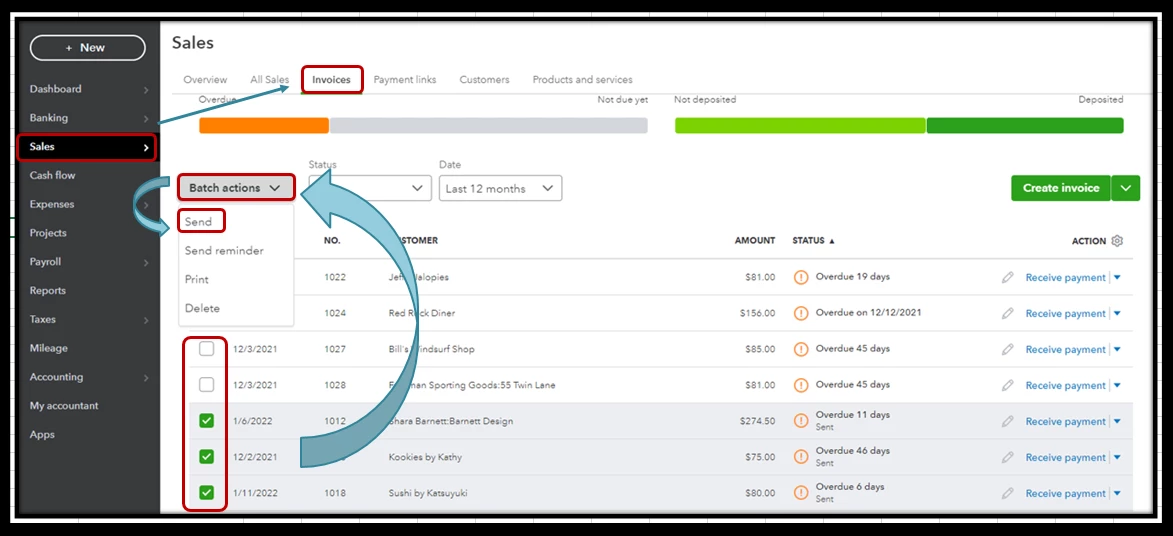
To learn more about the process, please see this article: Email or Print Multiple Invoices and Sales Forms.
For more tips in preventing changes to past transactions, I encourage browsing this article: Close your Books in QuickBooks Online.
Additionally, I've included an article that'll help you learn more about what you and your accountant need to do in QuickBooks Online to close out the previous year and prepare for the new one: Year-end Guide.
I'm only a few clicks away if you need assistance with your other QuickBooks tasks, gcotton. It's always my pleasure to help you out again.

