April 27, 2021
Solved

Emailing invoices NOT saving changes to text in the body of the email

  • April 27, 2021
  • 6 replies
  • 0 views

Just two weeks ago I could change the email language on the fly when emailing an invoice to the customer. Example: I might change the subject line to say CORRECTED Invoice and make changes in the body of the email. Today I realized the changes are not being kept and the email is going out UNCHANGED.  This was possible before.  What has happened to Quickbooks?  I'm using Quickbooks Premier Contractor Edition 2020.

Best answer by jamespaul

Hi Bonnie,


I am having the same issue!  What is the "WORK AROUND that Mich_S. suggested"?  I do not see any other responses in this thread except fro JasroV.


Hello, hsimechanicalinc. 


It looks like Bonnie was referring to the other thread: Mich_S answer. I'll give some more details about the email body issue. 


I checked our systems a bit and found out that there's an issue with the email body changes. Our engineers are currently working to resolve this as soon as possible. 


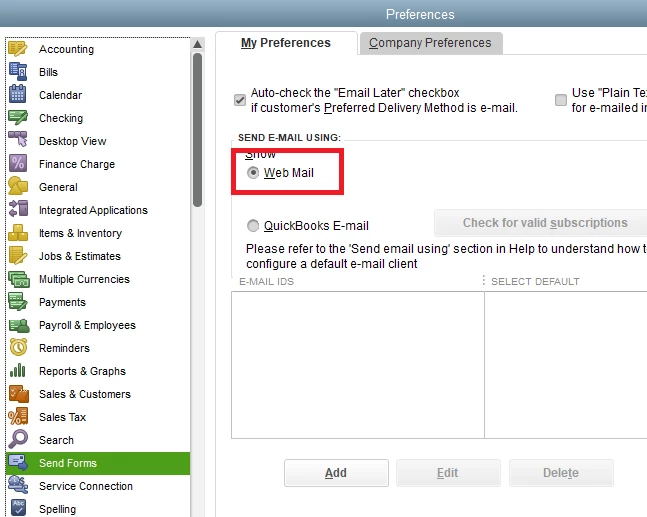
Aside from Mich_S' workaround, you can use the webmail option while we're fixing this. Here's how: 


  1. Go to the Edit menu, then select Preferences.
  2. Click the Send Forms tab.
  3. Under My Preferences, select the Web Mail option.
  4. Click the Add button to add your email ID.
  5. Once done, click OK.


When sending your emails, edit the body manually. 


Since you're one of the affected users, I would recommend contacting our support. They'll get your contact details and add you to the list of affected users. You'll receive an email update when it's fixed.


I'd like to do it here, but I'm unable to access and handle sensitive contact information. 


Here's how to reach them: 


  1. Click the Help menu.
  2. Choose QuickBooks Desktop Help.
  3. Click Contact us at the bottom of the popup window.
  4. Choose Solving Issues & Error Messages, then File & Network Management.
  5. Scroll down and choose how you want to reach us. 


Need to manage your transactions or need to pay bills or run reports for your data? You can check out the guides from the QuickBooks Desktop articles list page.


I appreciate your patience as we're bringing this function back to normal. In the meantime, I'll address any other concerns you might have regarding your sales forms and the like (and other things in QuickBooks Desktop).


Just reply here and I'll get back to you as soon as possible. 

6 replies

JasroV
April 28, 2021

I can provide some insights on how you can save the message in your email invoice, Bonnie.


You'll want to ensure your QuickBooks Desktop (QBDT) is updated to the latest release. This will install the newest features and fixes. Let me show you how.


  1. Go to the Help menu and select Update QuickBooks Desktop.
  2. Select the Update Now tab.
  3. Click Get Updates to start the download.
  4. When the download finishes, restart QuickBooks.
  5. Then accept the option to install the new release.


You can also check this article for more details: Update QuickBooks Desktop to the latest release.


If the issue remains, I recommend running the Verify Rebuild tool. This scans your company file for errors and quickly fixes them.


I've also added these links that provide detailed steps on how you can personalize your sales forms and record invoice payments: 


Let me know in your reply if you have other follow-up questions about emailing your invoices. I'll be around ready to help you. Keep safe!

Bonnie123Author
April 29, 2021

I realized the reason Quickbooks was not prompting me to install the new release because I already had the most recent release (V30.0D R11).  Once I confirmed I was up to date on updates, I proceeded to your final recommendation to Verify Rebuild and it found no errors/issues.  I'll continue to use the WORK AROUND that Mich_S. suggested, however, I would appreciate it if Quickbooks will look into this issue and issue an update to fix the problem.  I see that I'm not the only one having this issue and it appears the issue begin around 4/19/21.

May 3, 2021

Hi Bonnie,


I am having the same issue!  What is the "WORK AROUND that Mich_S. suggested"?  I do not see any other responses in this thread except fro JasroV.


November 3, 2022

Same problem here, started about a week ago and I think it's tied to the last Quickbooks update.  Used to be able to modify template text in email body.  Still lets me modify but when I go to sent folder, email reverts back to the unedited template text.  Tried rebuilding and verifying data file, tried making a new user and no luck.  This is a big problem for us and the workaround recommended by chat support of modifying the template with each invoice send isn't workable.  How do I fix this?

November 3, 2022

Our users have started seeing this behavior too. At first it was just one user, but now I have two in separate companies using separate networks experiencing the same problem. I tried the "workaround" of switching to Web Mail from Outlook and while it works, it doesn't allow our users to edit the emails to their specifications, primarily because Quickbooks invoice formatting is enforced. We'd like to be able to use Outlook as the email client as before. We're seeing the exact behavior from the original poster, in that edits made in Outlook are not reflected in the final email that is actually sent. 

November 6, 2022

I've found this workaround works as well - frustrating to take th extra steps, but it does work for the moment.  Copied from another thread with the same issue:


We were able to find the following workaround for now that I hope will help anyone else having this issue:

1. Pull up the email like you normally would, from your invoice or sales order screen. Don't make any customizations as they won't flow through to Outlook, but SAVE it. (For my client there was a button for this at the top of the email window.) This actually saves it as a draft in your Outlook.


2. Close the email from within Quickbooks. It is locked from editing in Outlook as long as it's open in Quickbooks.


3. Go to your drafts folder in OUTLOOK. You can open the email here and make any customizations you need to and send to the customer.


My client was able to do this and send their customized messages still. It's an extra step, but will let you do what you need to until this issue is fixed by Quickbooks.

November 7, 2022

Thank you very much for posting this workaround.  I'll try it when I'm in the office in the morning.  It definitely seems to be a Quickbooks issue that they need to fix, hopefully with the next update.  Have a great day and thanks again!

November 7, 2022

I did try this solution this morning and it did indeed work.  I couldn't figure out how to save as a draft so I just saved the email in my documents folder.  I then opened up File Explorer and it was the top document in the "recent" section.  I double clicked on it, it opened in Outlook, made the changes I wanted to the text body and YAY, it worked. Thanks again for posting this workaround.  It is the most viable and easiest of all solutions presented on this page.

November 7, 2022

The workaround seems to work, but it is just that, a workaround. Very annoying to have to train a handful of users to do this. We tried opening a ticket with Quickbooks Support, but after all of the backups, company file verifications and rebuilds, logging in test accounts from gmail, yahoo, etc into Outlook, etc, nothing seems to have fixed the problem. After nearly 2 hours, Quickbooks Support was unable to find a solution, leading me to believe that it is an issue with the last software update. Even a new company file is experiencing these issues. I believe an escalated investigation of this issue is warranted.

November 10, 2022

Another workaround is just before hitting send on the email.  Click "Format Text" at the top of your email and choose "Plain Text".  Then send. 

AlcaeusF
November 10, 2022

Hello Level10,


I have reviewed the solution, and it's correct and accurate. Thank you for sharing your input to help address the issue.


We love to see members supporting one another! Have a great day. 

November 11, 2022

This is not considered solved. This is a workaround. If we started taking snapshots of our screens and sending from a different device would that be considered "solved". 

Why not agree that there is an issue instead of closing it out and then the problem doesn't get addressed?