August 10, 2023
Solved

exclude transactions

  • August 10, 2023
  • 1 reply
  • 0 views

I am unable to exclude a transaction due to the following message, Partially matched: -$0.01 remaining out of -$78.31.. How can I fix this issue an exclude the transaction. Thanks.


I

Best answer by Rea_M

Hello, obonnaius.


You'll first have to unmatch the partially matched transaction in the Categorized tab so you can exclude it from your bank register. Let's go to the Banking menu to achieve this task in QuickBooks.


  1. Go to Bookkeeping, select Transactions, and then select Bank transactions or go to the Banking menu.
  2. Select the tile for the account you want to review.
  3. Go to the Categorized tab.
  4. Find the transaction to unmatch and click Undo under the Action column.
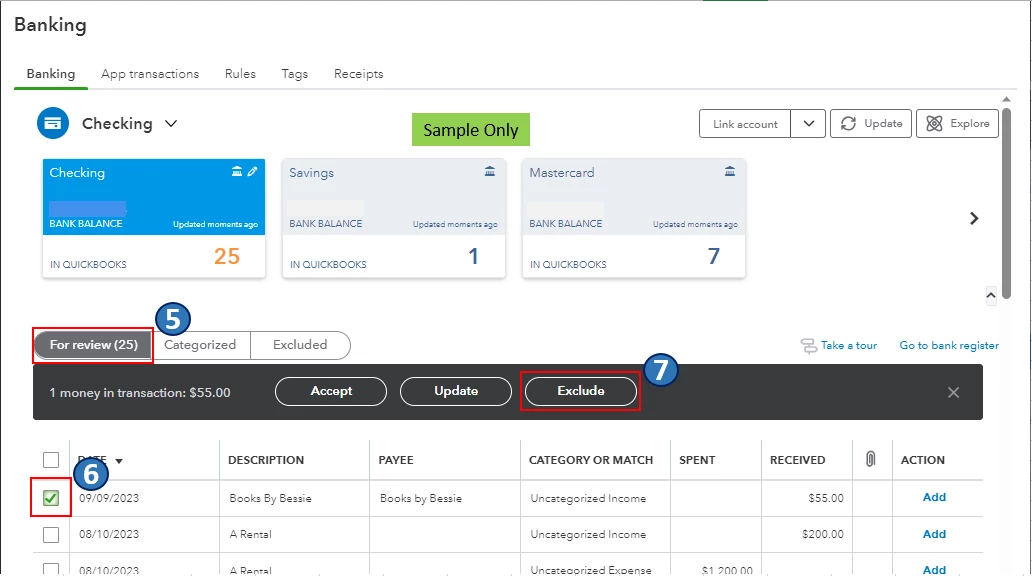
  5. Go to the For review tab.
  6. Click the checkbox of the transaction to exclude.
  7. Select Exclude


To learn more about excluding transactions in QuickBooks Online (QBO), please see this article: Exclude a bank transaction you downloaded into QuickBooks Online.


Also, I encourage you to reconcile your accounts in QBO regularly (every month). This helps monitor your income and expense transactions and detect possible errors accordingly. You may want to check out this article as your reference to guide you in doing and fixing reconciliations in QBO: Learn the reconcile workflow in QuickBooks.


I'm all ears if you have other banking concerns or questions about managing transactions in QBO. You can drop a comment below, and I'll gladly help.


1 reply

Rea_MAnswer
August 11, 2023

Hello, obonnaius.


You'll first have to unmatch the partially matched transaction in the Categorized tab so you can exclude it from your bank register. Let's go to the Banking menu to achieve this task in QuickBooks.


  1. Go to Bookkeeping, select Transactions, and then select Bank transactions or go to the Banking menu.
  2. Select the tile for the account you want to review.
  3. Go to the Categorized tab.
  4. Find the transaction to unmatch and click Undo under the Action column.
  5. Go to the For review tab.
  6. Click the checkbox of the transaction to exclude.
  7. Select Exclude


To learn more about excluding transactions in QuickBooks Online (QBO), please see this article: Exclude a bank transaction you downloaded into QuickBooks Online.


Also, I encourage you to reconcile your accounts in QBO regularly (every month). This helps monitor your income and expense transactions and detect possible errors accordingly. You may want to check out this article as your reference to guide you in doing and fixing reconciliations in QBO: Learn the reconcile workflow in QuickBooks.


I'm all ears if you have other banking concerns or questions about managing transactions in QBO. You can drop a comment below, and I'll gladly help.

obonnaiusAuthor
August 11, 2023

Thank you Rea_M for your speedy response. Your instructions were clear and worked perfectly. Thank you for the additional guidance,

August 11, 2023

You're always welcome, obonnaius.

I'm glad that I'm able to solve your banking concern. I appreciate you for letting us know how the steps went. I couldn't do it without your cooperation.

If there's anything else you need or you have any other concerns, please feel free to post here anytime. I'm always ready to help. Take care, and I wish you continued success.