

April 18, 2020
Question

Grid lines or alternating color rows on estimates

  • April 18, 2020
  • 6 replies
  • 0 views

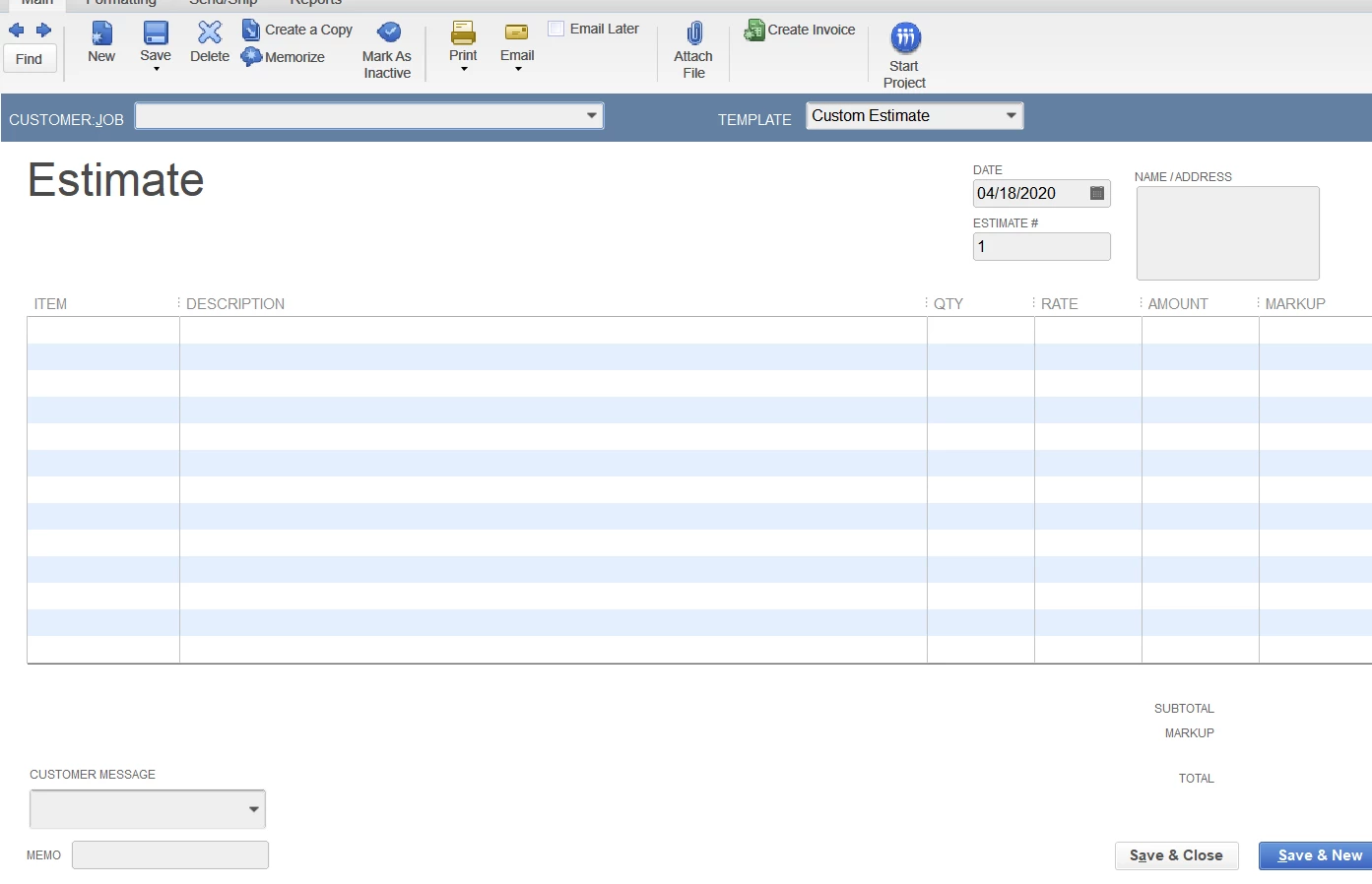
I would like the option to print grid lines or use alternating colors on line items when creating estimates and invoices.  Is there a way to do this.  I want it to print with the alternating colors, the same way it looks on the screen.
6 replies

April 19, 2020

Thanks for reaching out to us, ChristyN.


I can help you with printing your invoice with alternating colors in QuickBooks Desktop. When creating any sales forms like Estimates, Invoice, and Sales Orders in QuickBooks, the system generates a shaded background on a line item. Please note that this feature may not be available in QuickBooks Pro or Premier. 


To print invoice with alternating colors:


  1. From the Invoice page, select Print.
  2. Choose Invoice, and then click OK.
  3. In the Print One Invoice window, make sure to put a checkmark on Shade alternate table rows box.
  4. Click Print.

You should be able to have the printed invoice with the alternating colors after following the steps.


Let me know if you have any other concerns in QuickBooks. I'll be sure to help you out.

ChristyNAuthor
April 21, 2020

I am using Quickbooks Desktop Pro 2020.  I dont' seem to have that option.  Any other suggestions?  I have attached what my print screen looks like.  It would be a great feature for me if I can get it to work

KlentB
April 22, 2020

Hi there, ChristyN.


As of the moment, the Shade alternate table rows option is only available in QuickBooks Desktop Enterprise. You'll want to upgrade your plan to  QuickBooks Desktop Enterprise so that you'll be able to use this feature.


Thou, we can also save your estimate, then customize it outside QuickBooks using a third-party application. You can follow these steps in downloading your estimate:


  1. Log into QuickBooks.
  2. Select Customers from the sidebar menu.
  3. Choose Customer Center.
  4. Go to the Transactions tab, then locate the estimate.
  5. Click the Print drop-down button, then select Save As PDF.
  6. Select Save from the pop-up window.

Once done, you can visit our QuickBooks Desktop App Center to find a third-party application that handles sales forms customization. We'll just have to enter a keyword in the search bar or browse through the categories to filter the results.


I've added an article that will help you in customizing form templates forms like invoices, sales receipts, estimates, statements, and purchase orders to match your business needs.


I'm hoping that you'll find the best app. If you have any other concerns or questions about this topic, please don't hesitate to add a comment below. Have a pleasant day ahead.

November 3, 2020

My invoices look like huge walls of text. I also need some way to distinguish one line entry form the next. I use QB Pro. I am adding this in the hopes QB will realize this is a strong need for business users and fix it in a future update!

My only workaround now is to add a blank line between entries which is problematic and time consuming for a range of reasons. Plus it makes the invoice longer, whereas even a gridline would enable me to distinguish one date/line entry from the next on my invoices.

June 6, 2021

This needs to come back QuickBooks. 


I hope someone starts a class action lawsuit for you taking away such a basic feature that any free software can do. This is the height of predatory marketing. You should be ashamed of you company. 

June 9, 2021

I completely agree with the above. I've spent so much time trying to figure out how to do this. It's not like QB Pro is FREE...for goodness sake we are already paying hefty fees to use this product and QB just will not help customers by customizing the program in the MOST useful ways. Very frustrating.

February 23, 2022

Online has charged more and taken away features, rather than offering more. 

September 24, 2021

I have QB Enterprise and the Online version.  2 of my 3 users have the shaded lines, I do not.  We are all on QB Enterprise online.  I really want the shaded lines on every other line.  Easier to read.

I do not have the check box for shading.


September 25, 2021

I've got you covered, Jill.


Allow me to share some info about the missing feature in your account. 


If you're about to print the form, the checkbox option will show if you're only checking the printer setup, the checkbox option will not appear. Here's how:


  1. From the transaction page, select Print.
  2. Choose Invoice, and then click OK.
  3. In the Print One Invoice window, make sure to put a checkmark on Shade alternate table rows box.
  4. Click Print.


On the other hand, since the other two users have this option. Let's check the user access role to verify why you don't have a check option for the shaded line.


  1. Go to the Company menu and select Users. Then select Users and Roles.
  2. Select the Role List tab. Then select View Permissions.
  3. Select the roles you want to review and then select Display.


For more detailed steps, check out this article: Create and manage roles in QuickBooks Desktop Enterprise


If you have the same role as the other users, you can isolate the issue by deleting your access and recreate it as a user.


For future reference, you can also use and customize form templates in QuickBooks Desktop. 


Just in case you encounter issues customizing templates, you can read this article here to learn how to fix it.


Reach out to me if you have any other concerns or questions about QuickBooks. The Community has your back, and I’m here to assist further. Have a good one.


September 28, 2021

Quickbooks, so still no update on the row shading for Pro users? Not even an acknowledgement that you took this option away from Pro users and don't intend to bring back?

AlcaeusF
September 28, 2021

Hello @Mark L,


I appreciate you for reaching out to us about the row shading. I would feel the same way in that situation regarding not getting any alerts of the changes in QuickBooks.


I can see how beneficial this option is for most of the users in the program. Allow me to chime in and help you bring this feature back to improve the visual display.


As of now, there's no update about this ability from our product engineers. While we assess this feature, I recommend you send feedback directly within the program.


Our engineers might consider your feedback or suggestion in future updates. Here's how:


  1. Open QuickBooks Desktop.
  2. Click the Help tab at the top menu bar.
  3. Hover your cursor to Send Feedback Online.
  4. Choose Product Suggestion or Help System Suggestion


There are times features are configured and replaced with a similar method. To keep you up to date with the changes, you can also click the Help tab and select the New Features option.


For additional reference, I've attached a link you can use about how an estimate affects the A/R workflow in QuickBooks: Create an estimate in QuickBooks Desktop.


Please don't hesitate to comment down below if you have other concerns related to creating estimates in Desktop. The Community and I will be around to help you.

April 8, 2024

It is absolutely ridiculous that 4 years later this has still not been resolved. I too have spent time online trying to find a way to do this. This is a BASIC feature of any free service and all spreadsheets. QB is very expensive to already, to pay more for a BASIC feature is unacceptable. So frustrating.

April 10, 2024

I know! I had given up and got the email alert of your reminder it has been 4 years. Insane that this is still an issue.