

May 10, 2024
Question

How can we add more column options on invoice template for Quickbooks: Premier 2018?

  • May 10, 2024
  • 2 replies
  • 0 views

I have attached a screenshot to clarify my question as I believe it has been asked already. However, is there any way to add an other column in this version of QuickBooks (2018)? Or is the only solution to upgrade QuickBooks? Because I currently need Nwt. (Kgs) including in my template and the only area I have left to use is "service date" which I thought I could use; however, values would only enter as a date format. The rest of the columns are all being used and the only other way would be if there was an Other 3 column. I'm not sure why there isn't an option to add more columns; however, please if there is any work around this I'd appreciate any help. Thank you. 
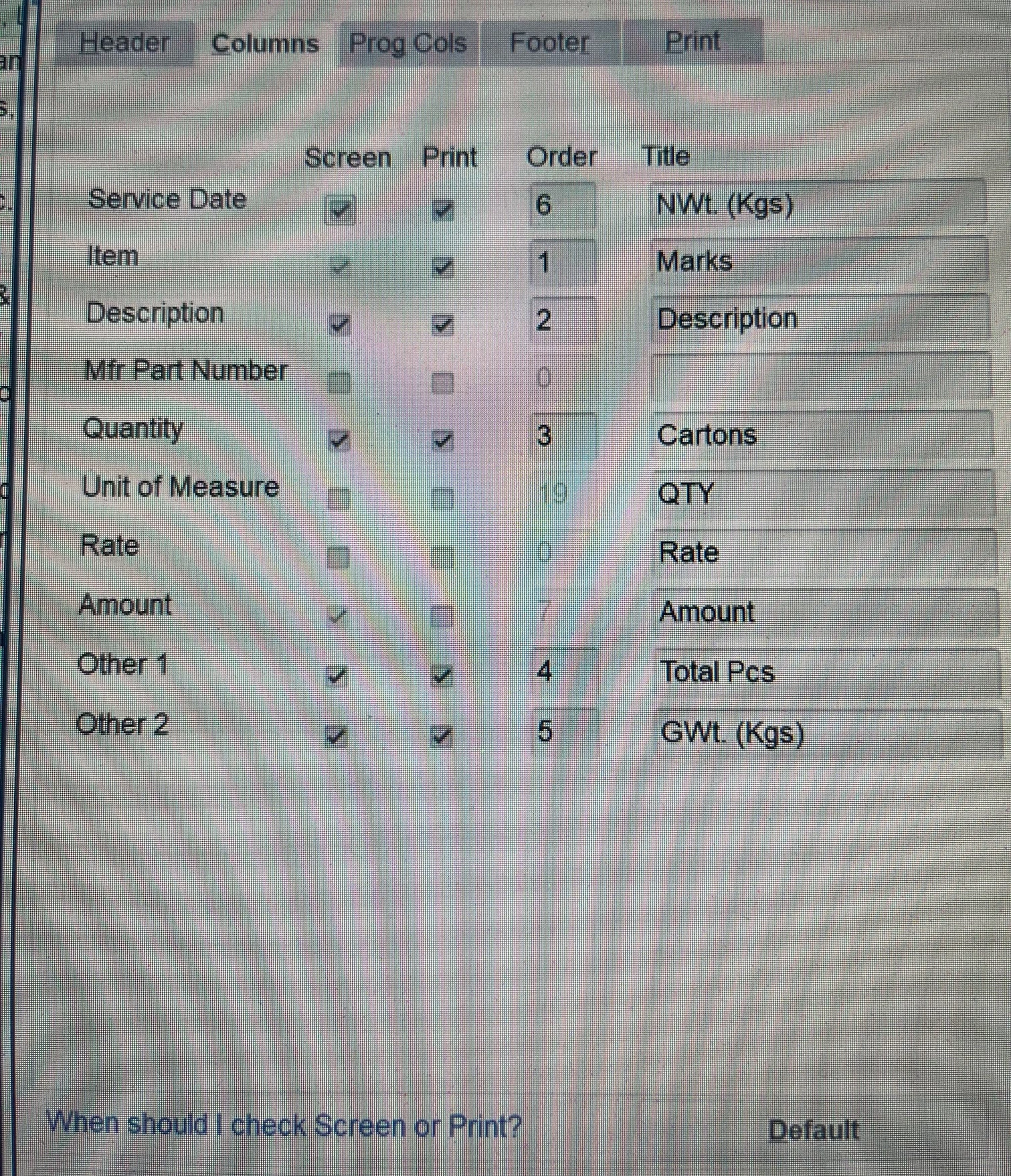


2 replies

BigRedConsulting
May 10, 2024

There's no way to add more than those you see on the window in your screenshot.

----

Edit: Except that you can add custom fields once they are set up on your items list, as IrishNinoJ  points out.

May 24, 2024

If you add the custom list, does it then become another column that you can add in invoice column? 

May 10, 2024

You can add more columns by going to Item Lists, @justanotheruser21. Let me guide you through the process.


Here's how:

  1. Go to the Lists menu and select Item List.
  2. Double-click any item on the list to open and edit it.
  3. Select Custom Fields. Then choose Define Fields.
  4. Name your custom field in the Label column.
  5. In the Use column, select the checkbox to turn on the custom field.
  6. Click OK to save the custom field.


Feel free to check out this article for more details: Create and use custom fields in QuickBooks Desktop.


Furthermore, you can visit this article to learn how to receive and process customer payments for invoices and in-person sales: Take and process payments in QuickBooks Desktop.


I'll keep an eye out for your reply. If you have questions about managing your invoice template or any QuickBooks-related concerns, please don't hesitate to include them in the comments. We're here to assist you 24/7.