December 26, 2018
Solved

How do I enter an invoice so that it appears under a particular income account on the profit and loss - ie revenue versus fee for service?

  • December 26, 2018
  • 2 replies
  • 0 views

Is there something I need to edit when I'm entering the invoice?  I feel like this should be pretty basic but I can't figure it out!

Best answer by VivienJ

Thanks for getting back to us, Michelle2018. 


Allow me to jump into this thread and add some information to the awesome answer provided by @john-pero


As what @john-pero mentioned above, the income account is linked to the products/services you sell. The invoice doesn't have a specific field where you can select a particular income account. 


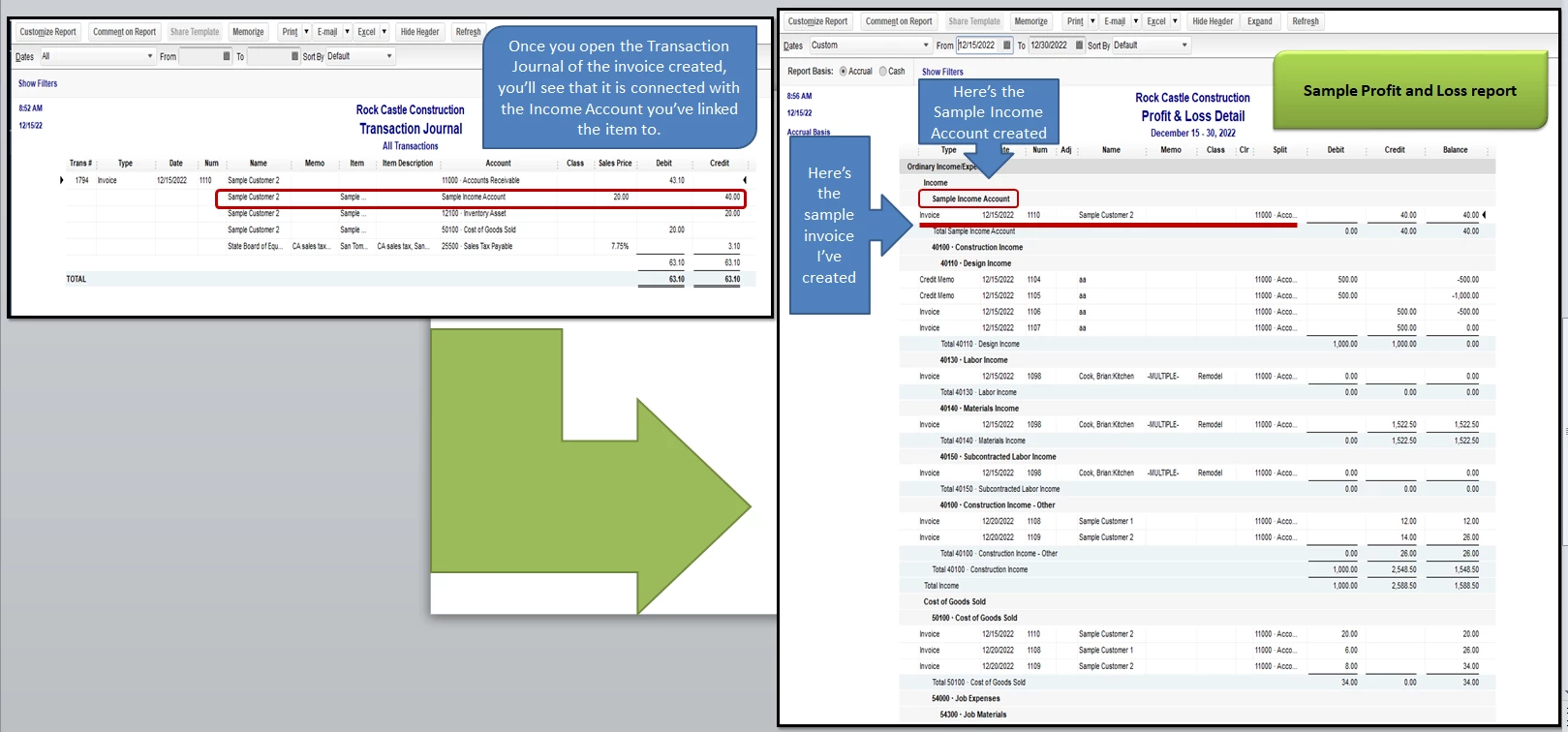
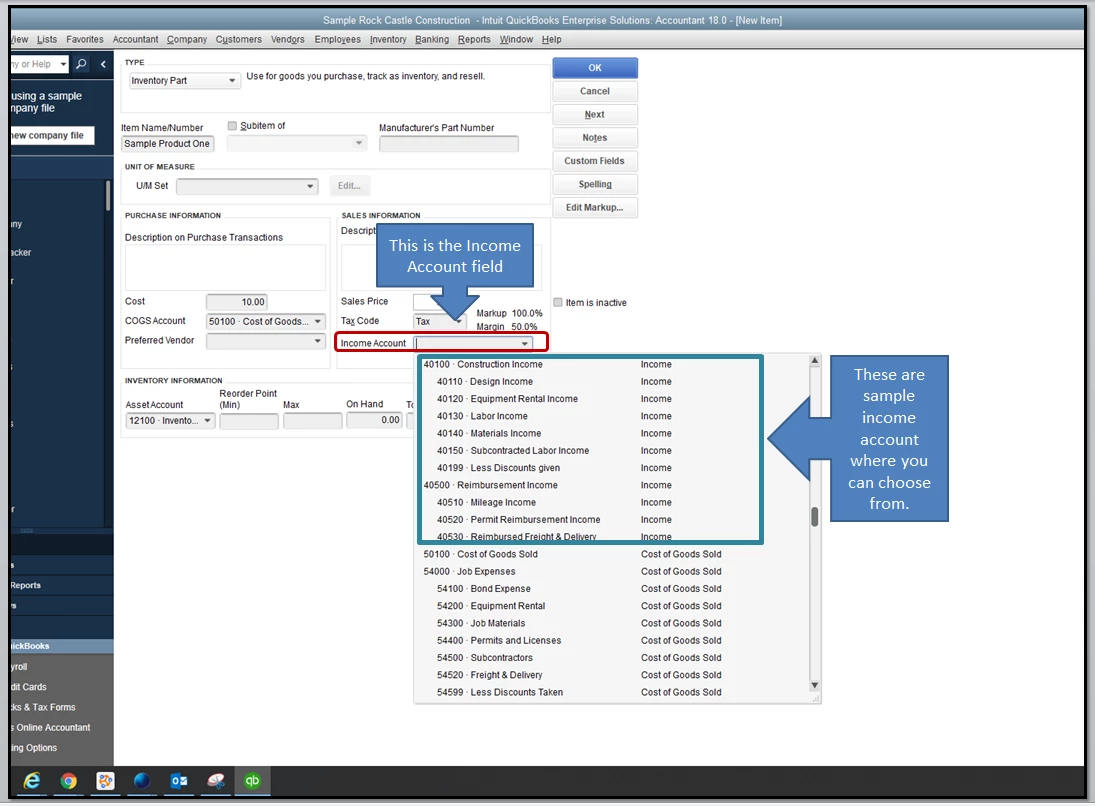
Once you set up a product or service items, QuickBooks Desktop will ask you to select an income account (see screenshot below). This will be used to track and handle each transaction, so they'll translate to your Profit and Loss report. 


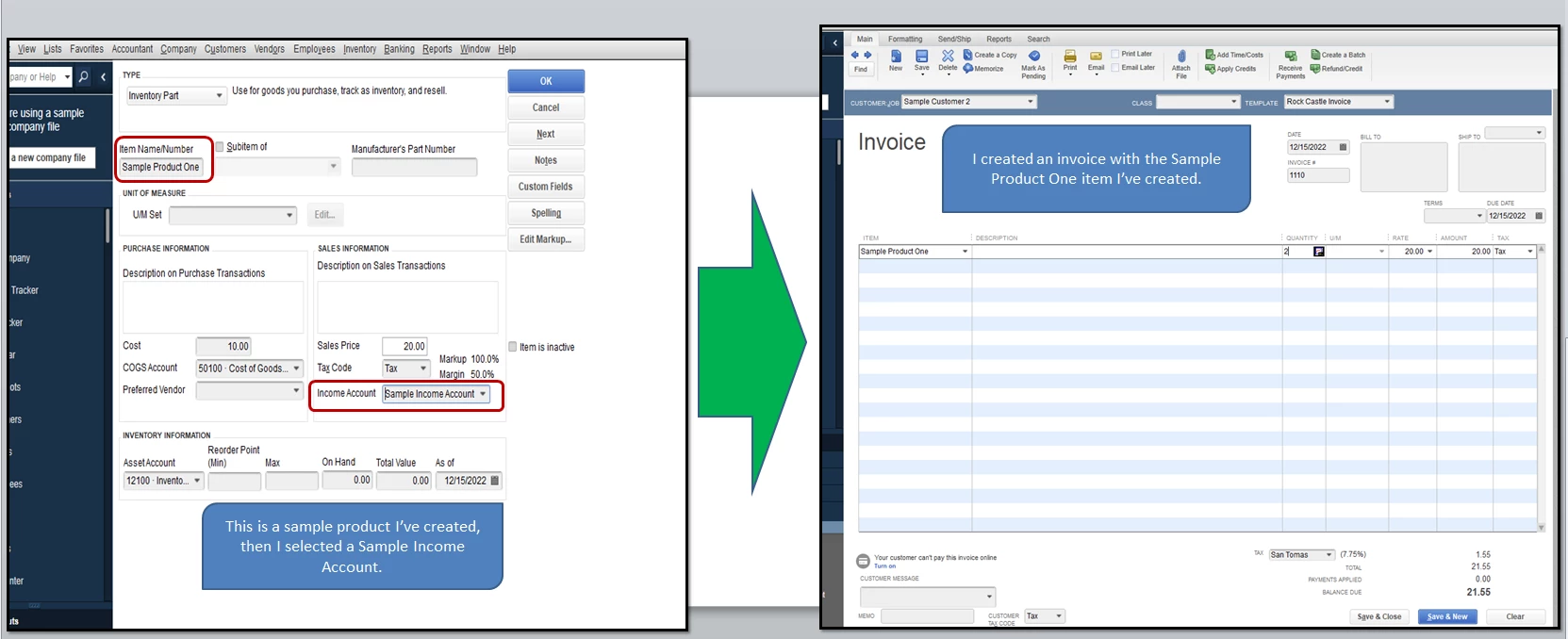
All you need to do is create an invoice, then select the item you want to use. The program will automatically post it to the income account you've initially designated to the item. For a visual reference, I've created a workflow of how QuickBooks handles those in the second and third screenshots below. 


To create an inventory or service item:

  1. Go to Lists at the top menu bar, choose Item List.
  2. Right-click the page and select New.
  3. Enter necessary details, then pick an Income account in the Account drop-down.
  4. Click Ok.

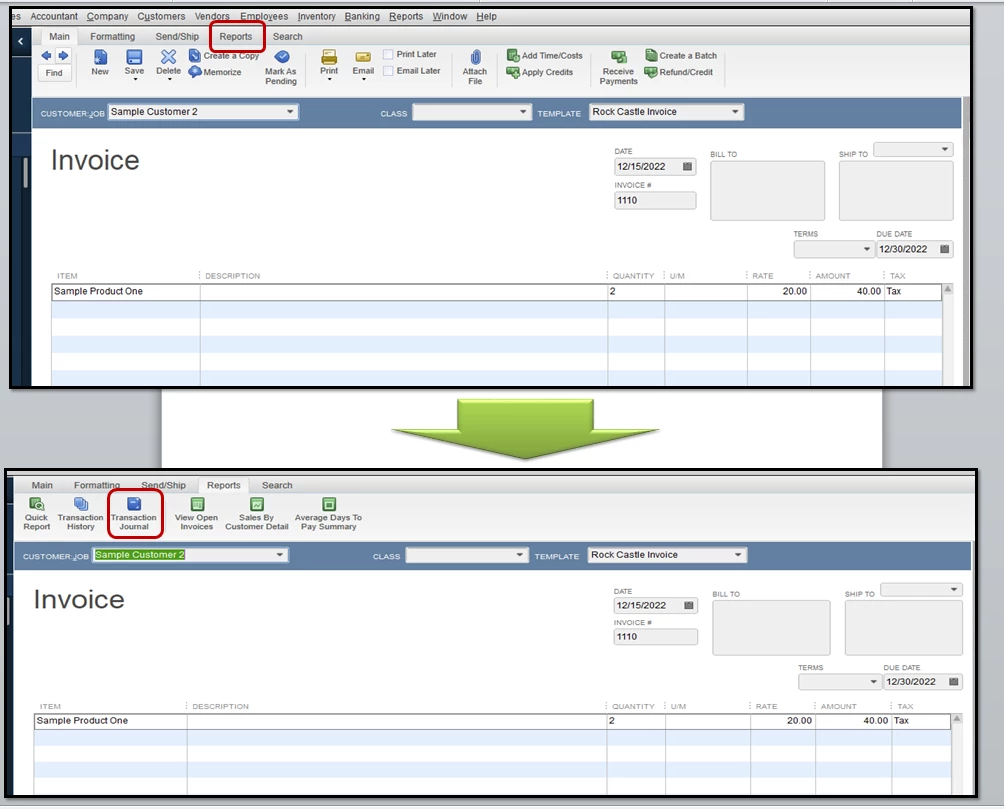
Should you want to review how the accounts work in the background, open the Transaction journal within the invoice:

  1. Open the invoice you've created. 
  2. Select Reports at the top of the page. 
  3. Click Transaction Journal (see screenshot 4).

Here's a link to our QuickBooks blog about understanding items in QuickBooks:


Understanding Items in QuickBooks


These steps and resources can give you an overview of how the program manages your transactions. 


Please know that you can always count on me if you need help with anything else. I'll be around, anytime. 
 

2 replies

john-pero
December 26, 2018

You enter Items (DESKTOP) or Products/Services (QBO) as charges to your customers on invoices and sales receipts. Set up Items you sell (or services you render) and select an income account that they will post to. Then what your customers are charged will be income to you when paid (cash basis) or when billed (accrual basis). It is that simple.


If you sell products you buy and hold in inventory these will be two sided as you will record same item being purchased will go into current inventory asset but against cost if goods sold when you sell

December 26, 2018

Hi John,


Thanks for your reply! 


I can't find anywhere on the invoice to select an income account to post to?  Would it be on the actual invoice?

VivienJAnswer
December 27, 2018

Thanks for getting back to us, Michelle2018. 


Allow me to jump into this thread and add some information to the awesome answer provided by @john-pero


As what @john-pero mentioned above, the income account is linked to the products/services you sell. The invoice doesn't have a specific field where you can select a particular income account. 


Once you set up a product or service items, QuickBooks Desktop will ask you to select an income account (see screenshot below). This will be used to track and handle each transaction, so they'll translate to your Profit and Loss report. 


All you need to do is create an invoice, then select the item you want to use. The program will automatically post it to the income account you've initially designated to the item. For a visual reference, I've created a workflow of how QuickBooks handles those in the second and third screenshots below. 


To create an inventory or service item:

  1. Go to Lists at the top menu bar, choose Item List.
  2. Right-click the page and select New.
  3. Enter necessary details, then pick an Income account in the Account drop-down.
  4. Click Ok.

Should you want to review how the accounts work in the background, open the Transaction journal within the invoice:

  1. Open the invoice you've created. 
  2. Select Reports at the top of the page. 
  3. Click Transaction Journal (see screenshot 4).

Here's a link to our QuickBooks blog about understanding items in QuickBooks:


Understanding Items in QuickBooks


These steps and resources can give you an overview of how the program manages your transactions. 


Please know that you can always count on me if you need help with anything else. I'll be around, anytime. 
 

March 15, 2024

I understand that each product is tied to an income account, but this is very limiting.  We also have multiple income accounts and I'd love to be able to select the income account I want each line item to go to.  As of right now, after every invoice I create, I have to post a journal entry to move the income to the correct account. This is tedious and makes for a more confusing audit trail.


Are there any plans to change this?


Please don't tell me to ask my accountant. I am the CPA.

March 15, 2024

Thanks for getting involved with this thread, econnolly.


I can certainly understand how an ability to select an income account for each line item while creating an invoice could be useful and have submitted a suggestion about it as of today.


You can also submit your own feedback while using QuickBooks.


Here's how:
 

  1. In the top menu bar, go to Help, Send Feedback Online, then Product Suggestion....


  2. Choose a Type of Feedback and Product Area (optional) from your available drop-down menus.


  3. Enter any suggestions/feedback in the Here is my suggestion: field.


  4. If you'd like, include your name/email in the My name is: (optional) and My e-mail address is: (optional) fields.


  5. Select Send Feedback.


Your feedback's definitely valuable to Intuit. It will be reviewed by our Product Development team and considered in future updates. You can stay up-to-date with the latest news about your product by reviewing Intuit's Product Updates webpage.


For the time being, you can use the workarounds mentioned by my colleagues in this thread. You also have the option of checking our QuickBooks App Store for apps which may be able to help you achieve what you're looking to accomplish.


If there's any additional questions, I'm just a post away. Have a lovely Friday!