Solved
How do I get the mobile app?
I deleted the app from my phone because it was not functioning correctly. When I went to re-install it I could not find the app in the Apple app store. How do I get the Quickens self employed app?


I deleted the app from my phone because it was not functioning correctly. When I went to re-install it I could not find the app in the Apple app store. How do I get the Quickens self employed app?
Hi there, Srabbott. To get the QuickBooks Self-Employed (QBSE) app, you can reinstall it from your download history in the App Store.
Please know that the QBSE mobile app will no longer be available for download starting March 25, 2024. Nonetheless, you can still reinstall it if you're using the same device where you previously had it installed.
Here's how you can reinstall the app:
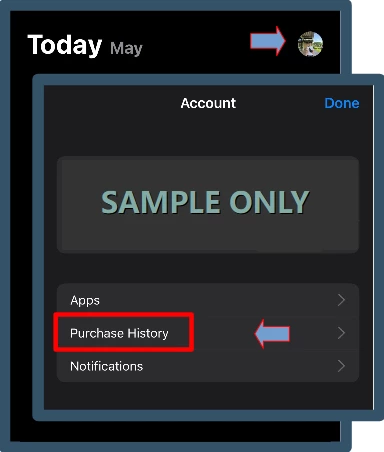
If you're using other devices, you can still access your QBSE account via a web browser to continue your tasks.
In case you're unable to install the app, consider switching from QBSE to QuickBooks Solopreneur. This enhanced tool for self-employed individuals includes familiar features with new functionalities, such as sending estimates and setting financial goals.
For future reference, you can read the QBSE annual tax guide to stay compliant and optimize your tax situation throughout the year.
We're still here to back you up if you have any questions or need further assistance during this process.
Enter your E-mail address. We'll send you an e-mail with instructions to reset your password.