

July 2, 2022
Question

How do you disable the "critical alert, support has ended" notification

  • July 2, 2022
  • 2 replies
  • 0 views

I have QuickBooks Premier 2019 and the support has ended for it. I'm fine with that since I've never used any of those support options anyway. How do I turn off the "Critical alert, support has ended...." notification at the bottom left of the screen, as shown in the picture. This version of QB does what I want it to do and I have no plans to upgrade soon. I'm just a tiny in-home business and don't need the extra expenses of the monthly or yearly subscriptions. 
Best Wishes,

Stephen
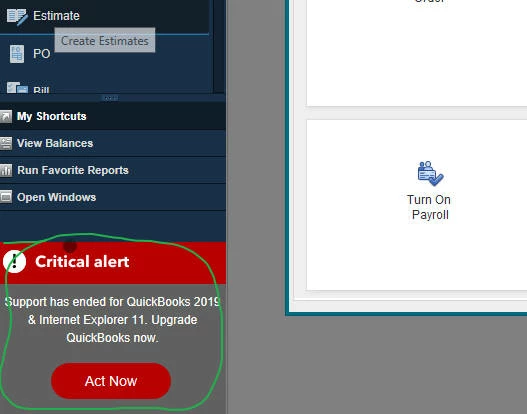
 

2 replies

BigRedConsulting
July 2, 2022

You can't turn it off.  You can stop using the left icon-bar and use the top icon-bar instead.

Stephen51Author
July 6, 2022

Hi Big Red,

Thanks for your reply. Since I use a lot of bookmarks in the left panel I don't want to stop using it. I'm just going to have to see that red critical alert box as part of the landscape. It is just there, live with it.

Thanks for your response,

Best Regards,

Stephen

August 21, 2022

Quickbooks used to be so good for small businesses. Now it has become a big pain in the A$$.


I hope someone who gives a crap at QB reads these notes.


We paid for software to use until Windows dies, not to be held a hostage from Intuit and pay ransom money every year.


I will NEVER recommend Quickbooks to anyone again. QB has repeatedly made the new versions of desktop software more time consuming (more unnecessary mouse clicks) for me to enter things and do business. I have reported bugs over the past many years and no one seems to care. These are NEW bugs that were NOT in past versions of QB. (I have been using QB for 17 years and I am a software programmer)

Time efficiency is very important to any small business. TIME = MONEY.


And now, Intuit will not offer a desktop version unless you pay a subscription! GREEDY!


Then to top it off, on the software I PAID for, QB 2019, I now have to live with your smut message in RED that it is expired. By the way taking up space on MY desktop reducing MY productivity. Great one.


Plus I have to wait now for the slow load time of QB because you want it to contact Intuit every time I start the program. DO  YOU PEOPLE UNDERSTAND YOUR CUSTOMER AT ALL? Lost time is lost money.


You are terrible Intuit!

I bet you remove this message like a politician to hide your guilt.

December 19, 2022

Fastest way to turn off the display of the message is to hide the icon bar.  You'll need to go to the "View" option on the top bar and click on "Hide Icon Bar" to check it.  The only place the message will now reside is on the right hand notifications pane on the home screen where it appears as a normal notification that can be minimized.


If you use your left icon bar for bookmarks, you may be able to switch to a top icon bar (the message does not appear there) and then edit to show your bookmarks if they don't appear there.


Hope this helps.


DivinaMercy_N
December 19, 2022

Thanks for posting here, @Dianna Moy.


I appreciate you sharing a solution for getting a critical alert notification in QuickBooks Desktop (QBDT). I'm sure that this will be a great help for other users that will encounter the same issue. 


Please know that we're always here in the Community to assist you with any QuickBooks concerns you may have. Have a good one and keep safe!