March 22, 2019
Solved

How do you set or change the expected delivery date for a po?

  • March 22, 2019
  • 2 replies
  • 0 views

Is it possible to change the expected delivery date of a vendor po? It looks like QB uses the po date as the next delivery date and that is not accurate.


 

Best answer by PreciousB

Welcome to the Community, RML9.


I'm here to share some information about the expected delivery date of the purchase order.


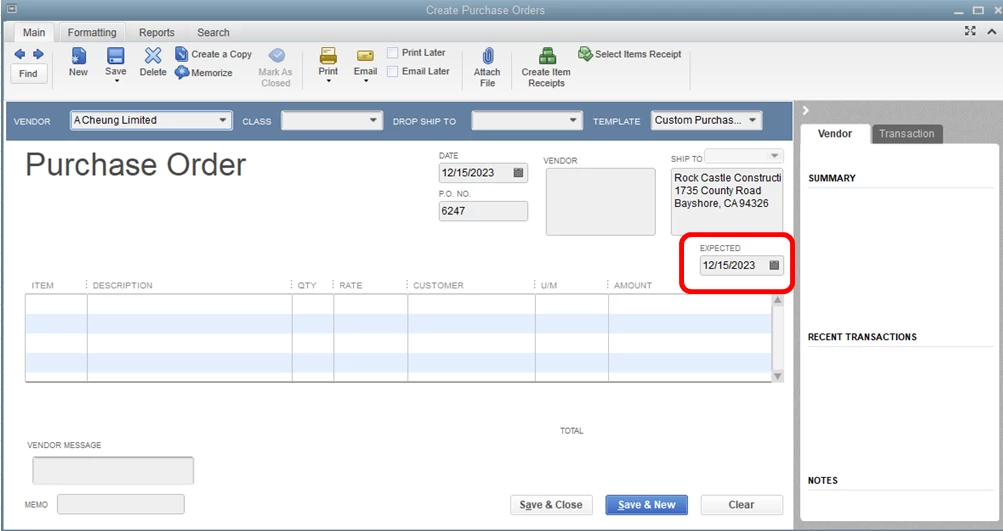
You're right that QuickBooks Desktop uses the purchase order date as the expected delivery date. If you want to change it, you'll have to open the purchase order and manually update it.


Here's how:

  1. Open the purchase order.
  2. Update the Expected date (refer to the screenshot below).
  3. Click Save & Close.

Check out this link for more details: Create a purchase order.


That information should get you on the right track. The Community always has your back, so don't hesitate to let me know if you have any questions. Have a good one.

2 replies

PreciousB
PreciousBAnswer
March 22, 2019

Welcome to the Community, RML9.


I'm here to share some information about the expected delivery date of the purchase order.


You're right that QuickBooks Desktop uses the purchase order date as the expected delivery date. If you want to change it, you'll have to open the purchase order and manually update it.


Here's how:

  1. Open the purchase order.
  2. Update the Expected date (refer to the screenshot below).
  3. Click Save & Close.

Check out this link for more details: Create a purchase order.


That information should get you on the right track. The Community always has your back, so don't hesitate to let me know if you have any questions. Have a good one.

RML9Author
March 25, 2019

Thanks so much! This was making me crazy and such an easy fix! It never occurred to me that there was a field missing form the po form I was using.

Have a wonderful day.

June 3, 2020

Though the PO appears correctly, the date on the report is not the same.

We typically COPY a purchase order for the next order, but it keeps using the original PO date for delivery rather than the corrected "new" date.  Anyway to get the Open Purchase Orders Detail report to correctly reflect what is actually on the PO?

June 3, 2020

Hi @BB_PAT,


I appreciate the number of details you've included in your post. Let me take care of this query for you. 


I've replicated this situation on my test account and found that when you edit the Expected delivery date box on your PO, it also reflects on your Open Purchase Orders Detail report. By default, the Expected field isn't on the PO.


Follow the steps below to have it appear on the PO:


  1. Go to the Vendors menu.
  2. Select Create Purchase Orders.
  3. Tap the Formatting tab.
  4. Press the Customize Data Layout button.
  5. Tick the checkboxes for Expected.
  6. Hit OK when done.

At this point, you can update the expected delivery dates on your PO transactions. Right after, you can run the Open Purchase Orders Detail report to see the changes.


Take a look at this article to learn more about the Accounts Payable workflow: Accounts Payable workflows in QuickBooks Desktop. This includes bills that have a PO and those that don't.


Let me know if you have other questions by posting a comment below. I'll get back to you as soon as I can.