May 24, 2022
Solved

how i get historical monthly financials IS BS YTD with revenue

  • May 24, 2022
  • 1 reply
  • 0 views

Detailed, historical monthly financials (IS, BS) for at least 2019-2022 YTD with revenue broken out by segment as appropriate (Subscription, Ads, Services, etc.) and expenses broken out by segment as appropriate (COGS, CS, R&D, S&M, G&A, etc.)

Best answer by Giovann_G

Thanks for reaching out to us, deepti3_1.


I'll ensure you'll be able to run the historical monthly financial report in QuickBooks Online.


You can view the Income statement (IS) from 2019 to 2022 YTD by running the Profit and Loss by Month report. This report will show your revenue and expenses. I'll show you how.


  1. Go to the Reports menu.
  2. Choose the Profit and Loss by Month report.
  3. Select Custom in the Report period dropdown, then ensure the date is from 2019 to 2022.
  4. Once done, hit Run report.


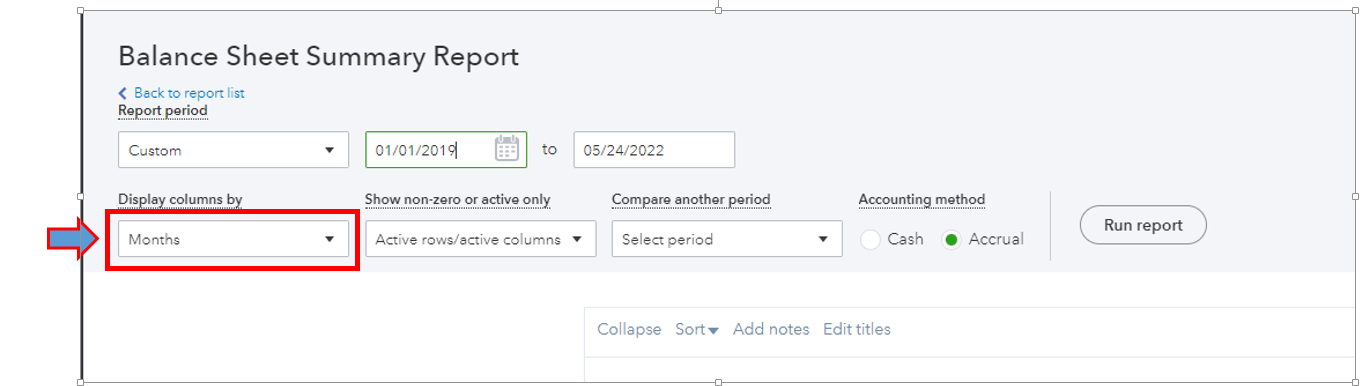
On the other hand, you can run the Balance Sheet Summary (BS) report to see a statement of your assets, liabilities, and equity. Then, you can select the Months from the Display column by dropdown to display the historical data per month.
 

For additional reference, you can read the following articles below to help you manage your reports:


If you want to use your report outside QuickBooks, you'll have the option to export them to Excel and save it anywhere you can easily find them.


Please add any details below if you need further assistance with the financial reports. I'll be around to help you.


1 reply

Giovann_GAnswer
May 24, 2022

Thanks for reaching out to us, deepti3_1.


I'll ensure you'll be able to run the historical monthly financial report in QuickBooks Online.


You can view the Income statement (IS) from 2019 to 2022 YTD by running the Profit and Loss by Month report. This report will show your revenue and expenses. I'll show you how.


  1. Go to the Reports menu.
  2. Choose the Profit and Loss by Month report.
  3. Select Custom in the Report period dropdown, then ensure the date is from 2019 to 2022.
  4. Once done, hit Run report.


On the other hand, you can run the Balance Sheet Summary (BS) report to see a statement of your assets, liabilities, and equity. Then, you can select the Months from the Display column by dropdown to display the historical data per month.


For additional reference, you can read the following articles below to help you manage your reports:


If you want to use your report outside QuickBooks, you'll have the option to export them to Excel and save it anywhere you can easily find them.


Please add any details below if you need further assistance with the financial reports. I'll be around to help you.

deepti3_1Author
May 24, 2022

thank you