February 11, 2025
Solved

how to add interest to an overdue invoice in Quickbooks desktop and can it be automatically updated.

  • February 11, 2025
  • 1 reply
  • 0 views

I would like to add interest to rent invoices.  Can the interest or late fee be automatically updated on a daily basis until the invoice is paid?  Currently on Quickbooks Enterprise Solution Manufacturing and Wholesale 24.

Best answer by Candice C

Hey there, @Dawn07


It's great to see you back in the Community! 


Creating a service item will allow you to add interest on the invoice in QBDT. Then add it to the second line when creating or editing the invoice. 


Here's how to create a service item for the overdue invoices: 


  1. Go to the Lists and then Item List
  2. Press CTRL + N and pick Service in the Type drop-down. 
  3. Enter an Item Name and complete the Rate, Tax code, and Account
  4. Hit OK when done. 


Review this guide for additional details: Add, edit, and delete items


Once done, add the service item you created in the second line in the invoice from. See the sample screenshot below for more reference: 
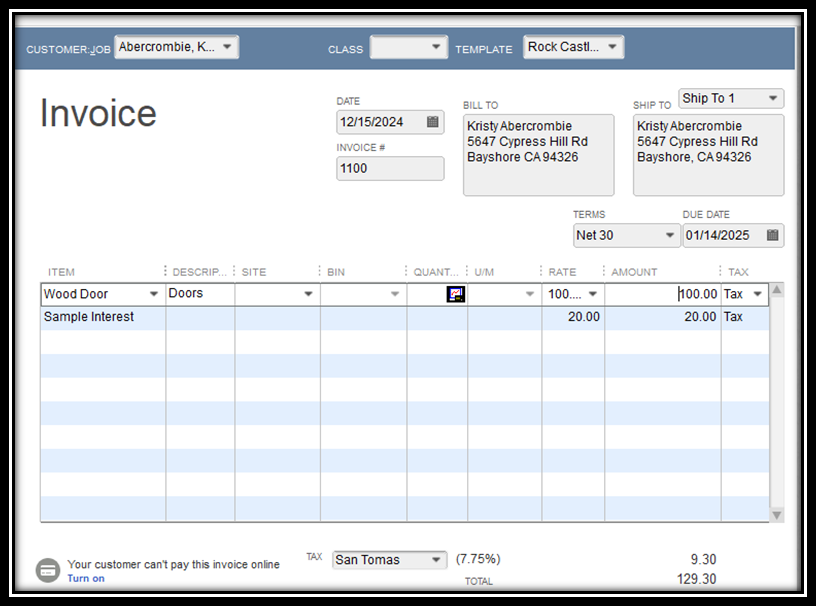


Feel free to come back if you need an extra hand managing your invoices. I'll be more than happy to assist you. Have a great day!


1 reply

Candice C
Candice CAnswer
February 11, 2025

Hey there, @Dawn07


It's great to see you back in the Community! 


Creating a service item will allow you to add interest on the invoice in QBDT. Then add it to the second line when creating or editing the invoice. 


Here's how to create a service item for the overdue invoices: 


  1. Go to the Lists and then Item List
  2. Press CTRL + N and pick Service in the Type drop-down. 
  3. Enter an Item Name and complete the Rate, Tax code, and Account
  4. Hit OK when done. 


Review this guide for additional details: Add, edit, and delete items


Once done, add the service item you created in the second line in the invoice from. See the sample screenshot below for more reference: 


Feel free to come back if you need an extra hand managing your invoices. I'll be more than happy to assist you. Have a great day!