
Solved
How to delete invoice templates in QB desktop 2020
Original commenter did not share additional details

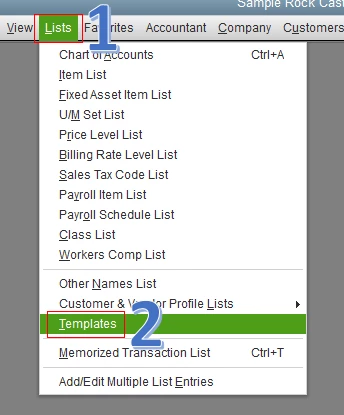
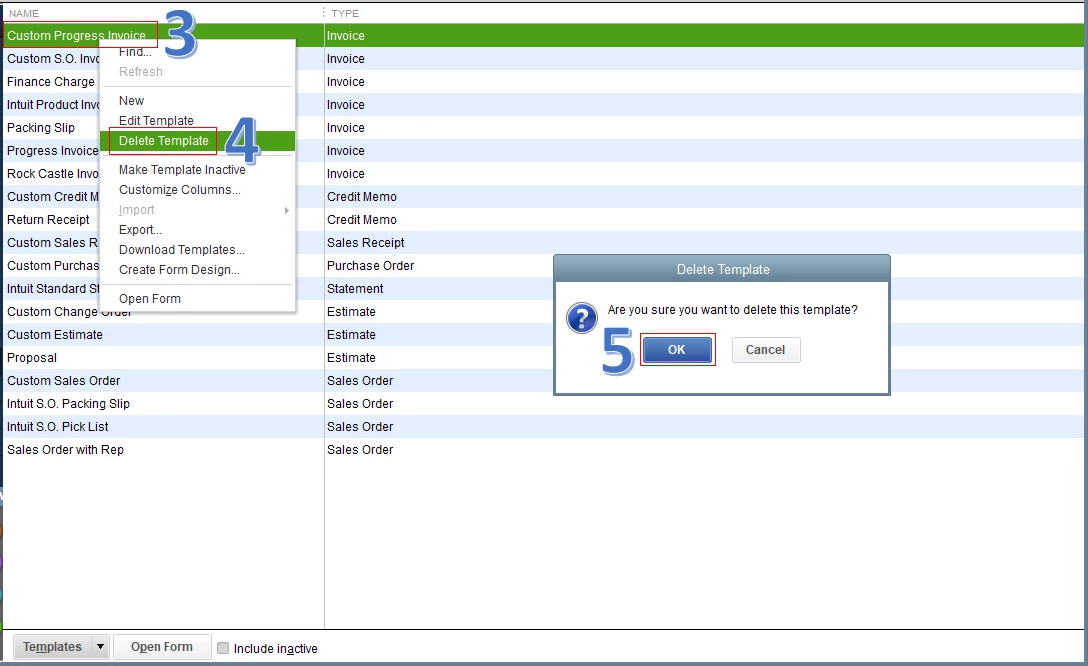
I've got the steps and screenshots so you can delete the invoice templates in QuickBooks Desktop (QBDT) 2020, @farmerbookkeeper.
Fiat Lux - ASIA is correct. Let's go to the Templates list to achieve your goal, and I'm here to guide you how.
The screenshots below show you the first to fifth steps.
Also, I'd suggest visiting this website: Use and Customize Form Templates. This link provides you steps on how to duplicate, export, import, and manage your form templates in the program.
I'm just a comment away if you need anything else. Have a great rest of your day, @farmerbookkeeper.
Enter your E-mail address. We'll send you an e-mail with instructions to reset your password.