Solved
How to print all open invoices
I want to print all open invoices. When I go to Sales, All Sales, Filter Invoices, Open, Dates = All. Then I select the top checkmark so all of them are checked, Batch Actions, Print Transactions is grayed out.


I want to print all open invoices. When I go to Sales, All Sales, Filter Invoices, Open, Dates = All. Then I select the top checkmark so all of them are checked, Batch Actions, Print Transactions is grayed out.
But that doesnt print the invoices. It just prints a report of the invoices.
Thanks for getting back to us, @dataforge11.
Let me share another workaround that can help you print the open invoices.
I've checked the screenshot that you've shared. It seems that you've created an open transaction (could be a journal entry) that was also marked check. This might be the reason why you're unable to print the open invoices by batch.
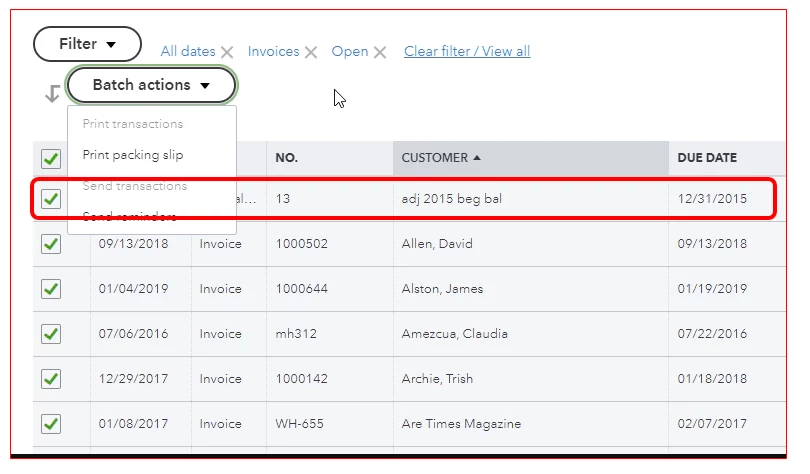
Let's try unchecking this one first, then print the transactions. Here's how:
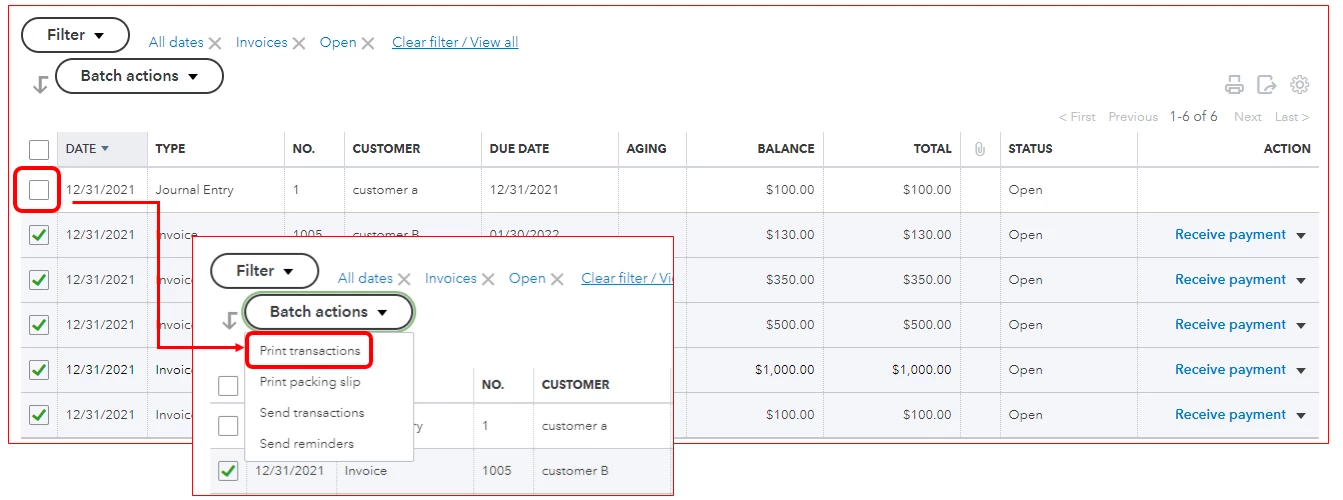
Once done, you can go back to the All Sales page and print it separately. For further info, you can check out this article: Email or print multiple invoices and sales forms.
In case you want to personalize and add specific info to your sales forms, use this article for your reference: How to Customize The Look and Info on Your Forms.
Please let me know if there's anything else I can do for you, the Community will always have your back. Thanks for reaching out, wishing you a safe and productive week ahead.
Enter your E-mail address. We'll send you an e-mail with instructions to reset your password.