April 11, 2019
Solved

How to record cancellation fees

  • April 11, 2019
  • 1 reply
  • 0 views

Ordered equipment from China. Canceled order. My money refunded to debit card except for cancellation fee.


How to record money loss in QB Desk Pro 2019.


In addition, I had to cancel the trucking service to deliver to my house. They charged 15% of cost of shipping.


I need to record the expense 2 time. Same problem 

Best answer by Rose-A

Thanks for dropping by, power engineer.

Let me help you record the cancellation fee and the 15% cost of shipping in your QuickBooks Desktop.


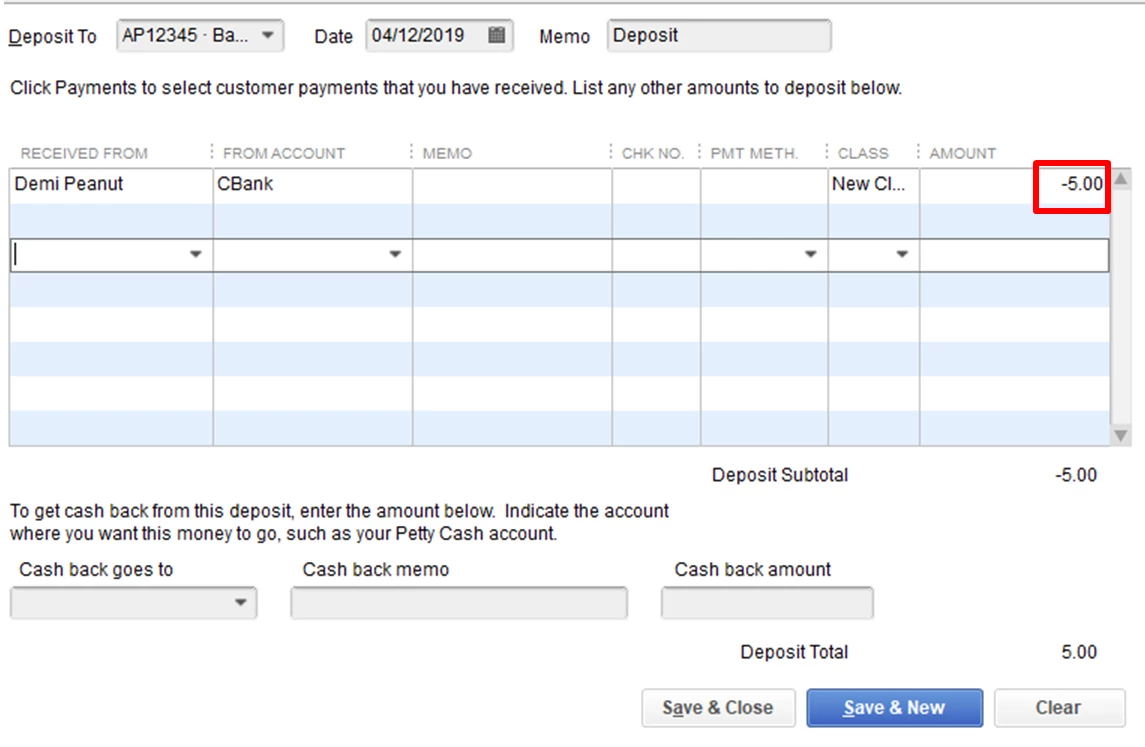
In order to record these transactions, you can make deposits under an expense account and enter the amount as a negative.


Here's how:


  1. Click Banking at the top menu, select Make Deposits.
  2. Choose a vendor in the Received From.
  3. In the From Account, choose an Expense Account.
  4. Enter the cancellation as a negative amount in the Amount column.
  5. Select Save and close.


You may find this article helpful: https://quickbooks.intuit.com/community/Help-Articles/Record-Merchant-Service-Deposits/m-p/201654.


As always, you can reach out to our QuickBooks Desktop Support if you need more help.


  1. Within your QuickBooks Desktop, click Help at the top menu bar.
  2. Click Contact us.
  3. In order to route you to the correct support expert, we need to know what type of question you have. Give a brief description of your issue and click Continue.
  4. We’ll provide you a few options. You choose which one is best for you.

Don't hesitate to leave a reply below if you have any other questions about recording cancellation and shipping fees in QuickBooks Desktop. I'm here to help.


1 reply

Rose-A
Rose-AAnswer
April 11, 2019

Thanks for dropping by, power engineer.

Let me help you record the cancellation fee and the 15% cost of shipping in your QuickBooks Desktop.


In order to record these transactions, you can make deposits under an expense account and enter the amount as a negative.


Here's how:


  1. Click Banking at the top menu, select Make Deposits.
  2. Choose a vendor in the Received From.
  3. In the From Account, choose an Expense Account.
  4. Enter the cancellation as a negative amount in the Amount column.
  5. Select Save and close.


You may find this article helpful: https://quickbooks.intuit.com/community/Help-Articles/Record-Merchant-Service-Deposits/m-p/201654.


As always, you can reach out to our QuickBooks Desktop Support if you need more help.


  1. Within your QuickBooks Desktop, click Help at the top menu bar.
  2. Click Contact us.
  3. In order to route you to the correct support expert, we need to know what type of question you have. Give a brief description of your issue and click Continue.
  4. We’ll provide you a few options. You choose which one is best for you.

Don't hesitate to leave a reply below if you have any other questions about recording cancellation and shipping fees in QuickBooks Desktop. I'm here to help.

April 12, 2019

I was able to use your "deposit entry" method to show the initial deposit and a partial refund due to a cancellation fee. The checking account reflects the correct fee paid.


Thank you very much for the quick response. Problem mitigated.

April 12, 2019

Hey there, power engineer. 


You're most welcome for the response! I'm glad to hear that you found it helpful.


The Community is always here if you need more assistance with QuickBooks. I'll be happy to be your guide once again. Have a wonderful day.