LaventilleLogistics
March 16, 2023
Solved

How to track mileage for a Truck in QBO

  • March 16, 2023
  • 1 reply
  • 0 views

Is it possible to modify the default "Car" vehicle type in QuickBooks Online when using the mileage feature for tracking a truck's mileage? We were able to manually input our truck's make and model, but we encountered some obstacles.

Best answer by MaryLandT

I know a trick that can describe the vehicle type, LaventilleLogistics.


Right now, modifying the vehicle type isn't an option. You can only choose Car from the drop-down.


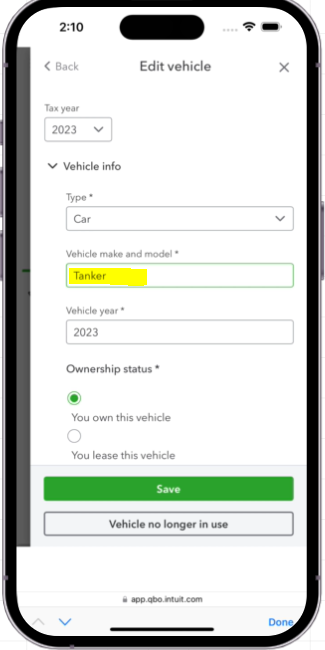
You may use the Vehicle make and model field to describe the vehicle you're using. Here's a sample screenshot as a visual reference.
 

Adding the correct truck information will help you match trips to the right vehicle. You can send feedback about being able to choose different car types to our Product Team. That way, they'll add this request to the list and help improve your mileage tracking experience.


You can send feedback within the QuickBooks Online company file. Here's how:


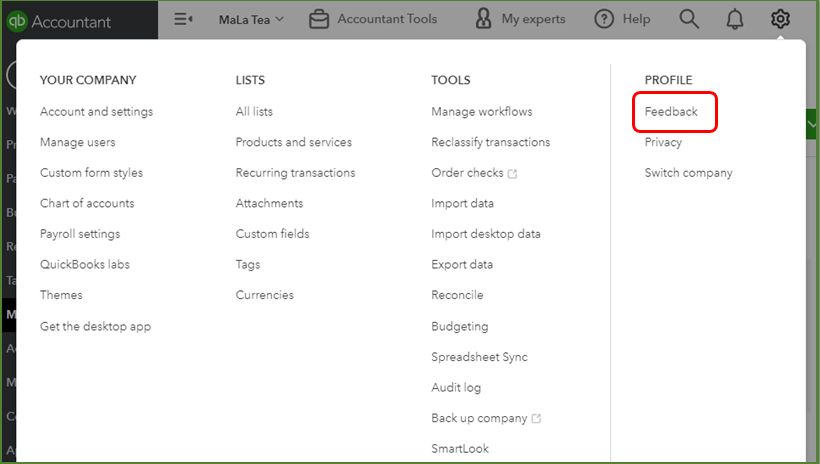
  1. Select the Gear icon at the top, then Feedback.
  2. Enter your comments or product suggestions. 
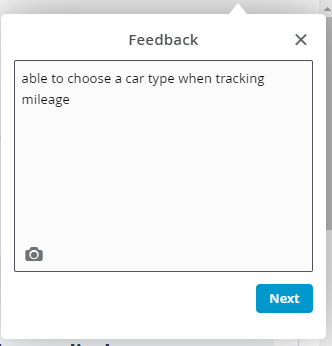
  3. Click Next to submit feedback.
  4. You can track feature requests through the QuickBooks Online Feature Requests website.


To ensure your recording business miles, please follow and don't miss any of the steps outlined in this article: Automatically track mileage in QuickBooks Online.


You're still welcome to comment back if you have more tracking-mileage questions in mind or need anything. I'll circle back or other Community agents are still around to help you.


1 reply

MaryLandT
MaryLandTAnswer
March 16, 2023

I know a trick that can describe the vehicle type, LaventilleLogistics.


Right now, modifying the vehicle type isn't an option. You can only choose Car from the drop-down.


You may use the Vehicle make and model field to describe the vehicle you're using. Here's a sample screenshot as a visual reference.


Adding the correct truck information will help you match trips to the right vehicle. You can send feedback about being able to choose different car types to our Product Team. That way, they'll add this request to the list and help improve your mileage tracking experience.


You can send feedback within the QuickBooks Online company file. Here's how:


  1. Select the Gear icon at the top, then Feedback.
  2. Enter your comments or product suggestions. 
  3. Click Next to submit feedback.
  4. You can track feature requests through the QuickBooks Online Feature Requests website.


To ensure your recording business miles, please follow and don't miss any of the steps outlined in this article: Automatically track mileage in QuickBooks Online.


You're still welcome to comment back if you have more tracking-mileage questions in mind or need anything. I'll circle back or other Community agents are still around to help you.

LaventilleLogistics
March 19, 2023

Thank you

March 19, 2023

You're always welcome,LaventilleLogistics.


I'm happy to hear that my colleague was able to help with your concern about tracking mileage. Please know that you’re always welcome to post in the Community space for any QuickBooks concerns you may have.


Feel free to contact us again if you need help with anything else. Have a wonderful day!