Let me add some details of this, Susan.
It looks like you've followed the steps provided in the article. And it's somewhat odd why you're unable to click the billable column because nothing comes up. Let's use the verify and rebuild tool to find the most common issues and fix them.
To verify your company file data:
- Go to File, then select Utilities.
- Select Verify Data, then select OK to close all windows. If you see “Your data has failed the integrity check” you need to rebuild your file. If there are no problems with your data, you’re done.
Once done, you can rebuild the file:
- Go to File, then select Utilities.
- Select Rebuild Data, then select OK to close all windows.
- QuickBooks will ask you to make a backup before rebuilding your company file, select OK. If you don’t want to do a backup, select Cancel to continue rebuilding your company file.
- If you haven’t set up any backup preferences, QuickBooks will ask you to update them. Select Backup Preferences and edit as needed, then select OK.
- When the backup's finished, select Show in Finder to locate the backup or select OK if you’re done.
- Once the rebuild's finished, click OK.
However, if you're still getting the issue, you'll want to reach out to our support team so they can take a look at what is happening and investigate further. They have the tools to pull up your account in a secure environment.
Furthermore, QuickBooks offers different reports that you can use to get the data you need for your business. To learn more, check out the list in this article: Create Reports In QuickBooks Desktop for Mac.
Please get back to us if you have any concerns about the time and cost of the job invoice. We're here to get you covered.
Hello Maria,
I found the problem.
(BTW I regularly verify and rebuild my data but did it again upon your suggestion which in this case didn't do anything.)
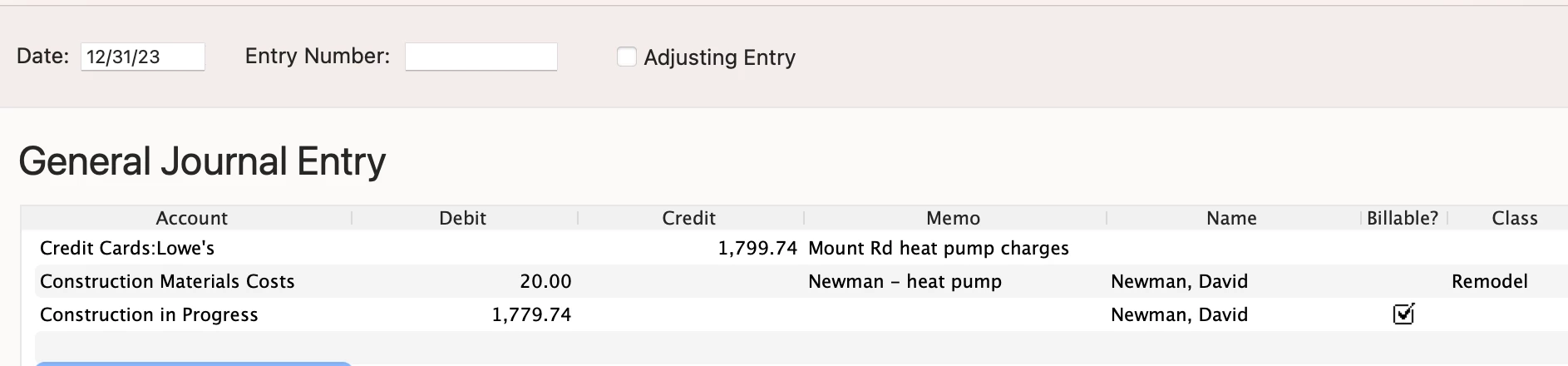
I had the account that was identified as Construction Materials Costs classified as a Cost of Good Sold account rather than an expense account. Therefore QB saw it as a contra-asset which would not be reimbursable, rather than as an expense than could be offset. Once I changed the designation of the account the billing column filled with a check mark so that the expense would show up when producing an invoice for the customer.
Here's an example after I split the GL entry and voile - expense was check marked.
Thanks for your time and prompt response.


