February 25, 2025
Solved

How to unsubscribe from community emails

  • February 25, 2025
  • 2 replies
  • 0 views

I can't find any way to unsubscribe from community updates. I still want to receive the product emails I've been receiving before joining the community. I just do not want to be inundated with every comment, like, badge, etc. Is there a way to stop those emails?


Best answer by Jessavell_A

Just_me is correct. You'll have to turn off your email notification setting through your QuickBooks Community profile, @Dragon7. Let me show you the steps below.


1. Navigate to this site: QuickBooks Community.

2. On the upper right corner, click Sign in. Then, enter your credentials.
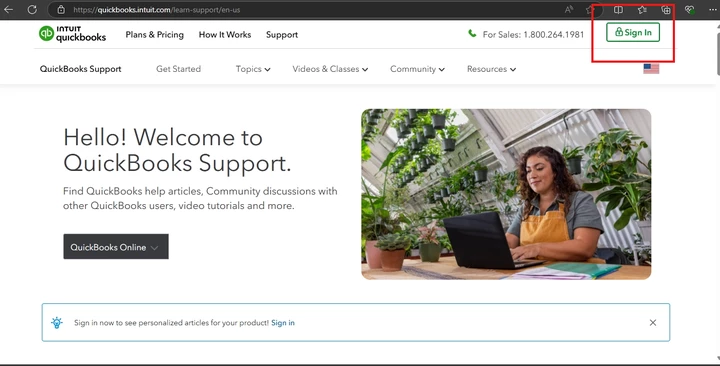
3. Click on Community, then choose Community Home.

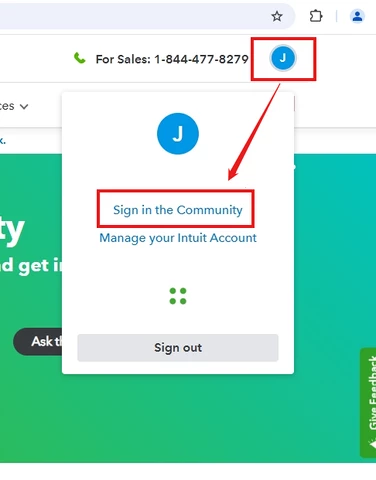
4. Click your initial on the upper right corner, then choose Sign in the Community.
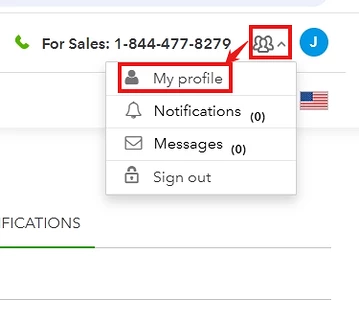
5. Select the profile icon beside your initial. Then, choose My profile.
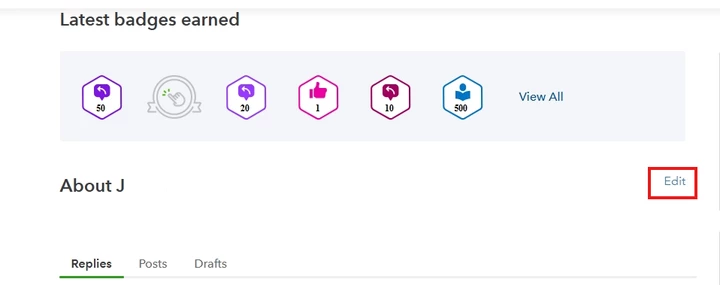
6. Click on Edit.
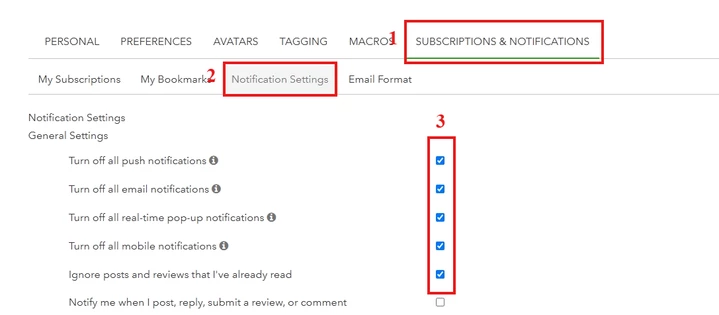
7. On the SUBSCRIPTIONS & NOTIFICATIONS tab, select Notification Settings and then tick the checkboxes you want depending on your preferences.
 

If you need further help about QuickBooks products, you can browse through this resource: QuickBooks Q&A.


We'll keep this thread open for you to come back freely if you'll need further assistance about turning off yuour notifications in Community. We tend to enhance your experience in this forum. Take care.


2 replies

February 25, 2025

If you go to your profile, within the community, to the FAR right of your user name it will say edit.  Click that and change your preferences in there.  

February 25, 2025

Just_me is correct. You'll have to turn off your email notification setting through your QuickBooks Community profile, @Dragon7. Let me show you the steps below.


1. Navigate to this site: QuickBooks Community.

2. On the upper right corner, click Sign in. Then, enter your credentials.

3. Click on Community, then choose Community Home.

4. Click your initial on the upper right corner, then choose Sign in the Community.

5. Select the profile icon beside your initial. Then, choose My profile.

6. Click on Edit.

7. On the SUBSCRIPTIONS & NOTIFICATIONS tab, select Notification Settings and then tick the checkboxes you want depending on your preferences.


If you need further help about QuickBooks products, you can browse through this resource: QuickBooks Q&A.


We'll keep this thread open for you to come back freely if you'll need further assistance about turning off yuour notifications in Community. We tend to enhance your experience in this forum. Take care.

Dragon7Author
February 27, 2025

Thank you. I did finally see it, although I must say it's in an odd location. Just FYI, I was unable to see any of the images included in your reply.