December 30, 2020
Solved

I'm trying to add a "Forward from email" under receipts, but when I do, I get a "there was a problem creating your email" error. I've tried a few times over the day..

  • December 30, 2020
  • 1 reply
  • 0 views
I've also tried a dozen or so variations and all error. I'm not sure what I'm doing wrong. Note: I'm on a sandbox/developer account. We're looking at integrating, but want to see if (in the short term) our clients can use this feature to get our order data into their account.
Best answer by ReyJohn_D

Thanks MaryLandT,


I actually tried that, I get the message :"We currently support issues related to the API only. For UI issues, visit the QuickBooks Community for help." :)


You're welcome, @userjosh-intuit.


I have another idea on how to get you going with your forwarding receipts concern.


The Community site can only assist with QuickBooks-specific issues. Since you have a sandbox account, I suggest visiting the Intuit Developer page. They can provide more insights why you're unable to forward receipts using your sandbox account through QuickBooks Online.


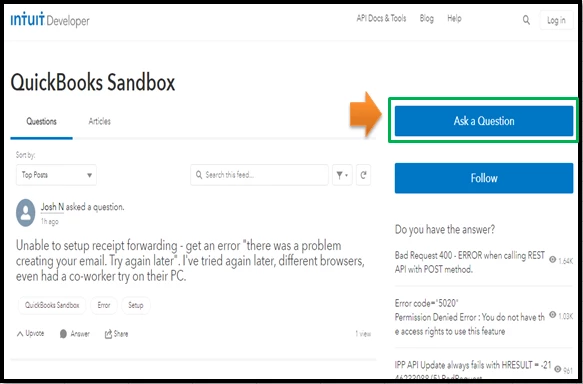
To ensure you'll get the right support team, here's a link you can use: Contact QuickBooks Sandbox. Click the Ask a Question button, and then enter your concern, like "Unable to forward receipts in QuickBooks using my sandbox account". 


When you're all set, you can start categorizing and matching your receipts. Doing so helps ensure they go to the right accounts and prevent any duplicates.


Stay in touch with me if you have additional questions about sending receipts. I'm here to answer them for you.


1 reply

December 31, 2020

This is not the kind of service we want you to experience in QuickBooks, userjosh-intuit.  As per checking with my resources and with our engineering team, there is no issue or error message you've encounter reported in our system. 


To ensure you can successfully forward your email receipt, you'd to set up correctly your forwarding receipts first to QuickBooks Online. I'll show you how to do it: 


  1. Log in to your QBO account, and select Banking. 
  2. Go to the Receipts tab and choose Customize email.
  3. This is where you set the customized email address ending @qbodocs.com. For example, myname@qbodocs.com.
  4. Follow the onscreen instruction to complete. 

For more detailed information about forwarding email receipts in QuickBooks Online, I refer to checking out this article: Email receipts and bills to QuickBooks Online


Please let me know if you have more questions about emailing receipts or anything else related to QuickBooks. I'm around in the Community to help you. Take care and stay safe always.

December 31, 2020

Thanks AileneA,


I tried doing what you suggest and I still get the error (attached)


Note I am on a developer/sandbox account.

December 31, 2020

Thank you for getting back to us and following the steps suggested by my peer above to fix your issue, @userjosh-intuit.


The issue with email for receipt forwarding was recently reported and already closed. Since you're still getting an error when trying to email forwarding receipts, let's perform some troubleshooting steps to get this fixed so you can get back to working order.


There are times that your browser stores frequently-accessed data, thus causing websites, like QuickBooks Online (QBO), to act weirdly. Let's try logging in to your QBO account using a private or a different browser.


Here's how:


  • Press Ctrl + Shift + N on your keyboard for Google Chrome and Mozilla Firefox
  • Press Command + Shift + N for Safari

Once done, go back and try to email receipts again to double-check.


If this works, it means that you need to clear the browser's cache so the system can start fresh. 


If you get the same result, I highly suggest contacting our Phone Support Team. This way, they can further investigate this matter and provide additional troubleshooting steps to get this resolved. Also, they can reopen the investigation if other users are experiencing the same.


Should you need any assistance managing your forwarding receipts, I'm available here to help any time. Wishing you all the best this coming new year!