August 11, 2023
Solved

I made an error in receiving a payment. Is there anyway to go in and un-receive, fix my mistake, then re-receive?

  • August 11, 2023
  • 2 replies
  • 0 views
Original commenter did not share additional details
Best answer by LeizylM

Hi there, employmentconsul. 


I'm here to provide information on how to correct the reference number on the payment in QuickBooks Online (QBO). 


You can open the payment transactions and edit the reference number from there.


Here's how:


  1. Click the Sales menu.
  2. Go to the All Sales section.
  3. Find the payment transaction. Then, click Edit.
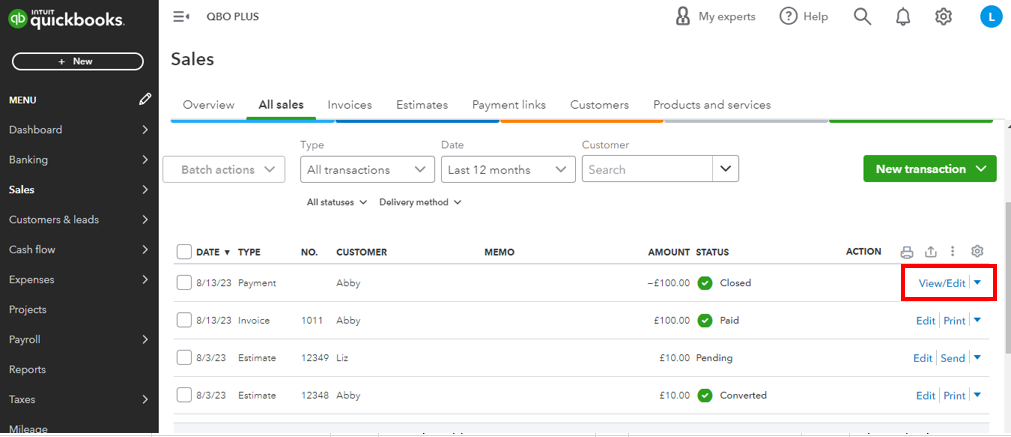
  4. You'll be routed to the Received Payment page.
  5. Edit the reference number. 


You can also use this page to adjust payments in another way on how to fix a payment applied to the wrong customer invoice.


Please let me know in the comments below if there's anything else I can help you with. Have a good day ahead.


2 replies

August 11, 2023

Hi there, @employmentconsul.


To better understand the concern, could you please provide more details about the specific error message you encounter when receiving payment? Any additional information you can provide about the error message, error codes, or any peculiar behavior will help in identifying the root cause and potentially finding a solution.


Thank you for your cooperation. I'm here to assist you further!

August 12, 2023

It is not an error message.  I just put in the wrong reference number.  😞

LeizylMAnswer
August 12, 2023

Hi there, employmentconsul. 


I'm here to provide information on how to correct the reference number on the payment in QuickBooks Online (QBO). 


You can open the payment transactions and edit the reference number from there.


Here's how:


  1. Click the Sales menu.
  2. Go to the All Sales section.
  3. Find the payment transaction. Then, click Edit.
  4. You'll be routed to the Received Payment page.
  5. Edit the reference number. 


You can also use this page to adjust payments in another way on how to fix a payment applied to the wrong customer invoice.


Please let me know in the comments below if there's anything else I can help you with. Have a good day ahead.

September 13, 2023

We appreciate you for reporting this behavior, BizSpots.


You might be experiencing some browser issues. The system occasionally behaves strangely when the browser frequently accesses pages that could be due to corrupted cache files. To rectify this, let's perform some browser troubleshooting steps to resolve this issue. To start, let's open QuickBooks Online (QBO) using an incognito browser. Private browser prevents saving cache and cookies that sometimes cause errors when running frequently visited websites. Here are the shortcut keys:


  • Mozilla Firefox or Microsoft Edge: CTRL + Shift + P
  • Google Chrome: CTRL + Shift + N
  • Safari: Command + Shift + N


Then, go back to the All Sales page and follow the steps provided by my LeizylM. Then, make sure we click the Save and close button to correct the reference number. 


If it works, go back to your regular browser and then clear its cache to enhance your browsing experience. If not, use other supported web engines. The current one you're using may have a temporary issue with QuickBooks. Utilizing a new browser allows you to get back to working order.


Additionally, you can make customized templates for your sales forms to add your preferences to your invoices.


Let me know in the comments below if you have follow-up questions regarding invoices and payments. I'm always here to guide you further. Take care, and have a good one. 

September 14, 2023

I tried both options and neither worked.  The only thing I'm trying to do is change the reference number on a payment I received.  The check number I received was entered incorrectly.

Angelyn_T
September 14, 2023

Thank you for your prompt reply, BizSpots. I appreciate the steps you've taken to change the reference number of your payment transactions. Let me share some updates about this behavior.


I know how it feels when a process that used to work smoothly suddenly stops functioning as expected. I want you to know that our engineers have identified this issue and are currently prioritizing and investigating it to determine a resolution as quickly as possible. While it's still ongoing, you may delete and recreate the payment with the updated reference number.


Additionally, I suggest contacting support to have your name added to the affected users in the list. It'll ensure that you receive timely email notifications regarding the latest developments.


To start:


  1. Sign in to your QuickBooks Online (QBO) account.
  2. Go to the Help menu.
  3. Click on Contact Us from the Search tab.
  4. Enter a short description of your concern.
  5. Choose a way to connect with support.


For your convenience, you can connect with them during their business hours.


To get more tips on receiving customer payments and making deposits, review the details in these articles:


If you have QuickBooks Payments, learn how to accept electronic customer payments for online invoices and in-person sales from this material: Take and process payments in QuickBooks Online with QuickBooks Payments.


Please notify me in the comment section below if you have other questions while working with your payment entries. I'm more than happy to help you again. Have a goodone!