Solved
I recorded 2 payments on invoices as usual but now it does not show up under add bank deposit.Deposit dates are entered correctly as well as the bank account.
Original commenter did not share additional details


Hi, surfacesolutionshouston! Let's find the missing payments and deposit them.
Before depositing money into your bank, ensure customer payments are in the Undeposited Funds account. It will then automatically appear in the Bank Deposit window.
Follow the steps below:
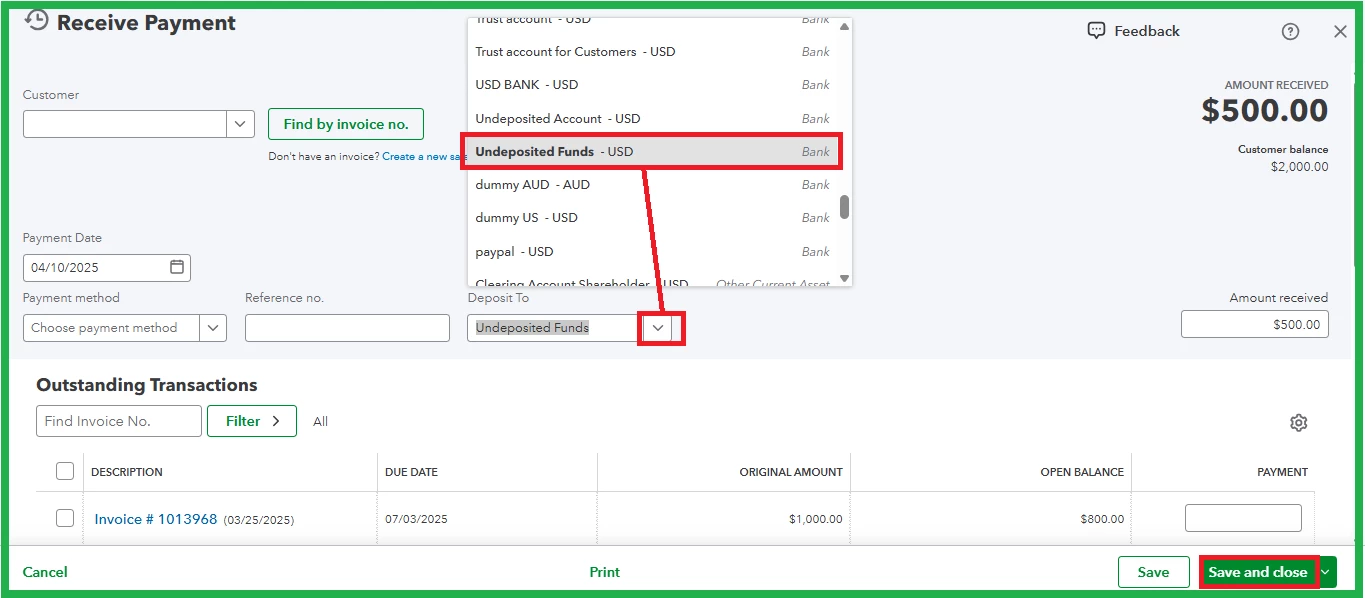
For additional details, refer to this article: Find missing payments you want to deposit in the Bank Deposit window in QuickBooks Online.
Moreover, reconcile your accounts to match your bank and credit card statements.
Furthermore, seek assistance from QuickBooks Live Expert Assisted for guidance on monitoring customer payments.
Reach out again for further assistance tracking sales-related entries.
Enter your E-mail address. We'll send you an e-mail with instructions to reset your password.