

August 21, 2021
Question

Import Custom form styles are not available

  • August 21, 2021
  • 1 reply
  • 0 views

Hi, Hope all are doing well.

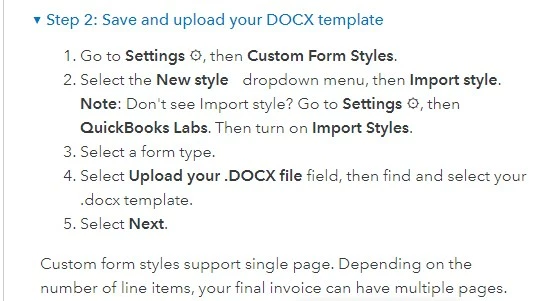
I need help. I cannot import custom forms as invoice templates. In Quickbook lab I cannot find the option to on the feature( As picture asstached). Would you pls someone tell me how can I do that. I am using QBO essential package. Thanks in advance. 
1 reply

BettyJaneB
August 21, 2021

Hi there, @Amolesh.


I have some insights to share about importing custom templates in QuickBooks Online.


As of 29/06/2021, new QuickBooks Online accounts will no longer have access to the Import Styles feature inside of QuickBooks Labs. Existing accounts can still save and upload DOCX templates.


If you're using an old account, I'd recommend accessing your QBO on a private window and import the template from there. This mode doesn't save web searches and cookies. 


Please refer to the shortcut keys I've listed below:

  • Ctrl Shift for Google Chrome
  • Ctrl Shift for Firefox & Microsoft Edge
  • Command Shift for Safari

If you're now able to import the templates successfully, go back to your regular browser and then clear its cache to delete the accumulated junk files. Switching to other supported browsers can also help fix this issue.


If you're using a new account of QuickBooks, I'd recommend checking out for a third-party application to help import your templates.


For more insights about importing and customizing sales templates in QuickBooks Online, please see these articles:

Just add a comment below if you have any other concerns or questions with sales templates. Have a great day!

AmoleshAuthor
August 22, 2021

Sorry, the issue is not solved, I have attached an image for your easy reference.

AmoleshAuthor
August 22, 2021

Pls see the image, the problem is not solved, the client is using the essential package.