February 22, 2023
Solved

Inventory Management with Bundled items

  • February 22, 2023
  • 1 reply
  • 0 views

I created a Bundle in Products and Services. That bundle now needs to be edited. I am not having any luck finding where Bundles are located. Can someone please tell me where the Bundles are located once created?

Best answer by JaeAnnC

You've come to the right place to ask for assistance, Robbin.


We can find the bundles you've created on the Product and Services page in QuickBooks Online (QBO), and I'm here to guide you on how.


QBO lets you bundle products and variants that customers buy together. This way, it records your sales without selecting each product every time. 


Once created, here's how to locate and edit them:


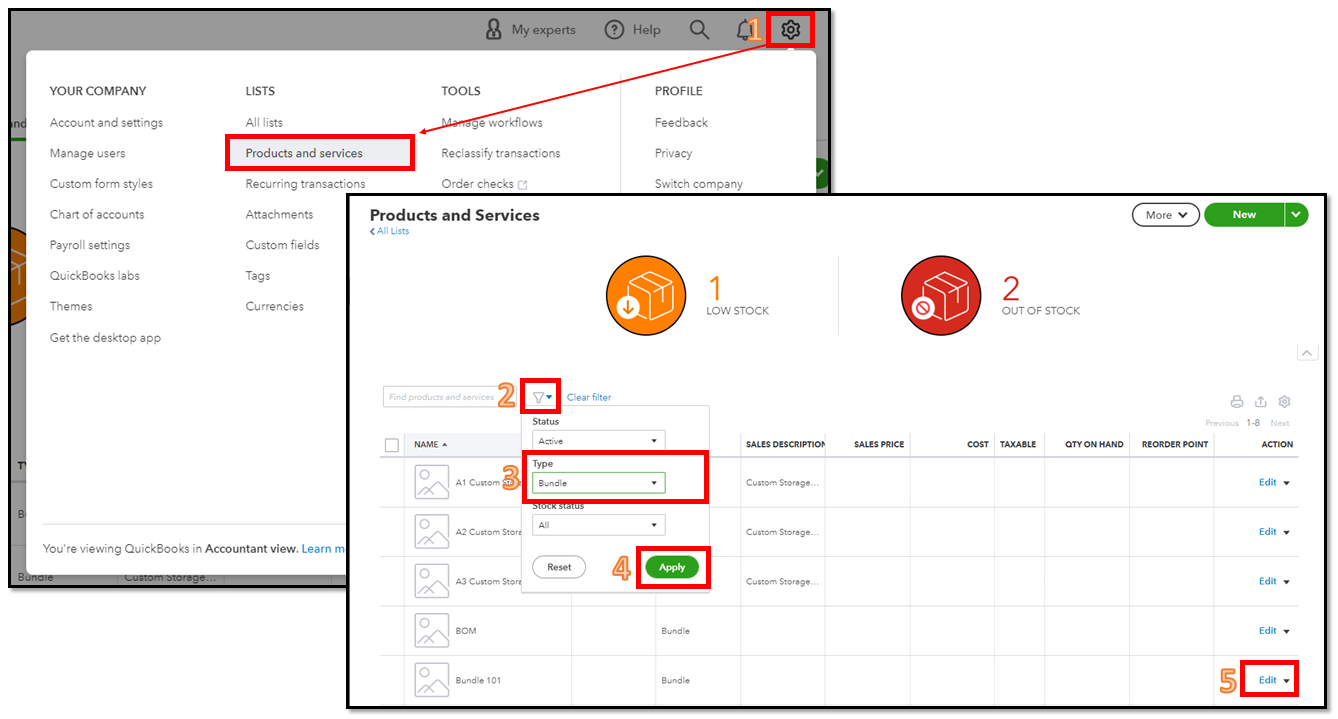
  1. Go to the Gear icon and select Products and services.
  2. Click the Funnel icon.
  3. From the Type dropdown, select Bundle. 
  4. Click Apply.
  5. Look for the bundle and click Edit under the Action column.
 

Moreover, we can use reports to gain valuable insights into the items you buy and sell, as well as the status of your inventory. 


You can always get back to us if you have any follow-up questions about bundles. We're always around to lend you a hand.


 

1 reply

JaeAnnC
JaeAnnCAnswer
February 22, 2023

You've come to the right place to ask for assistance, Robbin.


We can find the bundles you've created on the Product and Services page in QuickBooks Online (QBO), and I'm here to guide you on how.


QBO lets you bundle products and variants that customers buy together. This way, it records your sales without selecting each product every time. 


Once created, here's how to locate and edit them:


  1. Go to the Gear icon and select Products and services.
  2. Click the Funnel icon.
  3. From the Type dropdown, select Bundle. 
  4. Click Apply.
  5. Look for the bundle and click Edit under the Action column.


Moreover, we can use reports to gain valuable insights into the items you buy and sell, as well as the status of your inventory. 


You can always get back to us if you have any follow-up questions about bundles. We're always around to lend you a hand.

 

August 4, 2023

It appears the new BETA version of Products and Services doesn't include bundling. Is that correct? I need to revert back to the previous version so I can Copy one company to another. My original company used bundles, and the new company is on the BETA version of Products and Services which is creating Copy failures using Copy from Backup & Restore functionality.


Where did Bundles go? Are they being discontinued in the new BETA version of Products & Services?

August 4, 2023

Thank you for visiting the QuickBooks Community, Matt Vollmer. I'll share how Products and services work on the new interface. Let me also provide steps on how you can revert back to the previous workflow so you can copy the data from one company to another smoothly.


QuickBooks are rolling out new versions of Products and Services. With this, yes, you're right that the new BETA version of Products and Services doesn't include bundles when creating sales transactions.

Please know that the newly created QuickBooks Online allows you to switch back and forth between the old and new layouts. To do this, you have to simply open a sales transaction and you're able to revert back to the previous version from there.


Here's how:


  1. Go to the Invoice or Estimate page.
  2. Click the Old layout icon.
  3. Select the Switch layout and This doesn't have the feature I want radio button.
  4. Choose Leave and submit.


Once done, you can now start backup and restore your data from one company to another. You can open this article to see the detailed steps and how to perform the process: Back up and restore your QuickBooks Online Advanced Company.


Lastly, refer to this article if you need steps to view, create, and edit sales transactions from within the Sales page: View sales transactions in QuickBooks Online.


Please don't hesitate to keep us posted on how it goes. If you have other concerns about backing up your company file, comment below, and I'll gladly help, Matt Vollmer.