March 1, 2019
Solved

Invoice sent but customers sent payment directly to my suppliers

  • March 1, 2019
  • 1 reply
  • 0 views

I'm a travel agent and new to quickbooks and know little accounting. Please help me how to set this up on my QB.

1. Airlines/Suppliers bill me for the cost of air tickets.

2. I send invoice to my customers my selling price of the air tickets.

3. I receive credit/debit card payment from my customers BUT the payment goes straight to my suppliers. I use my suppliers merchant account when receiving payment from my customers.

4. My suppliers send me my commission.


How do I enter the payment received on my qb when the payment goes straight to my supplier/airlines?

Do i still need to create a bill received from the supplier?

 

Best answer by Angelyn_T

Thank you for adding a reply, @gm0907.


Let me help move the commission you receive from your supplier to your bank account.


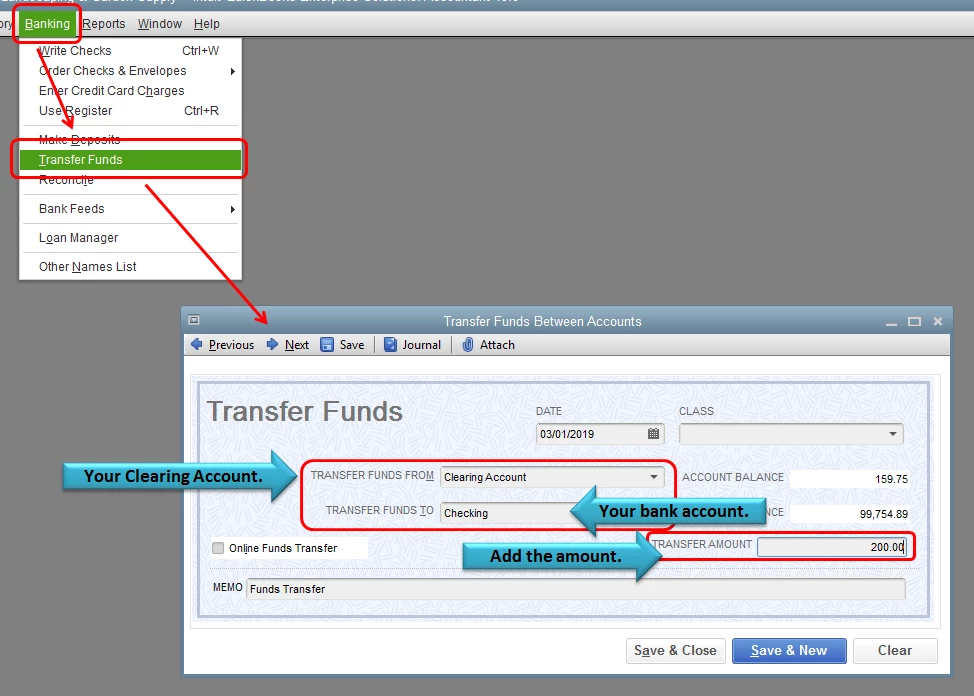
You can transfer the funds from the clearing account to your bank account under the Transfer Funds Between Accounts page.


  1. Click on Banking at the top menu bar.
  2. Select Transfer Funds.
  3. Select the clearing account in the Transfer Funds From and select your bank account in the Transfer Funds To field.
  4. Enter the amount under Transfer Amount.
  5. Click Save and Close.

After following the steps provided, you should be able to transfer the funds/amount to your bank account. Let me know if you have any other QuickBooks concerns. I'll be right here to  help you!

1 reply

Angelyn_T
March 1, 2019

Hi there, @gm0907.


Thank you for posting here in the Community. It's my pleasure to help you record customer payment that was sent directly to your suppliers. 


You may need to set up a clearing account if you haven't set up one in QuickBooks Desktop (QBDT). After setting up a clearing account, you need to deposit the payment under the account created (clearing account), then pay the bill using the clearing account.


To set up a clearing account:


  1. Go to Lists at the top menu bar.
  2. Select Chart of Accounts.
  3. In the Add New Account window, select the Bank radio button. 
  4. Select Continue.
  5. In the Account Name field, enter Clearing Account, Barter Account or Wash Account.
  6. Do not enter an opening balance.
  7. Click Save & Close.

For additional reference, you can check this article: Set up a clearing account.


Don't hesitate to add a comment if you have any other questions about recording payments in QuickBooks. I'm always here to help you!

gm0907Author
March 1, 2019

Wow, Thank you so much. I did it and it worked. Now, how do I move my commission from the clearing account to my real bank account? Let's say, I got a $1,200 bill from my supplier for the cost of ticket. I send an invoice of $1,400(selling price) to my customer.   I record everything on my clearing account from receiving payment to paying the bill. What do I do with the $200(my commission) left on my clearing account? How do I move that to my real bank account after receiving the check from my supplier?

Angelyn_T
Angelyn_TAnswer
March 1, 2019

Thank you for adding a reply, @gm0907.


Let me help move the commission you receive from your supplier to your bank account.


You can transfer the funds from the clearing account to your bank account under the Transfer Funds Between Accounts page.


  1. Click on Banking at the top menu bar.
  2. Select Transfer Funds.
  3. Select the clearing account in the Transfer Funds From and select your bank account in the Transfer Funds To field.
  4. Enter the amount under Transfer Amount.
  5. Click Save and Close.

After following the steps provided, you should be able to transfer the funds/amount to your bank account. Let me know if you have any other QuickBooks concerns. I'll be right here to  help you!