

January 21, 2020
Solved

Invoices and Purchase Orders are not decreasing or increasing my inventory as it should

  • January 21, 2020
  • 1 reply
  • 0 views

Hello Community,


I’m new to QBO and I’m encountering a problem.  I’m not an accountant or math wiz for that matter so bare with me.


I enter a purchase order for 500 items and create a bill to receive them.  They are listed as received (500) and the amount to pay the supplier is correct.  Additionally, I sell the item and invoice my customer.  The invoice has the correct amount of item and the correct amount to bill the customer.


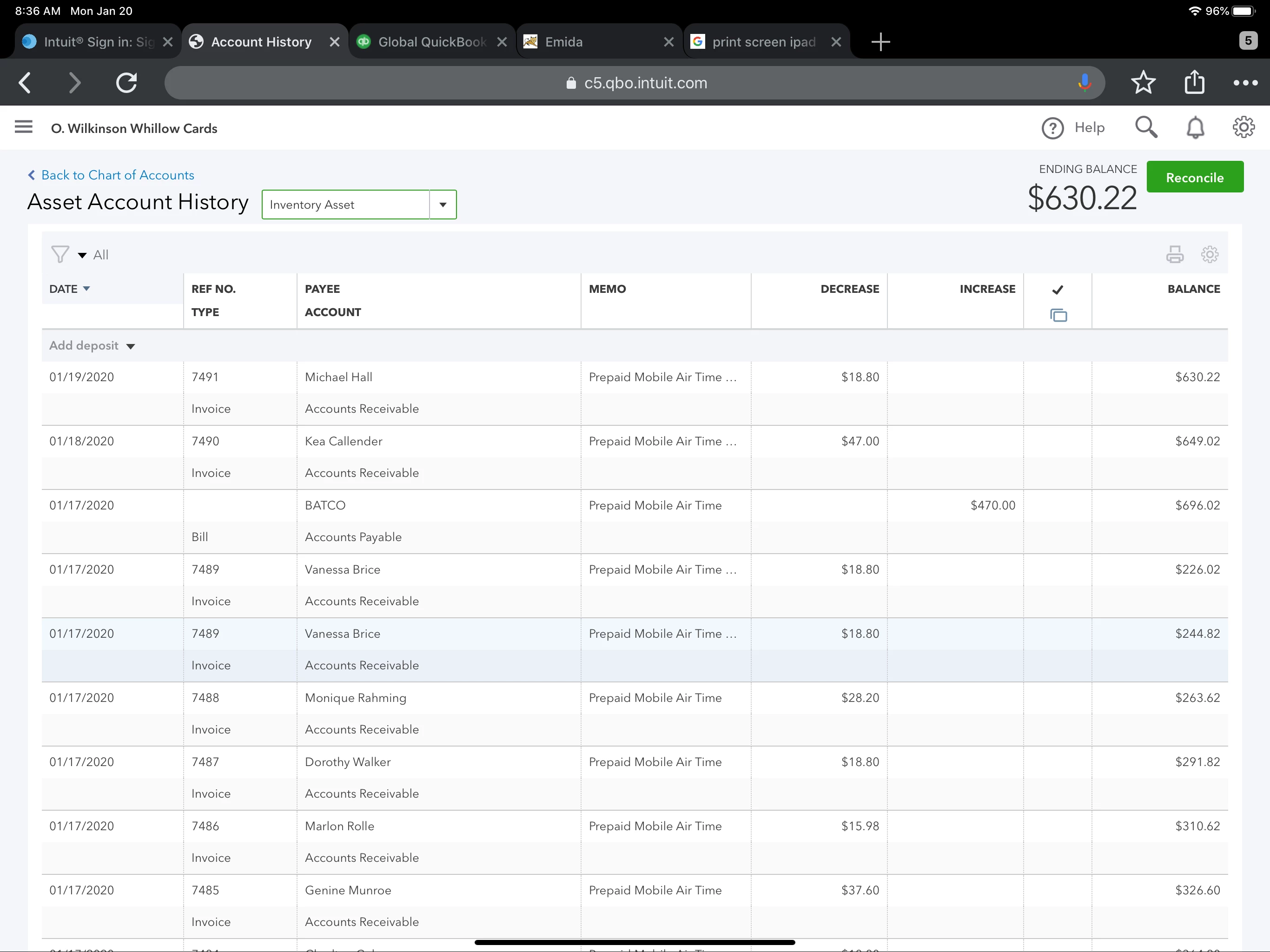
I go to my chart of accounts and the Inventory Asset account is showing the amount increasing and decrease incorrectly.   The Purchase received (500) is entering as what paid for them (470) and the invoices are entering as what I would have paid for the items ($18.80 not $20).  They are all deducting  my vendor rate.


What did I do wrong?  Please help5A1612DD-1B49-4622-9500-DD5053ACD5F8.jpeg
Best answer by Ryan_M

Thanks Jovychris


I have another question for you. I imported all of my invoices, products, etc using an excel file.  There was amount owing to a vendor of $564.  After the import it is showing as a Supplier Credit and is in the Ask My Accountant account.


How can I fix this?


Tried attaching a screen shot but getting an error


Hi @deycomin,


When you import your vendors via a CSV file, entering a negative opening balance for a vendor will result in a supplier credit. If it's amount you owe, it should be entered as a positive amount in the Opening Balance field.


You can mark the vendor in question as inactive so you can import it again, this time with the correct opening balance.


Here's how:

  1. Highlight the Expenses tab, then select Vendors.
  2. Search for the vendor in question.
  3. On the right-hand side of the vendor, click the down-arrow menu beside the Create bill link. Choose Make inactive.

Following the same process you did before, import the same vendor with the correct opening balance. 


Check out this article to take note of a list of things before importing vendors or customers: Import customer or vendor contacts from Outlook, Excel or Gmail.


Place your questions in the comments below, in case you have anything else. I'll get back to you as soon as I can. 

1 reply

Rustler
January 21, 2020

I am going to assume that this is about inventory type items, check that the item accounts are correct
Inventory and assembly items have three accounts
expense = COGS
income = your sales income account
asset = inventory asset

And that on the purchase you used the item details part of the bill (not the account part), selected the item, entered the qty of 500 and the total cost of 470

Is all that true?

deycominAuthor
January 21, 2020

5A1612DD-1B49-4622-9500-DD5053ACD5F8.jpeg