

July 23, 2021
Solved

Invoices and Total Contract Value Question

  • July 23, 2021
  • 1 reply
  • 0 views

Question:  Is there a best practice for having Total Contract Value displayed in Quickbooks?

  • Additional Information for Question:
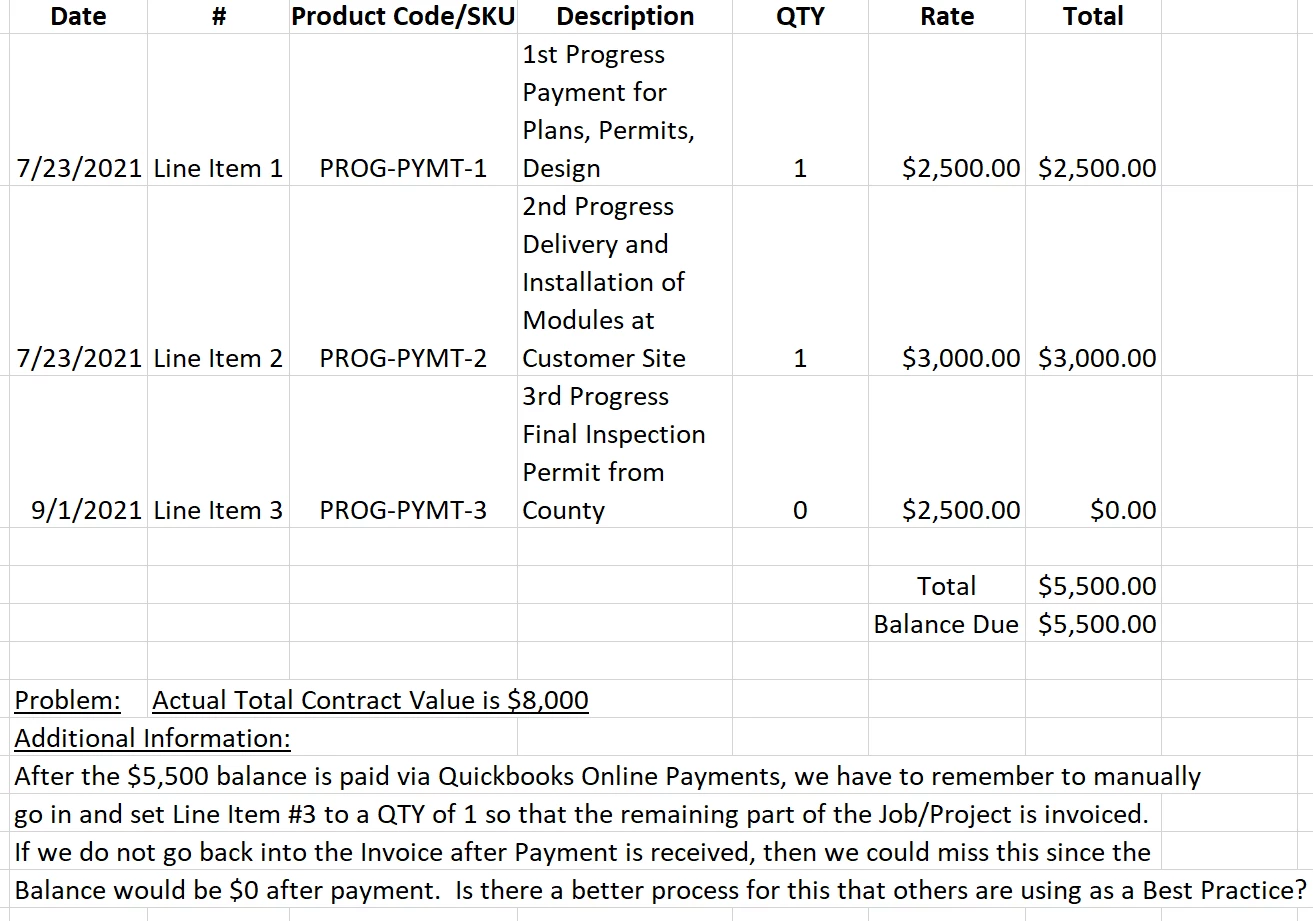
    • Right now, our company has a process where we invoice the Job being performing all within one (1) invoice with multiple Line Items to indicate each Milestone Payment for the Job.
    • In the example below, we are invoicing for Milestone Payment 1 & 2 today (and will show a QTY of zero for Progress Payment 3 since it is not due until Sept.)
  • Problems with this approach
    • When the customer pays with the online Quickbooks payment for Progress Payment 1 & 2, the outstanding balance goes to zero (as expected) but unless someone comes into the invoice and manually updates Progress Payment 3 to be a QTY of 1 (instead of a QTY of zero) then there are potential missed future invoices when viewing outstanding balances, overdue invoices, etc.
  • End-Goal:
    • Is there a best practice that others are using when wanting to be able to track and see Total Contract Value while at the same time invoice with this type of process?  Or would each Line Item have to be its own separate invoice (which we are trying not to do but if required we understand).


Screenshot:

Best answer by MariaSoledadG

Allow me to share some information on some of the best practices that you can do when invoicing in QuickBooks Online, JS1050.


In QuickBooks Online (QBO), you can use progress invoicing to split an estimate into as many invoices as you need. Instead of paying in full, you can invoice your customers for partial payments. You'll want to turn on this feature so you can use it. To do that, follow the steps below:

  1. Click the Gear ⚙ icon and select Account and settings.
  2. Select the Sales tab.
  3. In the Progress Invoicing section, click Edit ✎.
  4. Select the Create multiple partial invoices from a single estimate checkbox.
  5. Select Save and Done.

Once done, you can now create a progress invoice template. For more information and detailed steps, refer to this article for more information: Set up and send progress invoices in QuickBooks Online.


Aside from that, you can also use projects to add project income, expenses, labor expenses, add old transactions to new projects and run project-specific reports. To know more about this, read this article for additional reference: Set up and create projects in QuickBooks Online.


However, if none of the two works for you, you may want to use a third-party application to make sure that you'll be able to get the information you need and your end goal. Also, for your reference, you can run reports so you'll know where your business stands. Check this article so you'll be guided: Run Reports In QuickBooks Online.


Fill me in if you have any questions about invoices. We'll always be here to further assist you. 

1 reply

MariaSoledadG
July 23, 2021

Allow me to share some information on some of the best practices that you can do when invoicing in QuickBooks Online, JS1050.


In QuickBooks Online (QBO), you can use progress invoicing to split an estimate into as many invoices as you need. Instead of paying in full, you can invoice your customers for partial payments. You'll want to turn on this feature so you can use it. To do that, follow the steps below:

  1. Click the Gear ⚙ icon and select Account and settings.
  2. Select the Sales tab.
  3. In the Progress Invoicing section, click Edit ✎.
  4. Select the Create multiple partial invoices from a single estimate checkbox.
  5. Select Save and Done.

Once done, you can now create a progress invoice template. For more information and detailed steps, refer to this article for more information: Set up and send progress invoices in QuickBooks Online.


Aside from that, you can also use projects to add project income, expenses, labor expenses, add old transactions to new projects and run project-specific reports. To know more about this, read this article for additional reference: Set up and create projects in QuickBooks Online.


However, if none of the two works for you, you may want to use a third-party application to make sure that you'll be able to get the information you need and your end goal. Also, for your reference, you can run reports so you'll know where your business stands. Check this article so you'll be guided: Run Reports In QuickBooks Online.


Fill me in if you have any questions about invoices. We'll always be here to further assist you. 

October 28, 2023

The question posed regarding "Total Contract Value" also applies to QB Enterprise Desktop. The required process is:

1. We provide the Customer and Estimate.

2. They provide a Contract, with various line items for types of work under the Contract.

3. We can only invoice to the total value or funded amount of the total value, of the contract.

4. Your method, invoicing from an 'estimate' is not a proper method.  We should be albe to turn that into a 'Sales Order" from the Customer, then perform and invoice against that Sales Order.  The Sales Order would at least provide a 'credit balance' for the customer, and the invoices created against that sales order would decrement the balance on account the Customer has provided to us. This factor/process prevents over-billing the Customer, since the Sales Order Balance is decremented down as we invoice.

5: HOWEVER, YOUR SYSTEM DOES NOT LET US DO THAT.  it is so designed around very simple processes, that even in Enterprise Desktop, we struggle to get the right information keyed in and returned in reports.  Way too much manual effort to bypass the gridlock of normal accounting. 

6: And your 'process labels' need to catch up to Government Accounting Standards.  No one in Industry invoices from an Estimate. 

PLEASE.FIX.THIS.

October 28, 2023

So far, in a TEST200 set up, I have not been able to get it to work. I used exact same account labels, class labels, etc., and cannot get the 'profitability detail' to pull in the sales order amount to show open balance.  Therefore, our accounting system is not compliant with DCAA/DCMA regulations for Government Contract Management. 

I've been asking for:

1. Contract Value

2. Contract Funding (not always the same, sometimes Government funds 50% of total Contract Value)

3. Invoices decrementing against the Value/Funding of the Contract.

4. Detailed report showing all transactions, including modifications to the Contract for additional funding, if they did not initially provide 100% funding for the entire Contract Value.


Again, we've been using this for 14yrs, trying to find a solution. 

We have to do a LOT Of manual effort to get the numbers accurately portrayed.  Shouldn't be that hard for your customers.