March 1, 2023
Solved

Invoices not sending with gmail on workstation

  • March 1, 2023
  • 1 reply
  • 0 views

The main computer (Host ?) can send invoices via Gmail. The work station cannot.

Set it up the same way.

Best answer by RCV

Thanks for taking the time to scour our Community space for potential solutions. If you haven't encountered this yet, this solution will prove useful in resolving to send invoices via Gmail in QuickBooks Desktop, aobks.


Let's first make sure that your QuickBooks software is updated to the latest version. QuickBooks periodically provides maintenance releases and product (software) updates to fix emailing concerns, add features and enhancements, and update compliance information. Here's how:
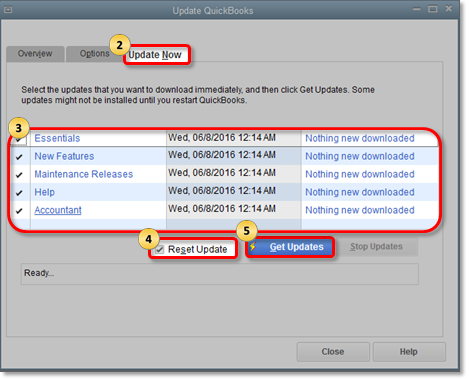
 

  1. Click the Help tab in the upper-right corner, then select Update QuickBooks Desktop.
  2. Go to the Update Now tab.
  3. Choose the updates you want to include.
  4. Put a checkmark on the box beside Reset Update.
  5. Hit Get Updates
  6. Close and re-open QuickBooks.

Download and install automatic QuickBooks Desktop updates


Once done, you can check the web mail's settings in the preferences. Let me guide you on how:


  1. At the top menu bar, click Edit.
  2. Choose Preferences.
  3. Click Send Forms on the left panel.
  4. Under the My Preferences tab, select the email account you're using.
  5. Click Edit.
  6. Mark the SSL box, or just select Default.
  7. In the Server Name field, make sure the server name matches your email provider's settings.


Please refer to this article for the list of SMTP Server and Ports: Set up email service. If you encounter any error messages when sending invoices, please check out this article for additional troubleshooting options: Could not connect to the email server.


That should do it. Give this a try and let me know how it goes. Post again in the Community if you need anything else, I’ll be more than happy to help. Wishing you and your business continued success!

1 reply

RCVAnswer
March 1, 2023

Thanks for taking the time to scour our Community space for potential solutions. If you haven't encountered this yet, this solution will prove useful in resolving to send invoices via Gmail in QuickBooks Desktop, aobks.


Let's first make sure that your QuickBooks software is updated to the latest version. QuickBooks periodically provides maintenance releases and product (software) updates to fix emailing concerns, add features and enhancements, and update compliance information. Here's how:


  1. Click the Help tab in the upper-right corner, then select Update QuickBooks Desktop.
  2. Go to the Update Now tab.
  3. Choose the updates you want to include.
  4. Put a checkmark on the box beside Reset Update.
  5. Hit Get Updates
  6. Close and re-open QuickBooks.

Download and install automatic QuickBooks Desktop updates


Once done, you can check the web mail's settings in the preferences. Let me guide you on how:


  1. At the top menu bar, click Edit.
  2. Choose Preferences.
  3. Click Send Forms on the left panel.
  4. Under the My Preferences tab, select the email account you're using.
  5. Click Edit.
  6. Mark the SSL box, or just select Default.
  7. In the Server Name field, make sure the server name matches your email provider's settings.


Please refer to this article for the list of SMTP Server and Ports: Set up email service. If you encounter any error messages when sending invoices, please check out this article for additional troubleshooting options: Could not connect to the email server.


That should do it. Give this a try and let me know how it goes. Post again in the Community if you need anything else, I’ll be more than happy to help. Wishing you and your business continued success!

aobksAuthor
March 2, 2023

Thank you, this fixed my problem; it is much appreciated.

The article in the link, "set up email service," is what worked.

Candice C
March 2, 2023

Hey there, @aobks


You're welcome! 


I'm glad my colleague was able to give you steps and articles that helped resolve your issue. 


Reach back out if you have any other concerns. We're always here to have your back. Have a splendid day and weekend ahead!
