

February 19, 2024
Question

Issue with adding credits after R9_127

  • February 19, 2024
  • 1 reply
  • 0 views

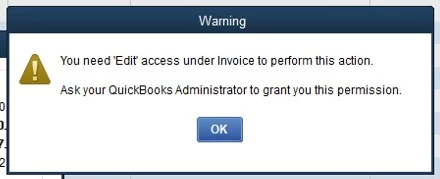
Since the rolling update of R9_127, users with limited permissions are now prompted to reach out to their administrator for access to posting credits to vendors\bills. They are being told they "need edit access under Invoice to perform this action".


Is this change to permission requirements permanent or is this a bug that that is being worked on?
 

1 reply

February 19, 2024

This change in permission requirements is permanent, Seattle_Admin. Let's review and manage your users' permission to enable them to post credits to vendors/bills in QuickBooks Desktop (QBDT). We'll guide you through this process below.


  1. Go to the Company menu, then select Users.
  2. Select Set Up Users and Roles.
  3. Enter the admin password, then select OK.
  4. Select the Role List tab.
  5. Choose a role, then select Edit to review its permissions.
  6. In the Area and Activities section, select an area of your accounts. You can select NoneFull, or Partial to set the access level.
  7. Once you set the permissions, select OK to save.


For more details on how you can create and manage users and roles in QBDT Enterprise, please see this article: QuickBooks user roles and permission.


Also, you may want to run the Audit Trail report to track the changes or modifications made by your users in your company file.


Stay in touch if you have other concerns about managing user access or additional questions regarding recording credits to vendor transactions. We'll get back to make sure everything is taken care of for you.

February 19, 2024

Is there a channel we can subscribe to so we can better track these updates? Our team was blindsided by this change and is left scrambling to make changes to multiple user roles in over 200 files.

February 19, 2024

We appreciate you for bringing this to our attention, Seattle_Admin. 


Accessing the latest release updates is beneficial for businesses like yours to adapt to the changes in QuickBooks Desktop (QBDT). We have a way for you to monitor the new and improved system features.


QuickBooks regularly updates to give you a better experience and fix issues. To explain further what's new and improved in QBDT, you can check out this article: Release notes for QuickBooks Desktop.


On the other hand, you can also contact our Customer Care team to help track these changes in your company file and create a case to initiate an investigation.


Also, you may want to visit this page to stay informed about our latest product updates and discover the newest features and enhancements in QuickBooks: Firm of the Future.


Please feel free to reach out again if you have further concerns about managing users and tracking vendor transactions in QBDT. We're always available to help you out.