

March 7, 2022
Solved

Late Fees

  • March 7, 2022
  • 1 reply
  • 0 views

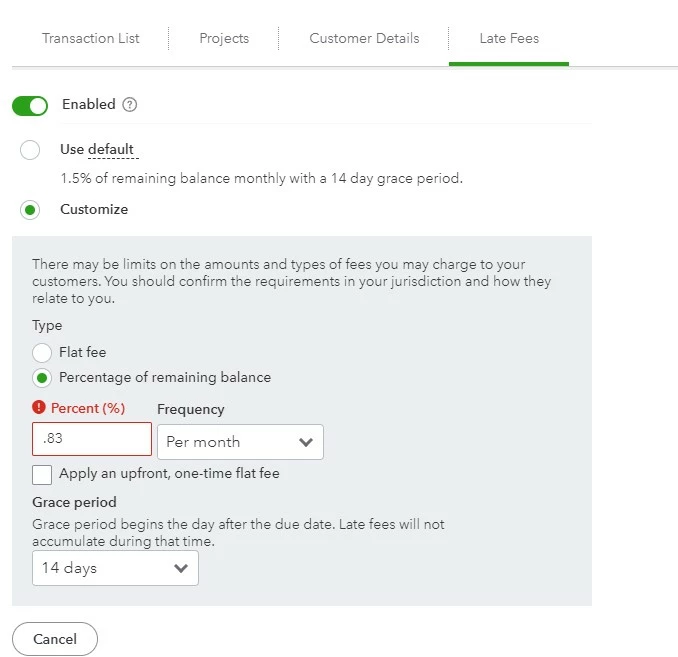
We have a standard 1.5%/month (18%/annum) late fee as our default in QBO. However, I want to have a different late fee calculated for one of our largest customers.  I have chosen the customer, gone to the Late Fees tab and Enabled the late fee.  I chose "Customize" and when I went to enter the percentage, I get the error message of "Invalid Value" and I cannot save the new finance rate.  What do I need to do to get this to work?


Peg Davis

Parsons Roofing


Best answer by Candice C

Good afternoon, @pdavis3437.


It's great to see you back in the Community. Let's work together to get this resolved. 


The reason may be due to needing a zero in front of the decimal. Here is the way it would be entered: 


"0.83" 


For additional details, check out this guide about late fees: 


Set up and apply automatic late fees to invoices


This should do the trick. Don't forget to let us know if this worked for you or not. I want to ensure that you get this taken care of. Have a great day!

1 reply

Candice C
Candice CAnswer
March 7, 2022

Good afternoon, @pdavis3437.


It's great to see you back in the Community. Let's work together to get this resolved. 


The reason may be due to needing a zero in front of the decimal. Here is the way it would be entered: 


"0.83" 


For additional details, check out this guide about late fees: 


Set up and apply automatic late fees to invoices


This should do the trick. Don't forget to let us know if this worked for you or not. I want to ensure that you get this taken care of. Have a great day!

March 7, 2022

Yep, the leading "0" worked!  Thanks!

March 7, 2022

Hey pdavis3437,


I am so happy my friend Candice could help you with this! If you ever need assistance, you know where to find us! Take care and be safe.