August 25, 2021
Solved

Line of Credit

  • August 25, 2021
  • 1 reply
  • 0 views

Hello,


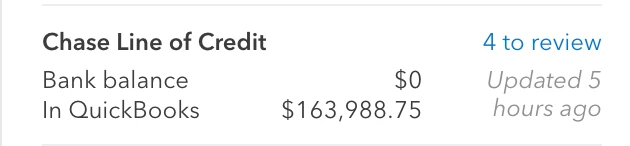
Our business received a Line of Credit which I have connected to QBO as a credit card type account so I can record transactions and payments just the same as other credit cards we have.


I have attached a screen shot of the first 4 transactions which QBO pulled when I connected the account. They amounts are the funding ($164,500), fee assessment ($50), fee payment ($50), fee payment ($411.25). I actually paid the fee total ($461.25) from our business checking account.


Ive tried to categorize, match, exclude, transfer and delete each individual transaction and can not get the Line of Credit in QuickBooks to be $0. Does anyone have any ideas?


BANK SCREEN SHOT


QUICKBOOKS ONLINE SCREEN SHOTS


Best answer by RCV

Thanks for bringing this one to our attention, georgesgradallse. 


I appreciate you for performing the recommended solutions provided by my colleague and coming up with solutions to get this sorted out. I've checked here on our end and there's no reported case about this one in QuickBooks Online (QBO). To zero out the line of credit, we'll need to make a payment so you can track what you pay back to your bank or creditor.


Also, we can't connect a liability account to your bank feeds in QuickBooks Online (QBO). It's possible that you've set up your line of credit account as a liability. To resolve this, we'll need to change the Account Type of your line of credit. Let me show you how:

  1. Go to Accounting on the left menu.
  2. Select Chart of Accounts.
  3. Locate the Line of Credit account.
  4. Tap Edit from the Action column.
  5. Choose Credit Card from the Account Type and Detail Type drop-down.
  6. Press Save and Close


Then, try connecting your account for bank feeds again. If the same thing happens, I'd suggest contacting our Customer Support Team. They'll pull up your account in a secure environment and investigate what's causing this issue. You may send a message via chat, call us at a time convenient to you, or we’ll get in touch with you instead. To ensure we address your concern, our representatives are available from 6:00 AM to 6:00 PM on weekdays and 6:00 AM - 3:00 PM on Saturdays, PST. See our support hours and types for more details about this one. Here's how: 

  1. Sign in to your QuickBooks Online company.
  2. Go to Help (?).
  3. Select Contact Us.
  4. Enter your concern, then select Let's talk.
  5. Choose a way to connect with us:
    • Start a chat with a support expert.
    • Get a callback from the next available expert.


Feel free to visit our Banking page for more insights about bank feeds and reconciling accounts.


You can always update us after contacting our support in the comment below as I'd like to ensure this is resolved for you. You have a good one. 

1 reply

Adrian_A
August 25, 2021

It seems odd, JG1357.


Since you've already categorized, matched, and excluded transactions, yet, the same thing happens, let's run some troubleshooting steps.


To start with, let's try check your In QuickBooks balance on a private window. There are instances that issues like this occurs when the system encounter cache traffic. You may use these keyboard shortcuts to open one:


  • Google Chrome: Ctrl Shift N
  • Mozilla Firefox: Ctrl Shift P
  • Microsoft Edge: Ctrl Shift P
  • Safari: Command Shift N


If it works, you can go back to a regular browser and clear its cache. Once a cache is piled up, it can cause some unexpected happenings on the opened pages like QuickBooks.


You can also switch to a different supported browser like Google Chrome, Mozilla Firefox, Safari, or Microsoft Edge.


Once everything's fine, you can reconcile the accounts so they always match your bank and credit card statements: Reconcile an account in QuickBooks Online.


Let me know if there's anything that I can help. Keep safe!

JG1357Author
August 25, 2021

Thanks Adrian_A


I did clear the cache which did not make a difference. Personally I don't think its a technical problem and its more of me categorizing these transactions in correctly. What do you think?


Do you have any idea how each of the transactions should be categorized? Maybe I need to match with a journal entry?


Appreciate your help.


RCVAnswer
August 26, 2021

Thanks for bringing this one to our attention, georgesgradallse. 


I appreciate you for performing the recommended solutions provided by my colleague and coming up with solutions to get this sorted out. I've checked here on our end and there's no reported case about this one in QuickBooks Online (QBO). To zero out the line of credit, we'll need to make a payment so you can track what you pay back to your bank or creditor.


Also, we can't connect a liability account to your bank feeds in QuickBooks Online (QBO). It's possible that you've set up your line of credit account as a liability. To resolve this, we'll need to change the Account Type of your line of credit. Let me show you how:

  1. Go to Accounting on the left menu.
  2. Select Chart of Accounts.
  3. Locate the Line of Credit account.
  4. Tap Edit from the Action column.
  5. Choose Credit Card from the Account Type and Detail Type drop-down.
  6. Press Save and Close


Then, try connecting your account for bank feeds again. If the same thing happens, I'd suggest contacting our Customer Support Team. They'll pull up your account in a secure environment and investigate what's causing this issue. You may send a message via chat, call us at a time convenient to you, or we’ll get in touch with you instead. To ensure we address your concern, our representatives are available from 6:00 AM to 6:00 PM on weekdays and 6:00 AM - 3:00 PM on Saturdays, PST. See our support hours and types for more details about this one. Here's how: 

  1. Sign in to your QuickBooks Online company.
  2. Go to Help (?).
  3. Select Contact Us.
  4. Enter your concern, then select Let's talk.
  5. Choose a way to connect with us:
    • Start a chat with a support expert.
    • Get a callback from the next available expert.


Feel free to visit our Banking page for more insights about bank feeds and reconciling accounts.


You can always update us after contacting our support in the comment below as I'd like to ensure this is resolved for you. You have a good one.